- VOLUME: MAX
12.2.3. Preparations
1. Apply [8.1 Checking Main and Transformer P.C.B, Deck P.C.B and
Deck Mechanism P.C.B.] under [8. Disassembly and Main
Component Replacement Procedures].
2. Remove 4 screws from the mechanism unit to disassemble. (Refer
to [8.2. Procedure for Replacing Cassette Holder (Step 1)] under
[8. Disassembly and Main Component Replacement Procedures].
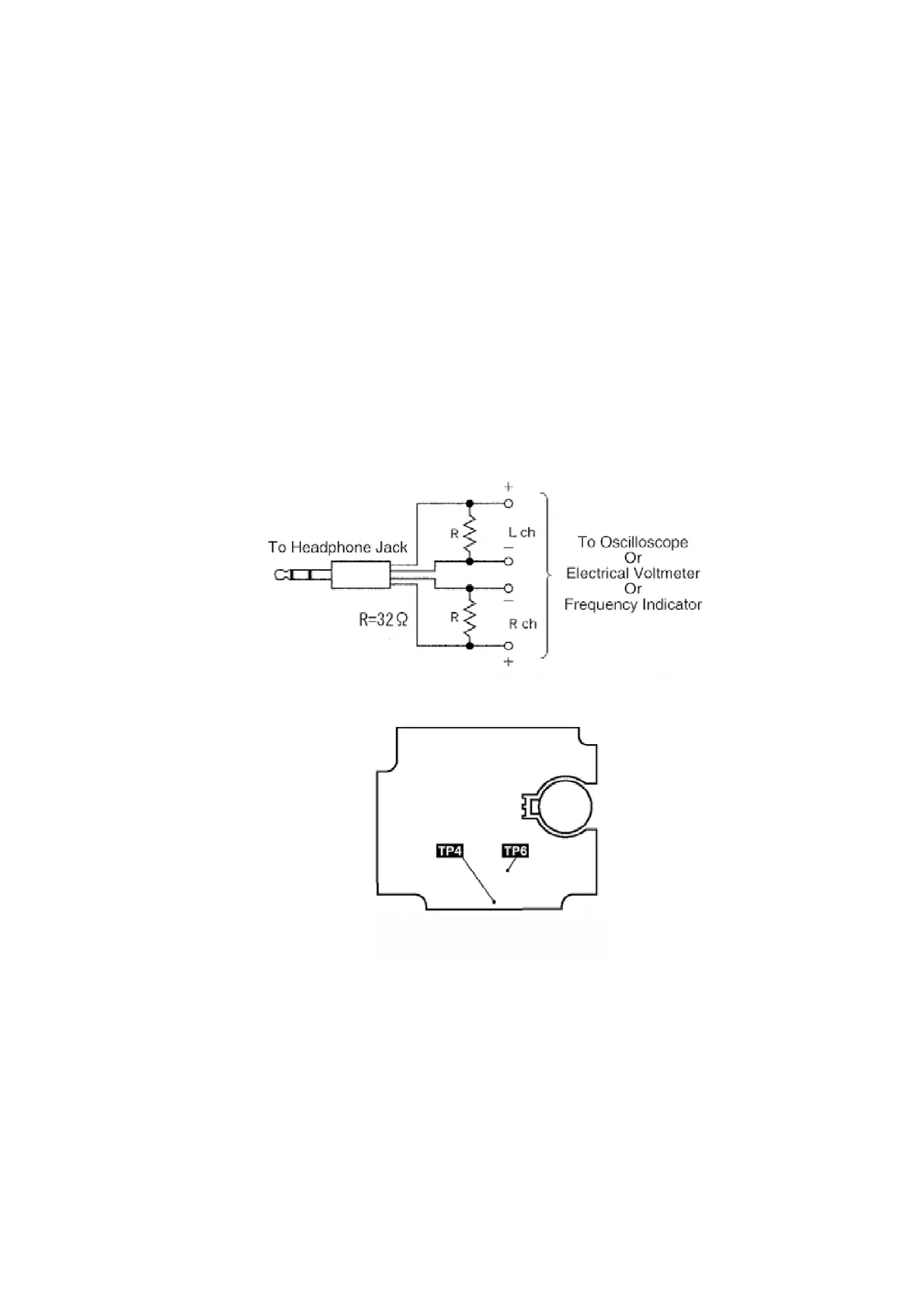
3. Connect the headphone jack output jig (Cf. Fig. 8) to headphone
jack.
Fig. 8
Fig. 9
12.2.4. Tape Speed Adjustment
- Normal speed adjustment (only during forward playback)
(Product reference value: 3,000±90Hz)
1. Connect a frequency indicator. (Cf. Fig. 12)
2. Playback the middle portion of the test tape (QZZCWAT).
3. Adjust the motor screw so that the following output level is
79









 To Next Page