EasyManua.ls Logo

Panasonic SC-CH52 - Advanced CD Playback Modes; Programming Tracks from Main Unit; Managing Programmed Tracks

Panasonic SC-CH52
28 pages
Print Icon
To Next Page IconTo Next Page
To Previous Page IconTo Previous Page
Loading...
14
Listening
to
Compact
Disc
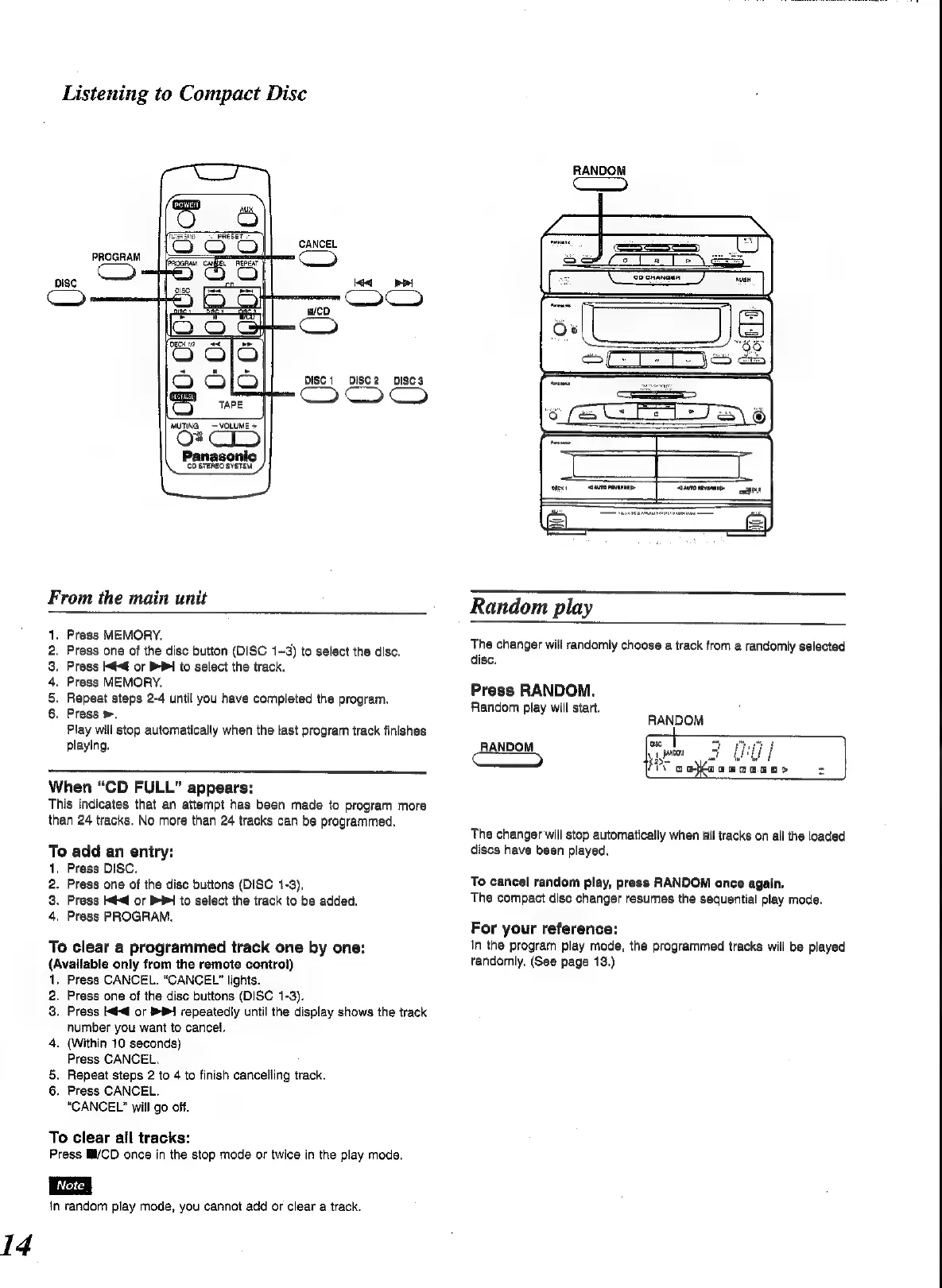
CANCEL
PROGRAM
=
oisc
DIsc1
DISc2
DISC3
MUTING
VOLUME
+
28
Panasonic
\.
“costeneosvstem”/
From
the
main
unit
Press
MEMORY.
Press
one
of
the
disc
button
(DISC
1~3)
to
select
the
disc.
Press
I@@
or
BB
io
select
the
track.
Press
MEMORY.
Repeat
steps
2-4
until
you
have
completed
the
program.
Press
>,
Play
will
stop
automatically
when
the
tast
program
track
finishes
playing.
egrana
When
“CD
FULL”
appears:
This
indicates
that
an
attempt
has
been
made
to
program
more
than
24
tracks.
No
more
than
24
tracks
can
be
programmed.
To
add
an
eniry:
1,
Press
DISC.
2.
Press
one
of
the
disc
buttons
(DISC
1-3),
3.
Press
Hdd
or
PP
to
select
the
track
to
be
added.
4,
Press
PROGRAM.
To
clear
a
programmed
track
one
by
one:
(Available
only
from
the
remote
control)
1,
Press
CANCEL.
“CANCEL”
lights.
2.
Press
one
of
the
disc
buttons
(DISC
1-3).
3.
Press
l@<@
or
B1
repeatedly
until
the
display
shows
the
track
number
you
want
to
cancel.
4.
(Within
10
seconds)
Press
CANCEL.
§.
Repeat
steps
2
to
4
to
finish
cancelling
track.
6.
Press
CANCEL.
“CANCEL”
will
go
off.
To
clear
all
tracks:
Press
M/CD
once
in
the
stop
mode
or
twice
in
the
play
mode.
{n
random
play
mode,
you
cannot
add
or
clear
a
track.
oD
GND
GED)
RANDOM
Cc
Random
play
The
changer
will
randomly
choose
a
track
from
a
randomly
selected
disc.
Press
RANDOM.
Random
play
will
start.
RANDOM
RANDOM
eon
25
an
cota
aa
o
ag>
Pd
The
changer
will
stop
automatically
when
ail
tracks
on
all
the
loaded
discs
have
been
played.
To
cancel
random
play,
press
RANDOM
once
again.
The
compact
dise
changer
resumes
the
sequential
play
mode.
For
your
reference:
In
the
program
play
mode,
the
programmed
tracks
will
be
played
tandomly.
(See
page
13.)

Related product manuals