EasyManua.ls Logo

Panasonic SC-CH52 - For Your Reference

Panasonic SC-CH52
28 pages
Print Icon
To Next Page IconTo Next Page
To Previous Page IconTo Previous Page
Loading...
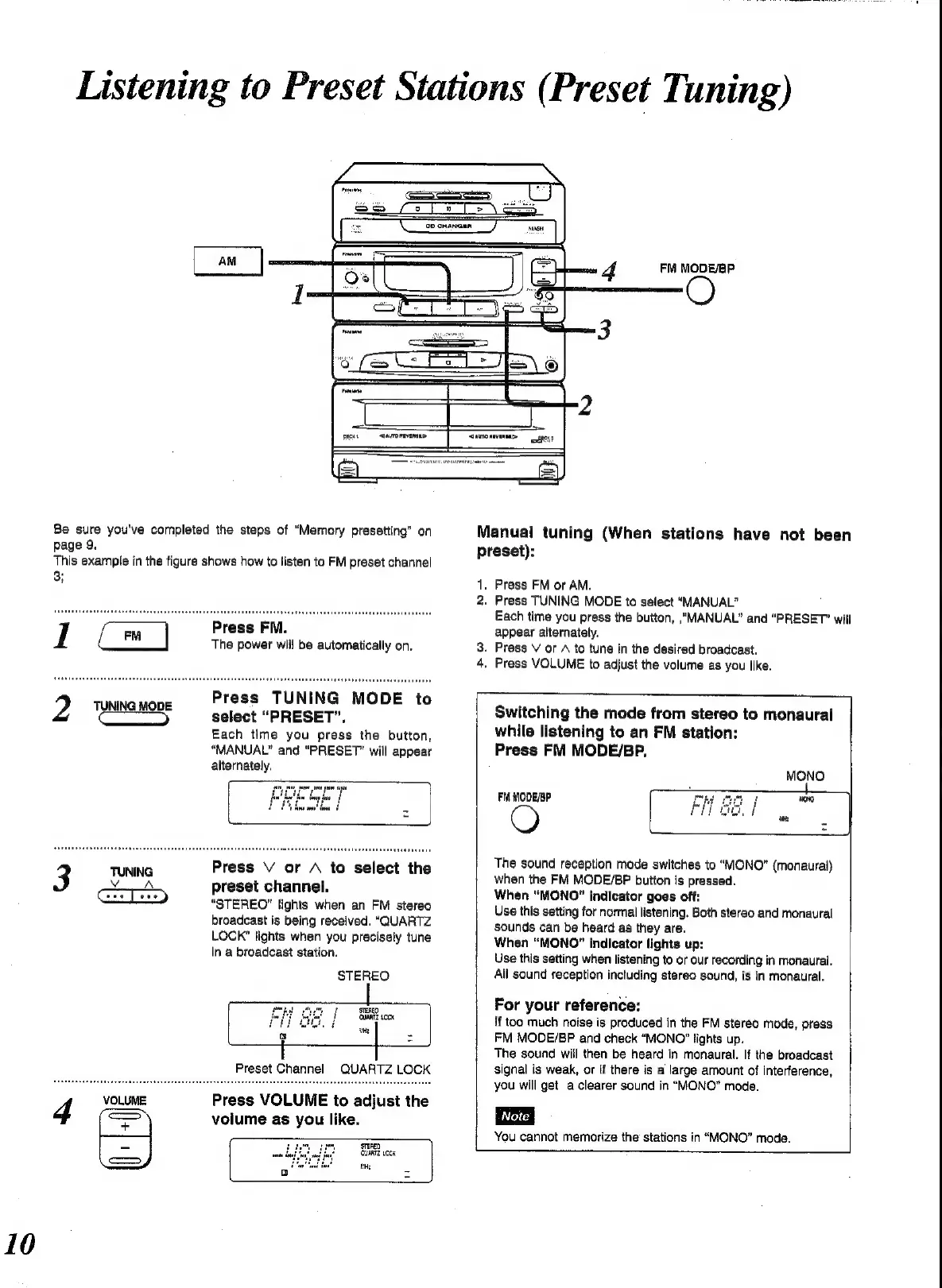
FM
MODE/EP
Be
sure
you've
completed
the
steps
of
“Memory
presetting”
on
page
9.
This
example
in
the
figure
shows
how
to
listen
to
FM
preset
channel
3;
Press
FM.
The
power
will
be
automatically
on.
Press
TUNING
MODE
to
select
“PRESET”,
Each
time
you
press
the
button,
“MANUAL”
and
“PRESET”
will
appear
alternately.
Press
V
or
A
to
select
the
preset
channel.
“STEREO"
lights
when
an
FM
stereo
broadcast
is
being
received.
“QUARTZ
LOCK”
lights
when
you
precisely
tune
in
a
broadcast
station.
‘the
ie
Preset
Channel
QUARTZ
LOCK
STEREO
STEREO
‘QUARTZ
00K
Press
VOLUME
to
adjust
the
volume
as
you
like.
fH:
Teneo
GuaRT2
09%
Manual
tuning
(When
stations
have
not
been
preset):
13
Press
FM
or
AM.
2.
Press
TUNING
MODE
to
select
“MANUAL”
BO
Each
time
you
press
the
button,
“MANUAL”
and
“PRESET”
will
appear
alternately.
.
Press
V
or
A
to
tune
in
the
desired
broadcast.
.
Press
VOLUME
to
adjust
the
volume
as
you
like.
Switching
the
mode
from
stereo
to
monaural
while
listening
to
an
FM
station:
Press
FM
MODE/BP.
FM
MODE/BP
The
sound
reception
mode
switches
to
“MONO”
(monaural)
when
the
FM
MODE/BP
button
is
pressed.
When
“MONO”
indicator
goes
off:
Use
this
setting
for
normal
listening.
Both
stereo
and
monaural
sounds
can
be
heard
as
they
are.
When
“MONO”
indicator
lights
up:
Use
this
setting
when
listening
to
or
our
recording
in
monaural.
Ali
sound
reception
including
stereo
sound,
is
in
monaural.
For
your
reference:
{f
too
much
noise
is
produced
in
the
FM
stereo
mode,
press
FM
MODE/BP
and
check
“MONO?”
lights
up.
The
sound
will
then
be
heard
in
monaural.
If
the
broadcast
signal
is
weak,
or
if
there
is
a
large
amount
of
interference,
you
will
get
a
clearer
sound
in
“MONO”
mode.
You
cannot
memorize
the
stations
in
“MONO”
mode.

Related product manuals