EasyManua.ls Logo

Panasonic SC-CH52 - Tape to Tape Recording; Setting Up Tape Copying; Starting and Stopping Tape Copying

Panasonic SC-CH52
28 pages
Print Icon
To Next Page IconTo Next Page
To Previous Page IconTo Previous Page
Loading...
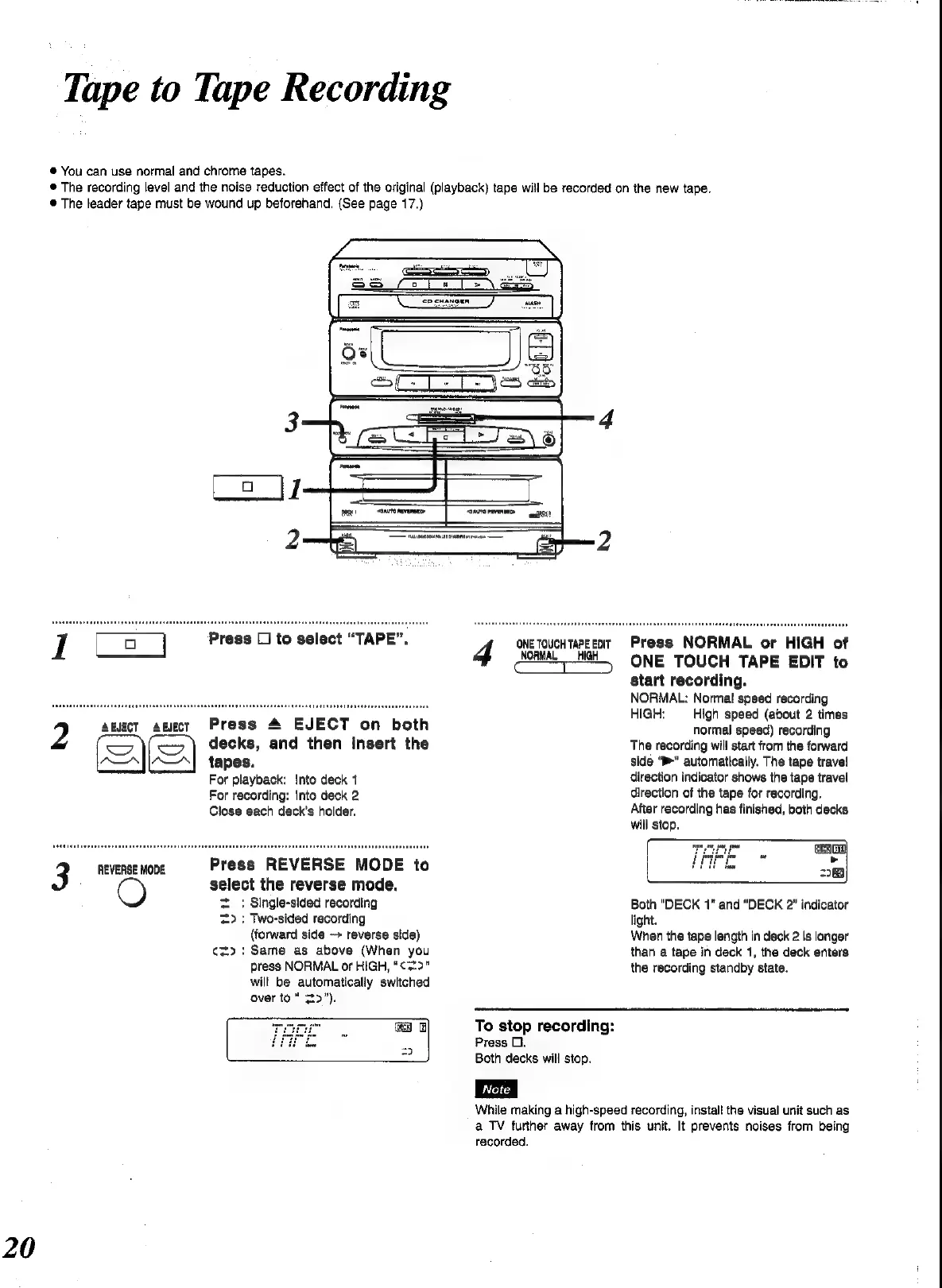
Tape
to
Tape
Recording
@
You
can
use
normal
and
chrome
tapes.
®
The
recording
level
and
the
noise
reduction
effect
of
the
original
(playback)
tape
will
be
recorded
on
the
new
tape.
©
The
leader
tape
must
be
wound
up
beforehand.
(See
page
17.)
2
ABJECT
A
EJECT
3
REVERSE
MODE
Press
1
to
select
“TAPE”.
Press
4
EJECT
on
both
decks,
and
then
insert
the
tapes.
For
playback:
Into
deck
1
For
recording:
Into
deck
2
Close
each
deck’s
holder.
Press
REVERSE
MODE
to
select
the
reverse
mode.
=:
Single-sided
recording
=>
:
Two-sided
recording
(forward
side
reverse
side)
¢s>.:
Same
as
above
(When
you
press
NORMAL
or
HIGH,
“¢=2>"
will
be
automatically
switched
over
to“
==>").
ONE
TOUCH
TAPE
EoIT
4
NORMAL
HIGH
Press
NORMAL
or
HIGH
of
ONE
TOUCH
TAPE
EDIT
to
start
recording.
NORMAL:
Normal
speed
recording
HIGH:
High
speed
(about
2
times
normal
speed)
recording
The
recording
will
start
from
the
forward
side
“>”
automatically.
The
tape
travel
direction
indicator
shows
the
tape
travel
direction
of
the
tape
for
recording.
After
recording
has
finished,
both
decks
will
stop.
ENG
*
2B
Both
"DECK
1"
and
“DECK
2”
indicator
light.
When
the
tape
length
in
deck
2
is
longer
than
a
tape
in
deck
1,
the
deck
enters
the
recording
standby
state.
To
stop
recording:
Press
2.
Both
decks
will
stop.
While
making
a
high-speed
recording,
install
the
visual
unit
such
as
a
TV
furher
away
from
this
unit.
It
prevents
noises
from
being
recorded.

Related product manuals