EasyManua.ls Logo

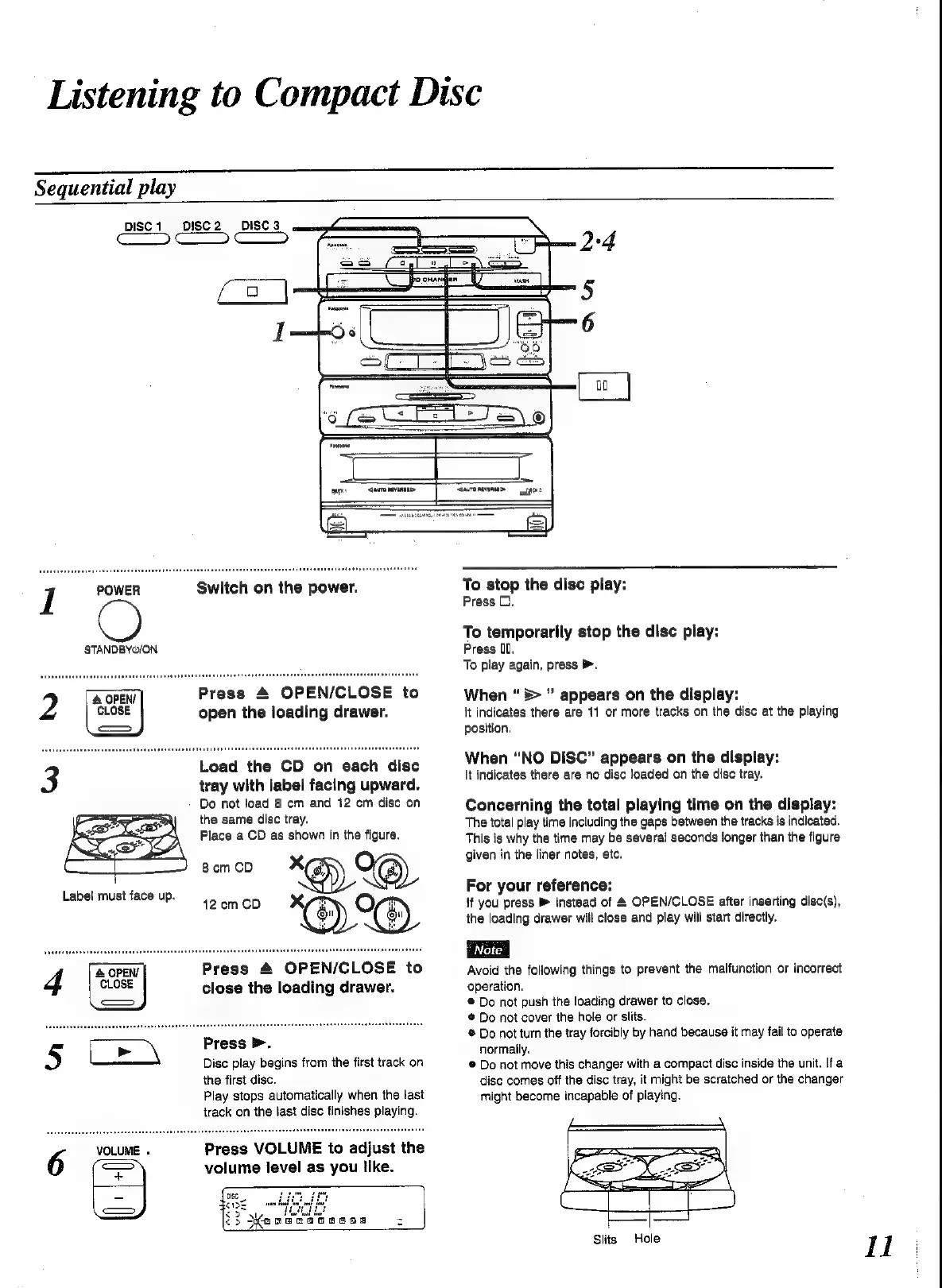
Panasonic SC-CH52 - Listening to Compact Disc - Basic Playback; Sequential CD Playback; Playback Controls and Indicators

Panasonic SC-CH52
28 pages
Print Icon
To Next Page IconTo Next Page
To Previous Page IconTo Previous Page
Loading...
Listening
to
Compact
Disc
Sequential
play
DISC’
DISC2
DISC
3
a)
STANDBYO/ON
Press
&
OPEN/CLOSE
to
open
the
loading
drawer.
Load
the
CD
on
each
disc
tray
with
label
facing
upward.
Do
not
joad
8
cm
and
12
cm
dise
on
the
same
disc
tray.
Place
a
CD
as
shown
in
the
figure.
Bom
CD
*@)
12
em
CD
Press
4
OPEN/CLOSE
to
close
the
loading
drawer.
Press
>
Dise
play
begins
from
the
first
track
on
the
first
disc.
Play
stops
automatically
when
the
last
track
on
the
last
disc
finishes
playing.
VOLUME
.
Press
VOLUME
to
adjust
the
6
are
volume
level
as
you
like.
=
aeog
2
To
stop
the
disc
play:
Press
(1.
To
temporarily
stop
the
disc
play:
Press
OU.
To
play
again,
press
>.
When
“>
appears
on
the
display:
It
indicates
there
are
11
or
more
tracks
on
the
disc
at
the
playing
position.
When
“NO
DISC”
appears
on
the
display:
It
indicates
there
are
no
disc
loaded
on
the
disc
tray.
Concerning
the
total
playing
time
on
the
display:
The
total
play
time
including
the
gaps
between
the
tracks
is
indicated.
This
is
why
the
time
may
be
several
seconds
Songer
than
the
figure
given
in
the
liner
notes,
etc.
For
your
reference:
{f
you
press
instead
of
&
OPEN/CLOSE
after
inserting
disc(s),
the
loading
drawer
will
close
and
play
will
start
directly.
Avoid
the
following
things
to
prevent
the
malfunction
or
incorrect
operation.
®
Do
not
push
the
loading
drawer
to
close.
©
Do
not
cover
the
hole
or
slits.
®
Do
not
turn
the
tray
forcibly
by
hand
because
it
may
fail
to
operate
normaily,
®
Do
not
move
this
changer
with
a
compact
disc
inside
the
unit.
If
a
disc
comes
off
the
disc
tray,
it
might
be
scratched
or
the
changer
might
become
incapable
of
piaying.
Slits
Hole

Related product manuals