EasyManua.ls Logo

Panasonic SC-CH52 - Program Play Function; Programming Tracks with Remote

Panasonic SC-CH52
28 pages
Print Icon
To Next Page IconTo Next Page
To Previous Page IconTo Previous Page
Loading...
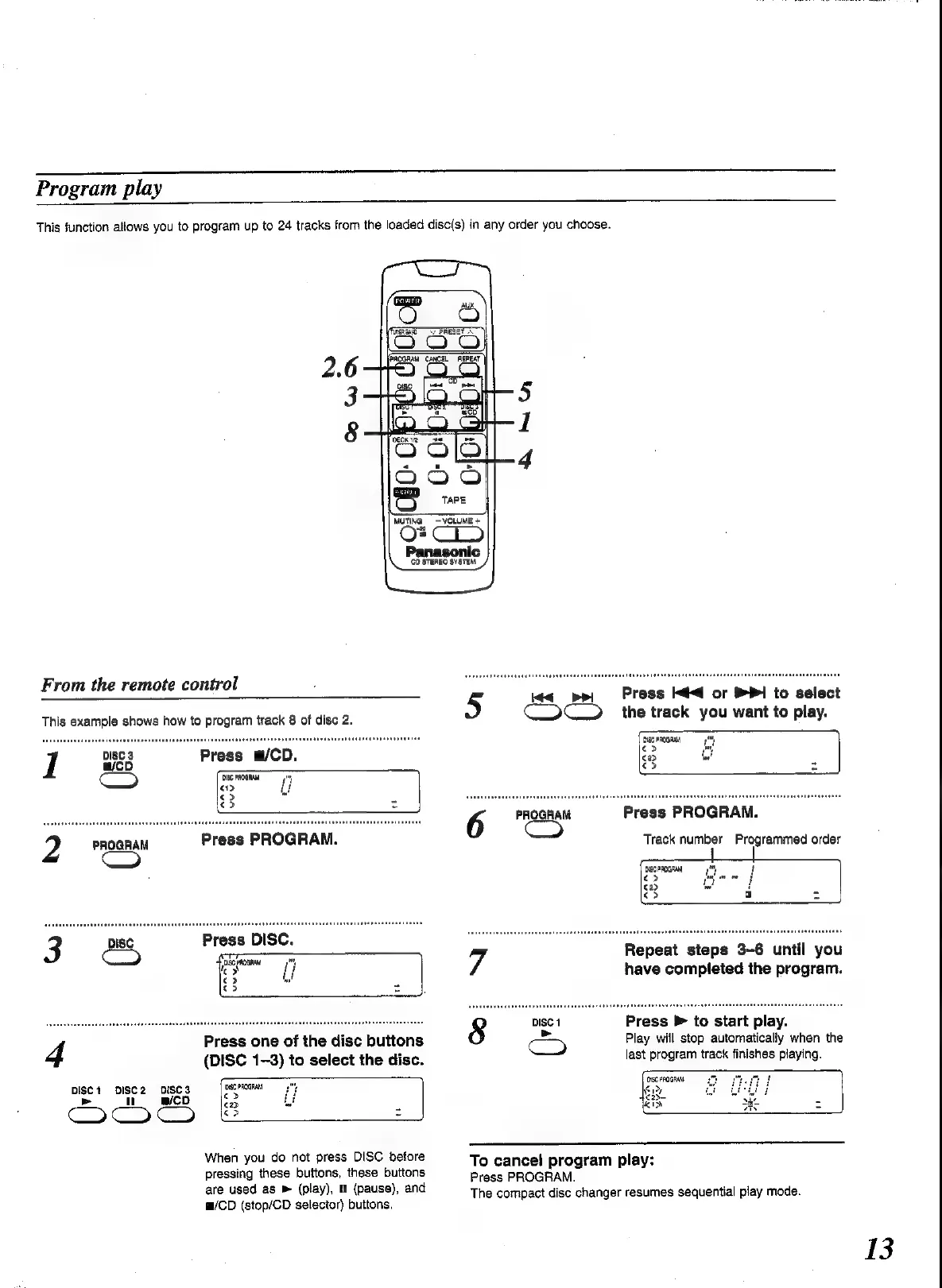
Program
play
This
function
allows
you
to
program
up
to
24
tracks
from
the
loaded
disc(s)
in
any
order
you
choose.
\rugnae
From
the
remote
control
This
example
shows
how
to
program
track
8
of
disc
2.
1
paca
Press
@/CD.
>)
ISG
PROGRAM
|
Press
PROGRAM.
Press
one
of
the
disc
buttons
4
(DISC
1-3)
to
select
the
disc.
16C
PROGRAN
"
|
Disc1
DISC2
DISC3
>
n
@cD
CoC
When
you
do
not
press
DISC
before
pressing
these
buttons,
these
buttons
are
used
as
»
(play),
MH
(pause),
and
m/CD
(stop/CD
selector)
buttons.
TCPRESET
~.
MUTING
VOLUME
+
“20
CO
STEREO
SYSTEM
bt
wv
Press
<4
or
®P1
to
select
the
track
you
want
to
play.
isc
PROGRAMA
o>
$ep
€>
Press
PROGRAM.
Track
number
6
PROGRAM
C3
Programmed
order
7
Repeat
steps
3-6
until
you
have
completed
the
program.
Press
>
to
start
play.
Play
will
stop
automatically
when
the
last
program
track
finishes
playing.
O1SC
FROGRENS
Ney
To
cancel
program
play:
Press
PROGRAM.
The
compact
disc
changer
resumes
sequential
play
mode.
13

Related product manuals