EasyManua.ls Logo

Panasonic SC-CH52 - Recording from Compact Discs; Preparing for CD Recording; Starting and Stopping CD Recording; Specifying Tracks for CD Recording

Panasonic SC-CH52
28 pages
Print Icon
To Next Page IconTo Next Page
To Previous Page IconTo Previous Page
Loading...
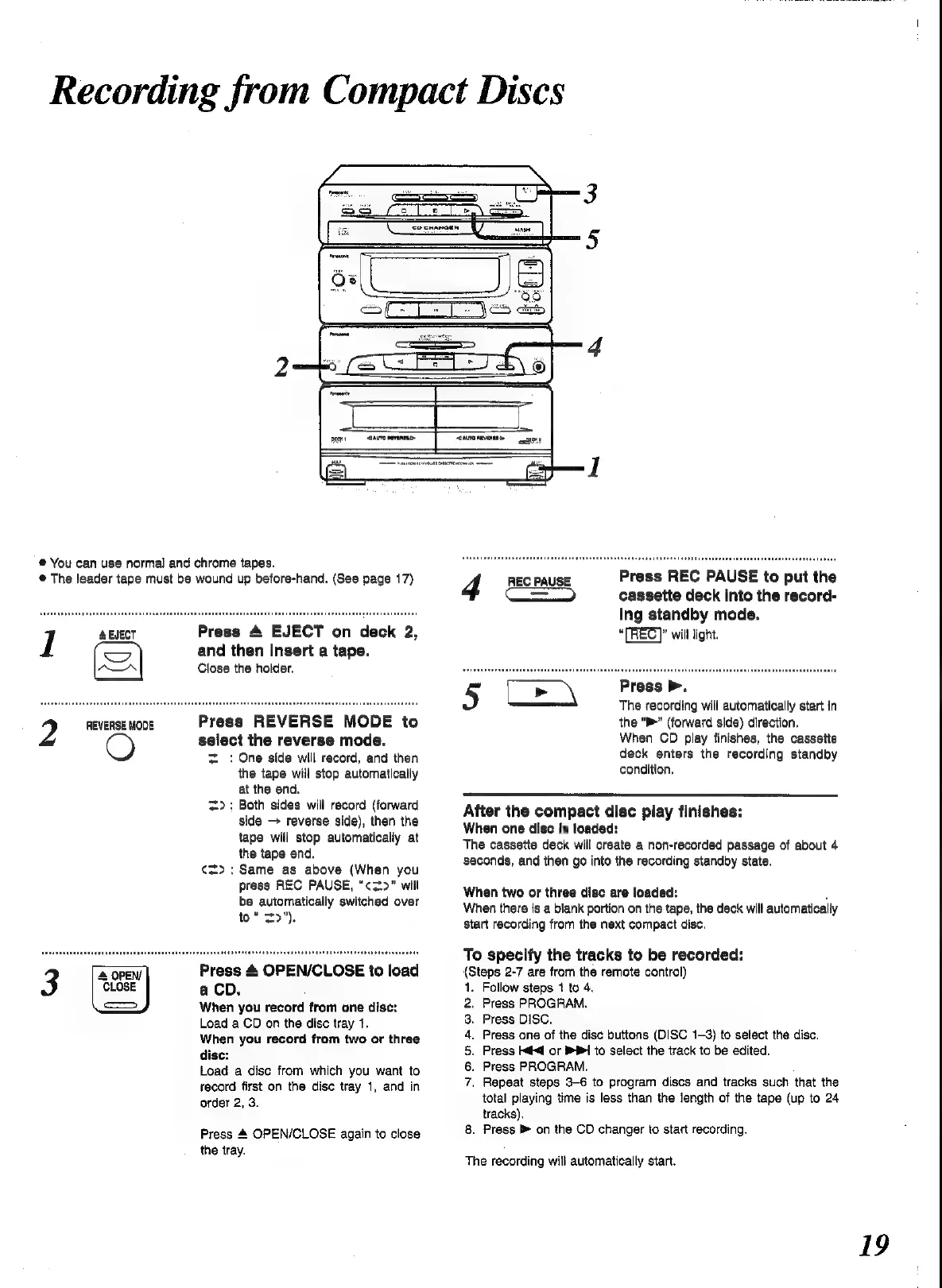
Recording
from
Compact
Discs
®
You
can
use
normal
and
chrome
tapes.
®
The
leader
tape
must
be
wound
up
before-hand.
(See
page
17)
ABJECT
Press
4
EJECT
on
deck
2,
1
and
then
Insert
a
tape.
Close
the
holder.
REVERSE
MODE
Press
REVERSE
MODE
to
2
O
select
the
reverse
mode.
=
:
One
side
will
record,
and
then
the
tape
will
stop
automatically
at
the
end.
=>:
Both
sides
will
record
(forward
side
>
reverse
side),
then
the
tape
will
stop
automatically
at
the
tape
end.
¢=>:
Same
as
above
(When
you
press
REC
PAUSE,
“c3*>”
will
be
automatically
switched
over
to“
=>").
Press
4
OPEN/CLOSE
to
load
a
Cb.
When
you
record
from
one
disc:
Load
a
CD
on
the
disc
tray
1.
When
you
record
from
two
or
three
disc:
Load
a
disc
from
which
you
want
to
record
first
on
the
disc
tray
1,
and
in
order
2,
3.
Press
4
OPEN/CLOSE
again
to
close
the
tray.
4
REC
PAUSE
Press
REC
PAUSE
to
put
the
aE
cassette
deck
into
the
record-
ing
standby
mode.
“(TREC)”
will
light.
5
Ce
\
Press
>.
The
recording
will
automatically
start
in
the
“>”
(forward
side)
direction,
When
CD
play
finishes,
the
cassette
deck
enters
the
recording
standby
condition,
After
the
compact
disc
play
finishes:
When
one
disc
is
loaded:
The
cassette
deck
will
create
a
non-recorded
passage
of
about
4
seconds,
and
then
go
into
the
recording
standby
state.
When
two
or
three
disc
are
loaded:
-
When
there
is
a
blank
portion
on
the
tape,
the
deck
will
automatically
start
recording
from
the
next
compact
disc.
To
specify
the
tracks
to
be
recorded:
(Steps
2-7
are
from
the
remote
control)
.
Follow
steps
1
to
4.
.
Press
PROGRAM.
.
Press
DISC,
.
Press
one
of
the
disc
buttons
(DISC
1-3)
to
select
the
disc.
.
Press
kd
or
1
to
select
the
track
to
be
edited.
Press
PROGRAM.
Repeat
steps
3-6
to
program
discs
and
tracks
such
that
the
total
playing
time
is
less
than
the
length
of
the
tape
(up
to
24
tracks).
8.
Press
on
the
CD
changer
to
start
recording.
NOURONM=
The
recording
will
automatically
start.
19

Related product manuals