EasyManua.ls Logo

Panasonic SC-CH52 - Tape Playback Operations; Basic Tape Playback Setup

Panasonic SC-CH52
28 pages
Print Icon
To Next Page IconTo Next Page
To Previous Page IconTo Previous Page
Loading...
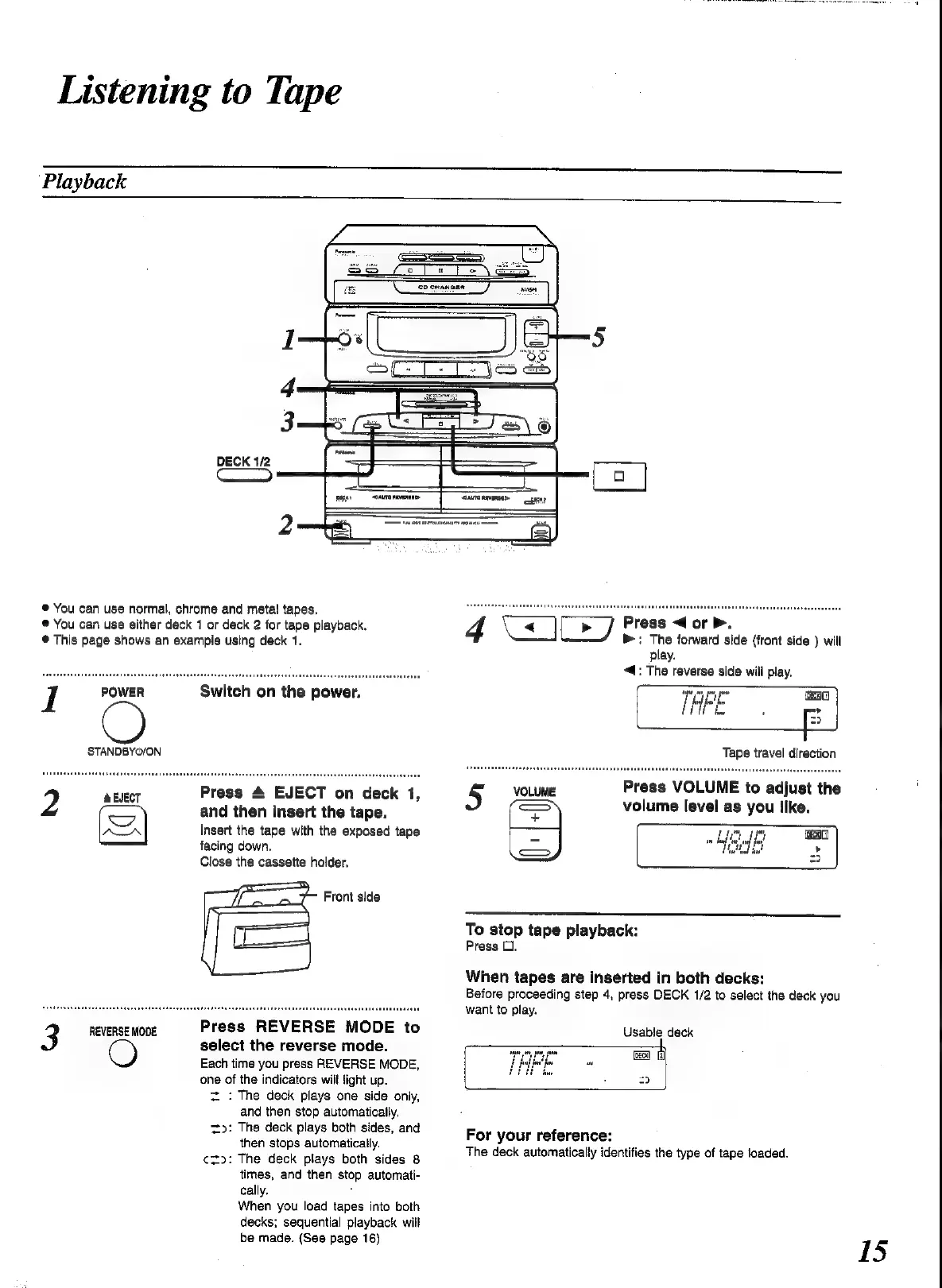
Listening
to
Tape
Playback
DECK
1/2
(a
®
You
can
use
normal,
chrome
and
metal
tapes.
®
You
can
use
either
deck
1
or
deck
2
for
tape
playback.
®
This
page
shows
an
example
using
deck
1.
I
POWER
Switch
on
the
power.
STANDBYO/ON
Press
4
EJECT
on
deck
1,
and
then
insert
the
tape.
Insert
the
tape
with
the
exposed
tape
facing
down.
Close
the
cassette
holder.
Front
side
REVERSE
MODE
Press
REVERSE
MODE
to
3
select
the
reverse
mode.
Each
time
you
press
REVERSE
MODE,
‘one
of
the
indicators
will
light
up.
zt.
:
The
deck
plays
one
side
only,
and
then
stop
automatically,
to:
The
deck
plays
both
sides,
and
then
stops
automatically.
¢zto:
The
deck
plays
both
sides
8
times,
and
then
stop
automati-
cally.
When
you
load
tapes
into
both
decks;
sequential
playback
wilt
be
made.
(See
page
16)
4
\e
|
Press
<
or
Pb.
b&:
The
forward
side
(front
side
)
will
play.
4:
The
reverse
side
will
play.
5
VOLUME
Press
VOLUME
to
adjust
the
volume
level
as
you
like.
To
stop
tape
playback:
Press
O.
When
tapes
are
inserted
in
both
decks:
Before
proceeding
step
4,
press
DECK
1/2
to
select
the
deck
you
want
to
play.
Usable
deck
=
For
your
reference:
The
deck
automatically
identifies
the
type
of
tape
loaded.
15

Related product manuals