EasyManua.ls Logo

Panasonic SC-CH52 - Memory Presetting; Presetting Radio Stations

Panasonic SC-CH52
28 pages
Print Icon
To Next Page IconTo Next Page
To Previous Page IconTo Previous Page
Loading...
Memory
Presetting
©
If
broadcast
frequencies
are
preset
in
the
memory,
you
can
easily
®
Up
to
10
stations
can
each
be
set
in
the
FM
and
AM
bands
with
tune
in
any
these
of
frequencies
from
the
system
or
remote
the
memory
presetting.
control
unit.
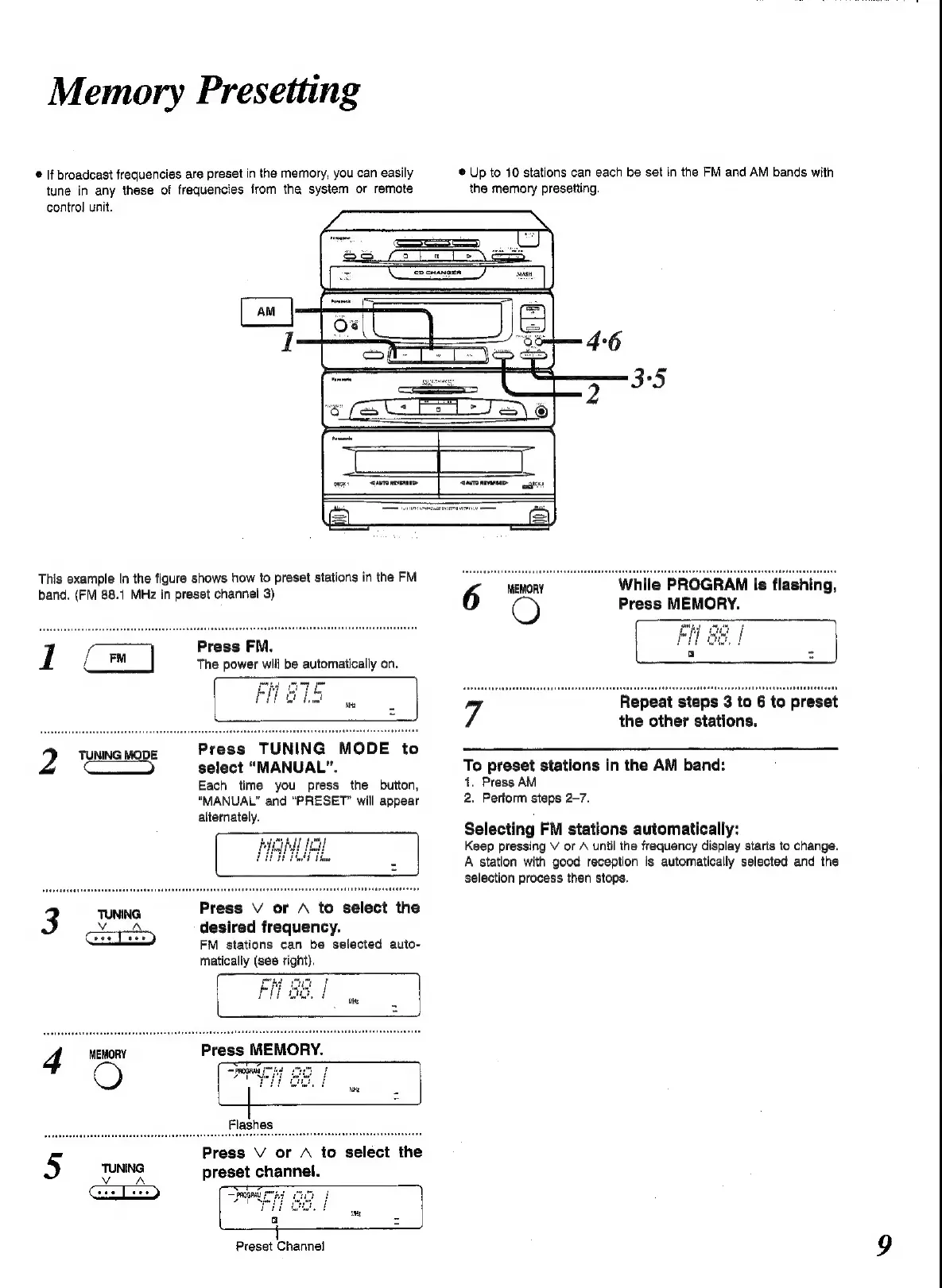
This
example
in
the
figure
shows
how
to
preset
stations
in
the
FM
s
band.
(FM
88.1
MHz
in
preset
channel
3)
6
MEMORY
While
PROGRAM
is
flashing,
O
Press
MEMORY.
1
Press
FM.
The
power
will
be
automatically
on.
7.
Repeat
steps
3
to
6
to
preset
the
other
stations.
2
TUNING
MODE
Press
TUNING
MODE
t
———
select
“MANUAL”.
To
preset
stations
in
the
AM
band:
Each
time
you
press
the
button,
1.
Press
AM
“MANUAL”
and
"PRESET”
will
appear
2.
Perform
steps
2-7.
alternately.
Selecting
FM
stations
automatically:
Keep
pressing
V
or
A
until
the
frequency
display
starts
to
change.
A
station
with
good
reception
is
automatically
selected
and
the
selection
process
then
stops.
3
TUNING
Press
V
or
A
to
select
the
desired
frequency.
FM
stations
can
be
selected
auto-
matically
(see
right).
4
MEMORY
Press
MEMORY.
Press
V
or
A
to
select
the
5
TUNING
preset
channel.
Preset
Channel

Related product manuals