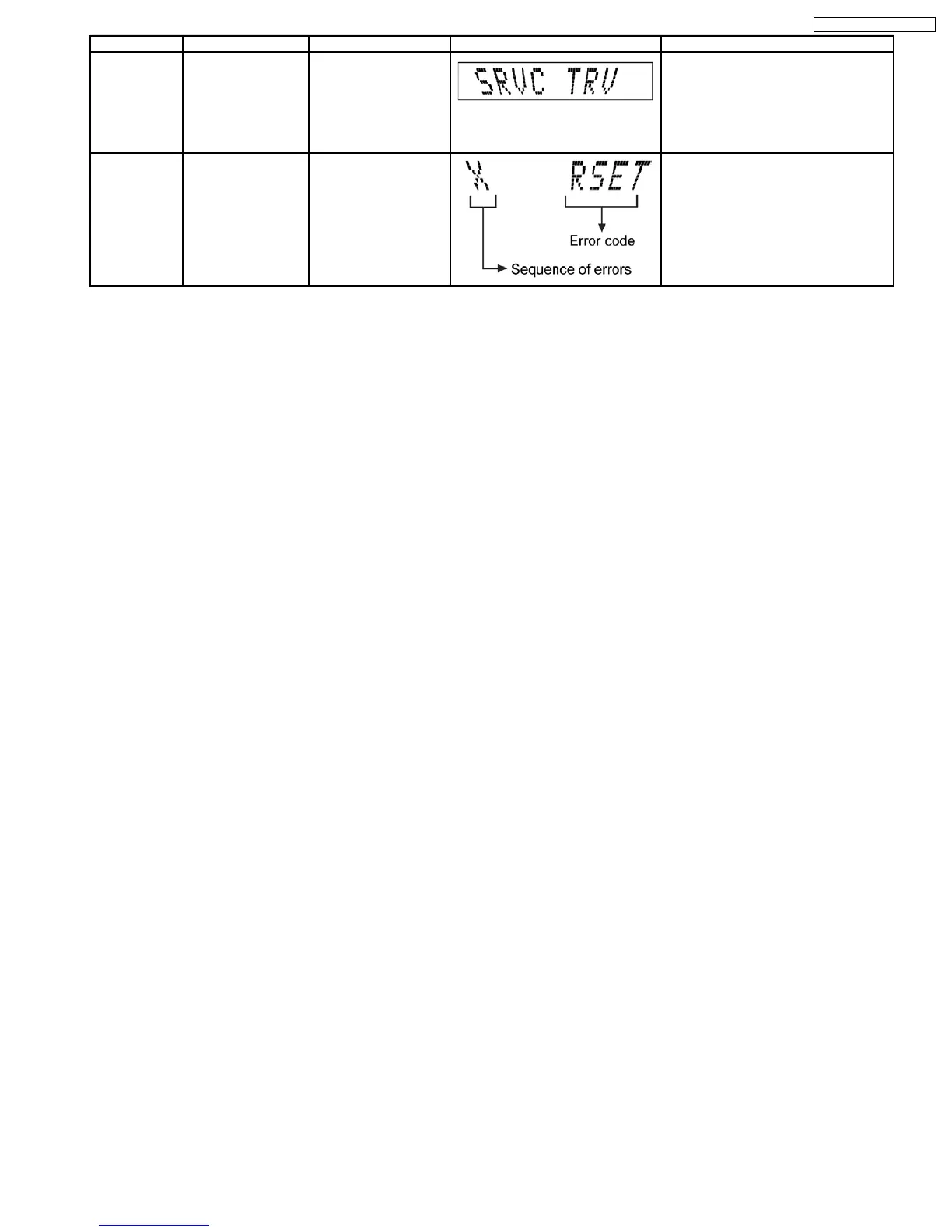
Error Code Diagnosis Contents Description of error Automatic FL Display Remarks
SRVC_TRV To unlock the
travers
e unit for
service
1. All trays set to
“STOCK” position
2. Mechanism set to
tra
y 5
3. Cam gear set to
“HOME
” position
For CD changer unit (CRS1).
Pres
s [SINGLE CHANGE] on main unit.
RSET Cam gear jam/close
senso
r faulty
During tray re-open, the
ca
m gear will rotate in
th
e opposite direction to
rese
t the cam
gearposition
. When it
fails
, the error code will
appear
.
For CD changer unit (CRS1).
Pres
s [SINGLE CHANGE] on main unit
fo
r next error.
CRS1 Error Code display
1. The errors that occured in CRS1 Mechanism can be recalled and displayed, in the order of the occurence under self-diagnostic
(Refer to Section 9.1 for procedures to enter this mode.
·
Only the first 5 errors will be memorized (in backup memory). The subsequence error shall be ignored and not memorize.
Fo
r system with EEPROM as memory backup,memory space in EEPROM is neccesary.
2. To display all error code memorized
In CRS1 Self-Diagnostic mode, press [SINGLE CHANGE] to display subsequence error code.
It shall repeat after reaching error no. 5.
e.g.
:
[1 _ _ _ _ I H M S] → [SINGLE CHANGE]
[2 _ _ _ _ I T O P] → [SINGLE CHANGE]
[3 _ _ _ _ H O M E] → [SINGLE CHANGE]
[4 _ _ _ _ L O A D] → [SINGLE CHANGE]
[5 _ _ _ _ _ U D D] → [SINGLE CHANGE]
3. To clear the error code memory
In CRS1 Self-Diagnostic mode, long press [SINGLE CHANGE] key (2s or more)
19
service manual SC-TM760








 To Next Page