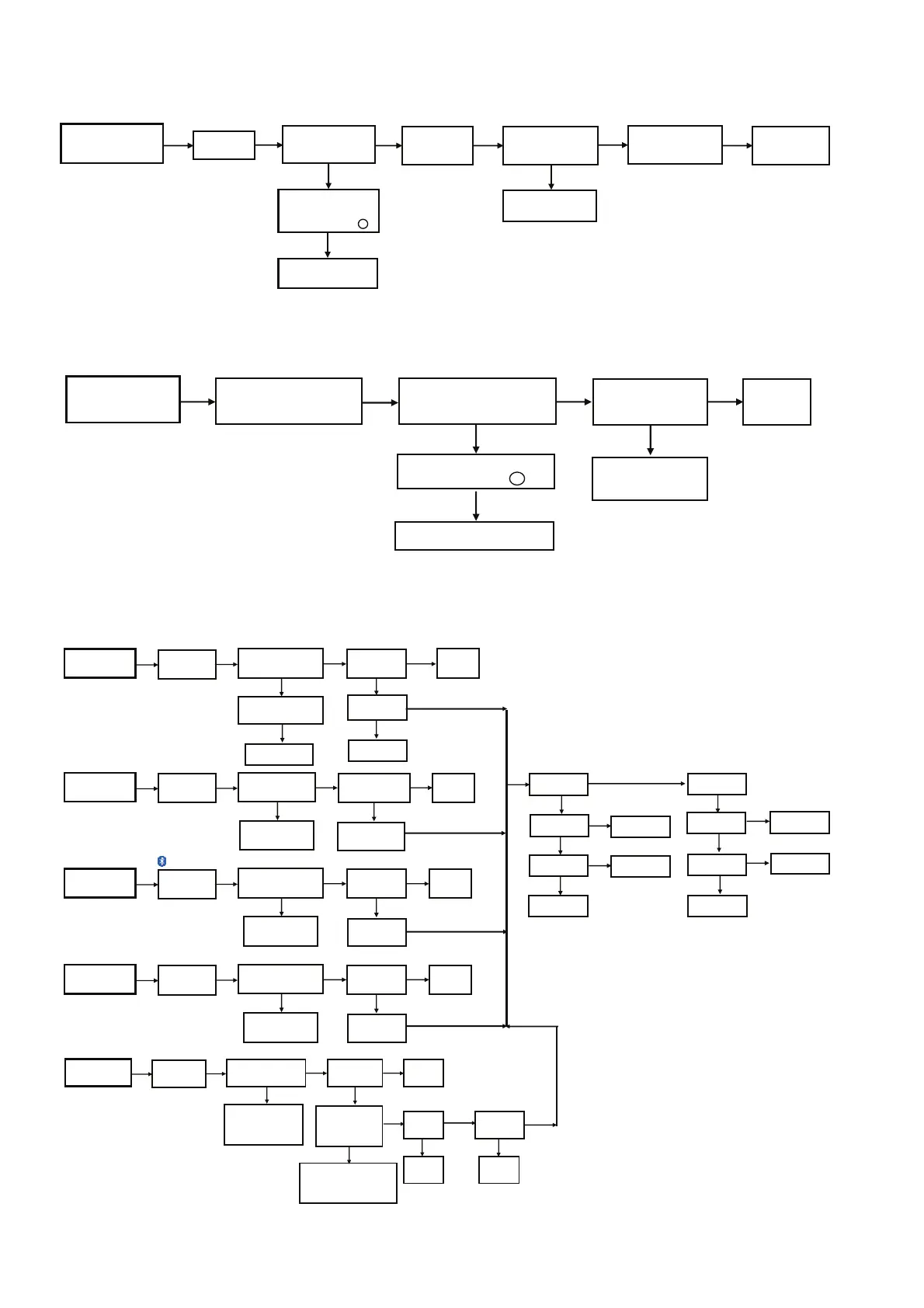
7.4. No Remote Control Function
7.5. USB Device Cannot Detect
7.6. No Output Sound
pin 1 for IR waveform.
Noted: DAB+/FM mode
(For UX102 only)
Press Power Button
of Unit or Remote
Control
to Turn ON the Unit
Check IC2001
Output I2S
Pin81-83
NG
Press Play
FL Display " Track & Count"
NG
Output Sound
No Problem
Found
OK
OK OK
Select
CD Mode
Check CD Mechanism
Press Power Button
of Unit or Remote
Control
to Turn ON the Unit
Check Pin 97 and
Pin 98
at IC2001
NG
Insert USB Thumdrive
FL Display "USB"
Press "Play"
NG
Output Sound
No Problem
Found
OK
KOKO
Select
USB Mode
Change USB drive
Press Power Button
of Unit or Remote
Control
to Turn ON the Unit
Check IC2001
(Pin 101-103,
105-108)
NG
Press Play
FL Display "BLUETOOTH "
NG
Output Sound
No Problem
Found
OK
OK OK
Select Bluetooth
Mode
Re-connect Bluetooth
into the Device
Press the Power Button
of Unit or Remote
Control
to Turn ON the Unit
Check IC2001
(Pin 110-112,
Pin 73, 74)
NG
Search for Tuner Signal
NG
Output Sound
No Problem
Found
OK
OK OK
Select
FM Mode
Check the Antenna
Wire Connection
NG
Change IC2001
OK
Check IC6500
PWM output
Pin27-30
NG
Check Pin 35, 40
at IC6500
Check IC1002
NG
Check SMPS
Module
NG
OK
Check IC6000
Speaker output
Pin27/32/35/39
NG
Check +12V
at Pin 1, 12
at IC6000
Change IC6000
Check +32V
at Pin 29, 36
at IC6000
OK
OK
OK
OK
OK
Check Pin 41, 42
at IC6500
Change X6500
NG
OK
Check
IC1005
NG
Check
IC2001
OK
CD Play
USB Play
Tuner Mode
Bluetooth Play
Change Traverse Unit
Press the Power Button
of Unit or Remote
Control
to Turn ON the Unit
Check IC4201
Signal IN (pin1)
Supply (pin 3,19,22)
Output Signal (pin27)
Input signal (pin 28, 29)
NG
Play music/sound from external
Device (Player or TV)
Check optical cable is connected
properly from source to D-IN.
Source output format is PCM
Source Fs 16kHz to 96kHz
NG
Output Sound
No Problem
Found
OK
OK OK
Select
D-IN
OK
Check IC4401
(Data out
pin 4)
OK
NG
NG
Signal (pin1) - Checkoptical Jack
Supply (pin 3,19,22) - Check ferrite bead
LB4201, LB4202, LB4203
input signal pin 28, 29)- Check SOC
Output Signal (pin27)- change IC4201
Change
IC4401
IC2001 I2S out
pin 81 to 83
NG
Change
IC2001
Check DSP
OK
D-IN (Optical) Mode


 To Next Page