19
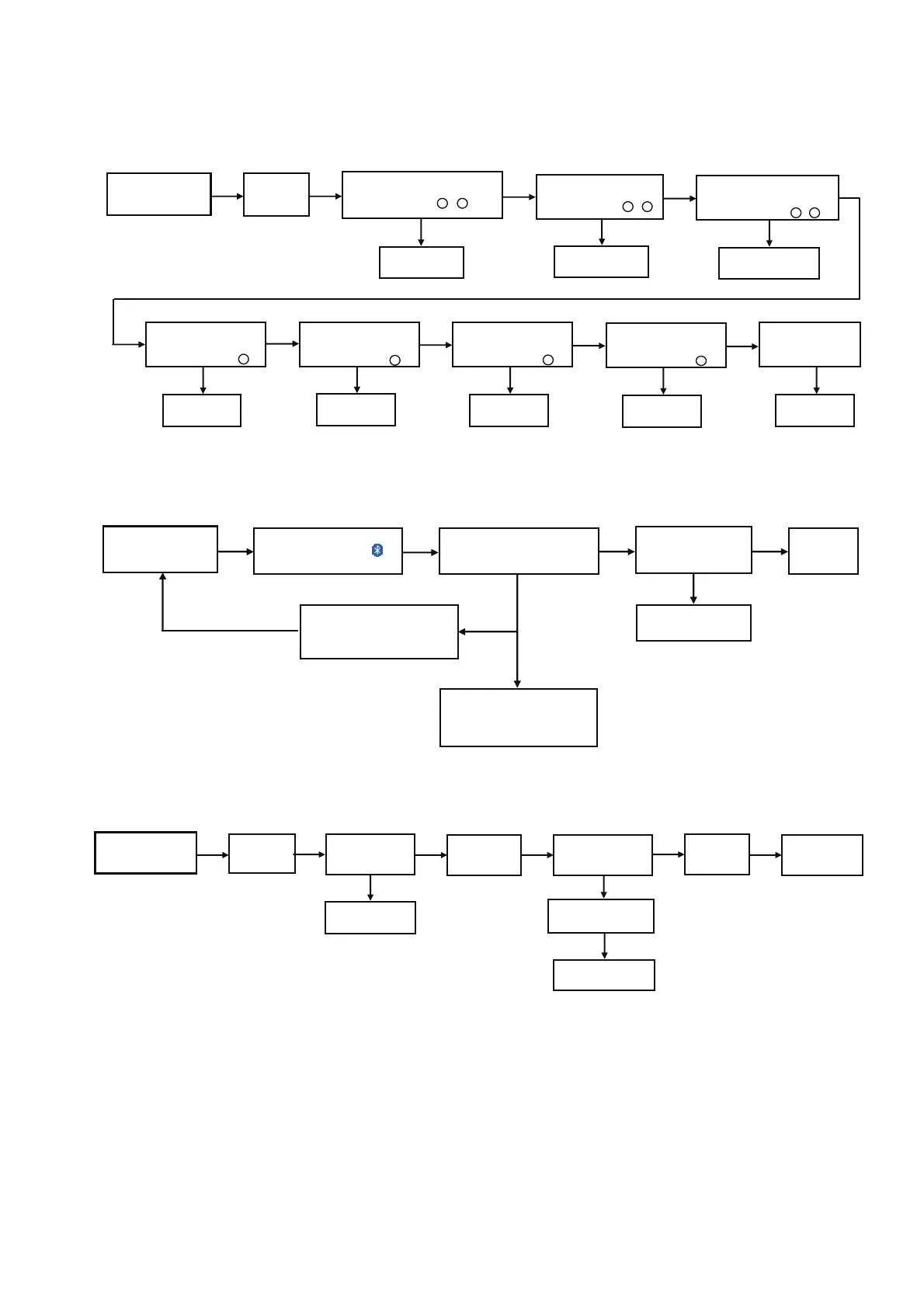
7 Troubleshooting Guide
7.1. No Power or No Display
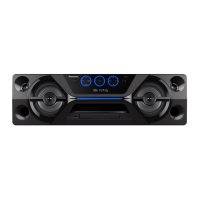
7.2. Bluetooth
®
Pairing Failure
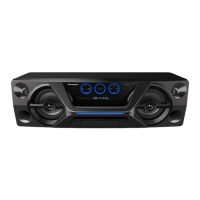
7.3. No Key Function
Press Power Button
of Unit or Remote
Control
to Turn ON the Unit
No Display on
FL Display
(DP6801)
1. AC Cord Plug-out
2. Check Fuse(F1) = 0 ohm
[ refer to check point - ]
Change SMPS
Module
Check Primary E-Cap (C1)
Measured 300V or more
[refer to check point - ]
11
2 2
Change SMPS
Module
Check Secondary Cap. (C5)
or Secondary Rect. Diode (D2)
Measured 14V (Off) or 33V(On)
[refer to check point - ]
3 3
Change SMPS
Module
Check DC-DC Regulator
IC1002 Measured
7V (Off) or 12V(On) at C1052
[refer to check point ]
4
Change IC1002
Check Regulator IC
(IC1005)
Measured 3.3V at Pin 2
[refer to check point ]
5
Change IC1005
Check Connector (P1801)
Measured 5/3.3/12/V
at Pin 1/3/5
[refer to check point ]
7
Check Main P.C.B
Check Regulator IC
(IC1004)
Measured 1.6V at Pin 3
[refer to check point ]
6
Change IC1004
If No Display on
FL Display (DP6801)
Check Panel P.C.B
OK OK
OKOK OK OK OK
NG
NGNG
NG
NG
GNGN
NG
Press Power Button
of Unit or Remote
Control
to Turn ON the Unit
Press [PAIRING] on the Set
or Remote Control
Display "BLUETOOTH"
Check IC2001 pin
119/120 for Tx Rx
waveform
NG
"PAIRING" will display and
blinking while handphone or
other devices are connecting
to the Set
Do Cold Start and AC Plug Out .
Press and hold Power Button then
AC Plug-IN, wait to display "-------"
then will OFF the Set
back to start.
NG
1) Check IC2001 on Main PCB,
pin 119/120 on Main PCB
2) Check Bluetooth Module
(IC7000)
option 1 (Do once)
option 2
The set will displayed
the
"READY" followed
by "BLUETOOTH"
No Problem
Found
OK KOKO
Press Power Button
or CD Door Open of Unit
to Turn ON the Unit
If Cannot
Power ON
(No Display)
Check Main P.C.B
OK
NG
Use Remote Control
to Turn ON the Set
FL Display
Show "HELLO"
OK
Press Power Buttons
or Other Buttons
Check FFC between Main
P.C.B.and Panel P.C.B
NG
OK
All Buttons
are Working
Check Panel P.C.B
NG
OK
No Problem
Found


 To Next Page