24
VQT1P61
Setup
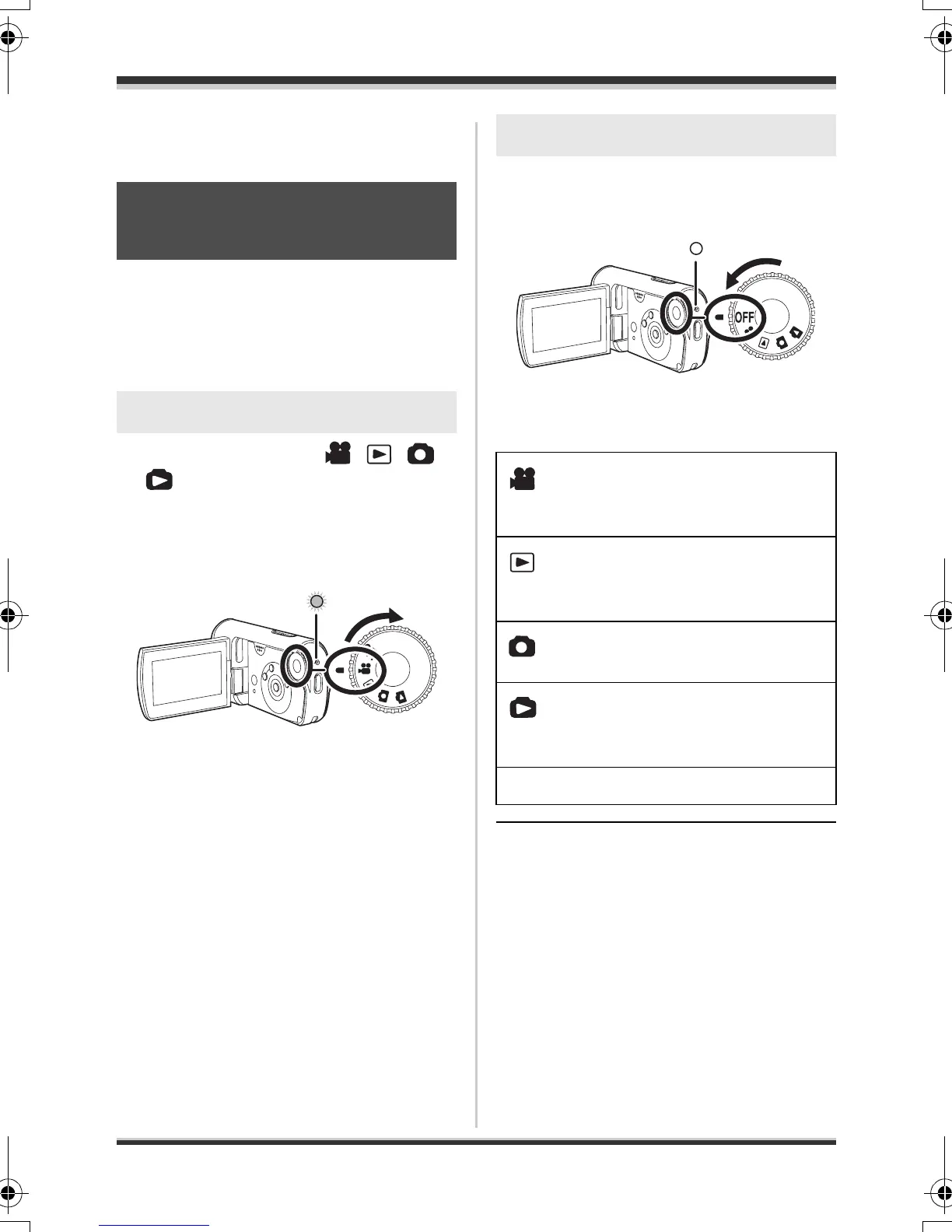
Selecting a mode
Rotate the mode dial to video recording,
video playback, picture recording, picture
playback or power OFF.
Rotate the mode dial slowly but surely.
Set the mode dial to , ,
or .
≥ Align the desired mode pictograph to
the position shown in the illustration.
The status indicator A
lights and the
power turns on.
≥ When the unit is turned on for the first
time, a message asking you to set the
date and time will appear. Select [YES]
and set the date and time. (l 35)
Set the mode dial to OFF.
The status indicator A goes off when the
power turns off.
≥ Do not forcefully rotate the dial.
Selecting a mode
(Turning the unit on/off)
How to turn on the power
A
How to turn off the power
Video recording mode (l 40)
Use this to record motion
pictures.
Video playback mode (l 59)
Use this to play back motion
pictures.
Picture recording mode (l 43)
Use this to record still pictures.
Picture playback mode (l 63)
Use this to play back still
pictures.
OFF The power turns off.
SDR-S9-VQT1P61_eng.book 24 ページ 2007年12月18日 火曜日 午後3時59分





 To Next Page