75
VQT1P61
With other products
With a printer
(PictBridge)
To print pictures by directly connecting
this unit to the printer, use a printer
compatible with PictBridge. (Read the
operating instructions for the printer.)
≥ Use the AC adaptor to free you from
worrying about the battery running
down.
¬Turn on the unit.
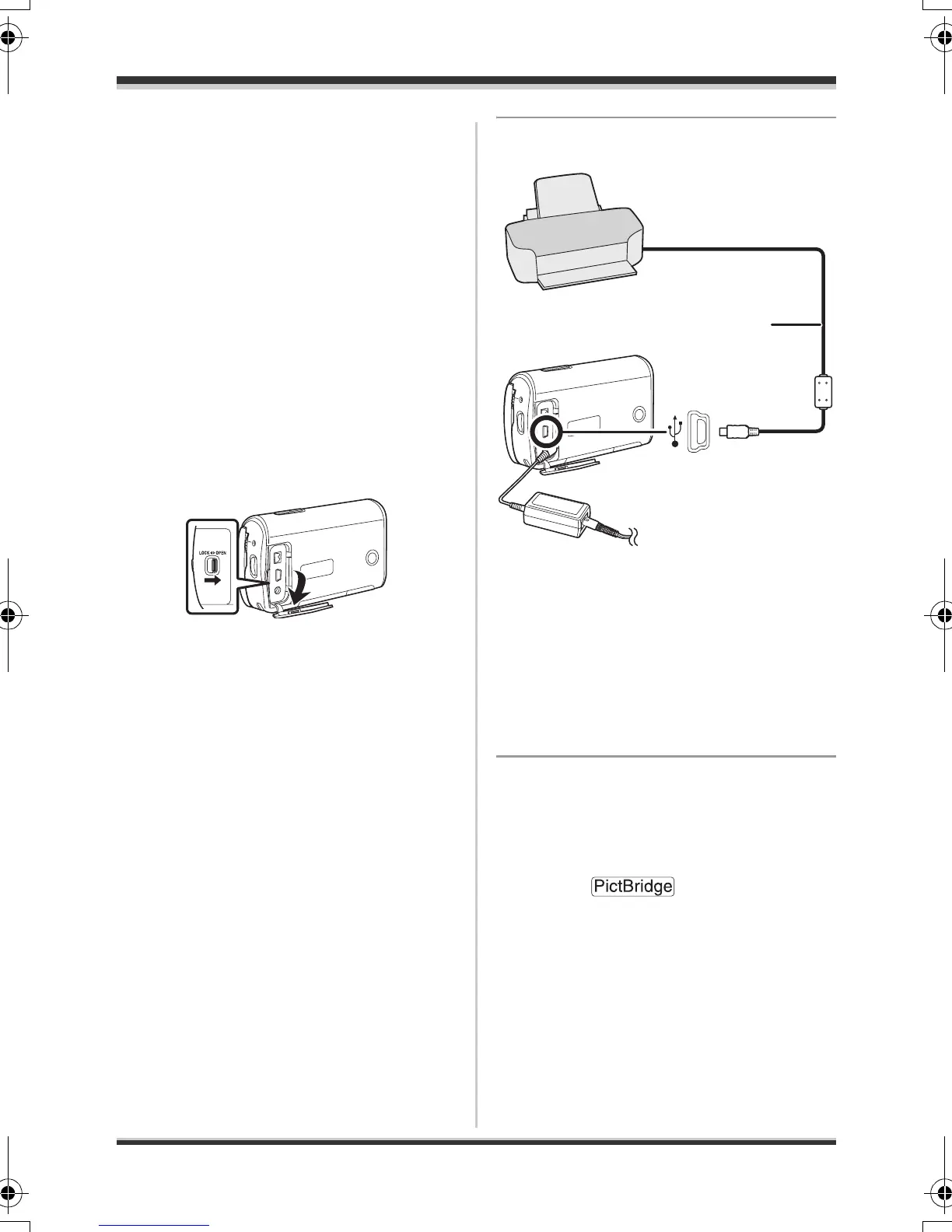
1 Slide the terminal cover lock
to OPEN and then open the
terminal cover.
2 Connect this unit to a printer.
A USB cable (supplied)
≥ Insert the plugs as far as they will
go.
≥ Do not use any other USB
connection cables except the
supplied one. (Operation is not
guaranteed with any other USB
cables.)
3 Press the cursor button up or
down to select [PictBridge],
then press the cursor button
in the centre.
≥ The [ ] indication
appears on this unit’s screen.
A
SDR-S9-VQT1P61_eng.book 75 ページ 2007年12月18日 火曜日 午後3時59分




 To Next Page