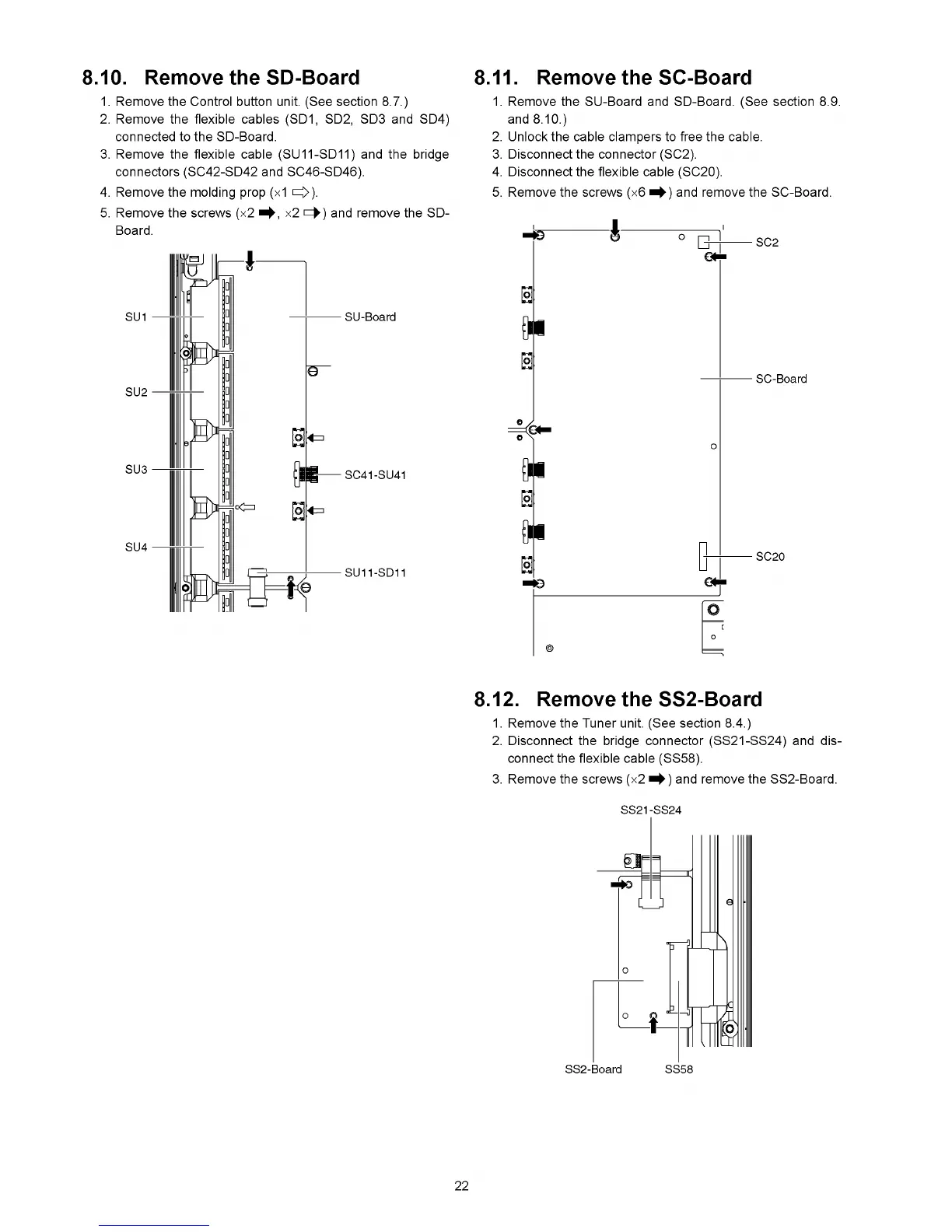
1. Remove the Control button unit. (See section 8.7.)
2. Remove the flexible cables (SD1, SD2, SD3 and SD4)
connected to the SD-Board.
3. Remove the flexible cable (SU11-SD11) and the bridge
connectors (SC42-SD42 and SC46-SD46).
4. Remove the molding prop (x1 O )-
5. Remove the screws (x2 x2 >=►) and remove the SD-
Board.
8.10. Remove the SD-Board
1. Remove the SU-Board and SD-Board. (See section 8.9.
and 8.10.)
2. Unlock the cable clampers to free the cable.
3. Disconnect the connector (SC2).
4. Disconnect the flexible cable (SC20).
5. Remove the screws (x6 and remove the SC-Board.
8.11. Remove the SC-Board
8.12. Remove the SS2-Board
1. Remove the Tuner unit. (See section 8.4.)
2. Disconnect the bridge connector (SS21-SS24) and dis
connect the flexible cable (SS58).
3. Remove the screws (x2 and remove the SS2-Board.
22






 To Next Page