34
LSQT1150
Setup
A few moments after the ACCESS/PC lamp
blinks, the cover of the disc compartment will
open slightly.
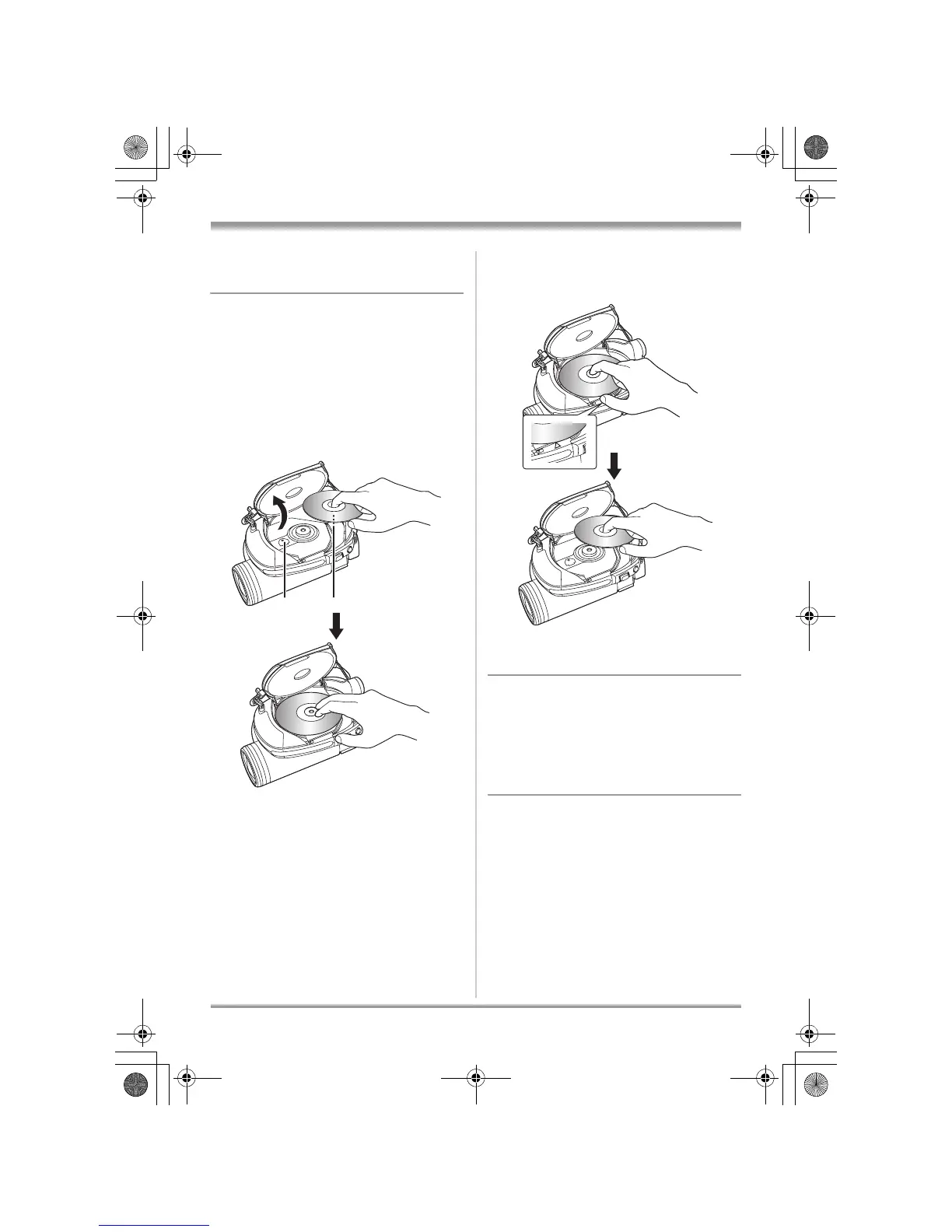
3 Open the cover of the disc
compartment by hand and insert/
remove the disc.
∫ Inserting disc
Fit the disc onto the spindle in the center and
then push the disc down until it clicks into place.
A Recording/playback side
B Pickup lens
∫ Removing disc
While pressing down on the spindle, grasp the
edge of the disc and gently lift it out.
≥ Take care not to touch the recording/playback
sides of a disc when inserting or removing it.
4 Push the section marked
PUSH CLOSE on the cover of the
disc compartment to close the
cover.
≥ If you use a new DVD-RW, it is necessary to
format the disc. (l 25)
∫ Identifying recording/playback sides of
disc
Single sided disc:
The recording/playback side is opposite to the
labelled side.
Double sided disc:
The “SIDE A” recording/playback side is the side
opposite the side with the “SIDE A” mark. The
A
B
LSQT1150.book 34 ページ 2007年1月19日 金曜日 午前9時27分














 To Next Page