77
LSQT1150
Editing
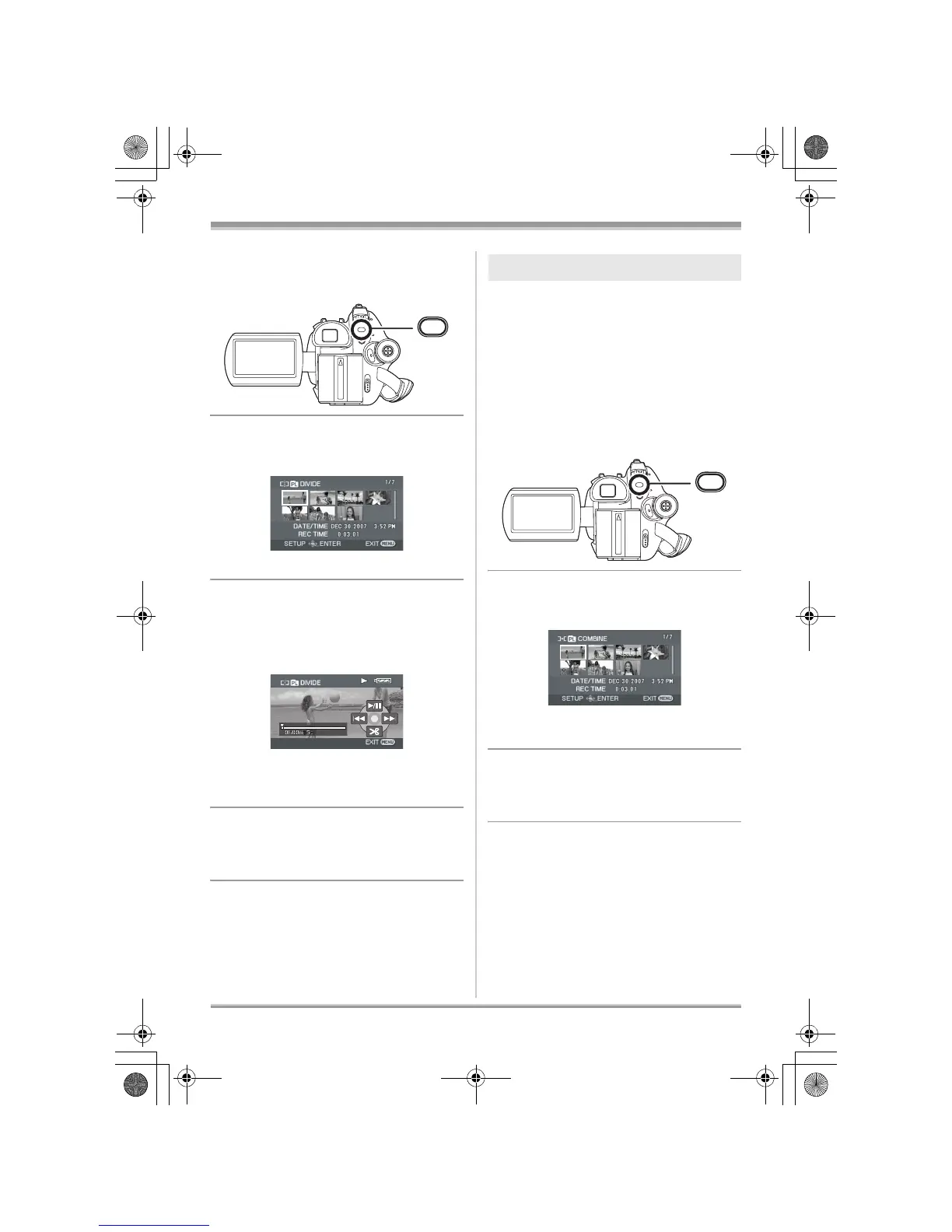
1 Press the MENU button, then
select [EDIT] # [DIVIDE] # [YES]
and press the joystick.
2 Select the scene to be divided,
then press the joystick.
The selected scene is played back.
3 When you reach the area where
you want to divide the scene,
move the joystick down to set the
dividing point.
≥ Using slow-motion playback or frame-by-frame
playback makes it easy to search for the point
where you want to divide the scene. (l 66)
4 When the confirmation message
appears, select [YES], then press
the joystick.
To continue dividing other scenes
Repeat steps 2-4.
To complete editing
Press the MENU button.
Two consecutive scenes can be combined into
one.
≥ Combining scenes on a playlist will not affect
the original scenes.
¬Select playlist playback mode. (l 74,
steps 1 and 2)
1 Press the MENU button, then
select [EDIT] # [COMBINE] #
[YES] and press the joystick.
2 Select the scene to be combined,
then press the joystick.
≥ The selected scene and the next scene are
combined.
3 When the confirmation message
appears, select [YES], then press
the joystick.
To continue combining other scenes
Repeat steps 2-3.
To complete editing
Press the MENU button.
MENU
Combining scenes
MENU
LSQT1150.book 77 ページ 2007年1月19日 金曜日 午前9時27分














 To Next Page