22
8 Settings and Operations
(continue)
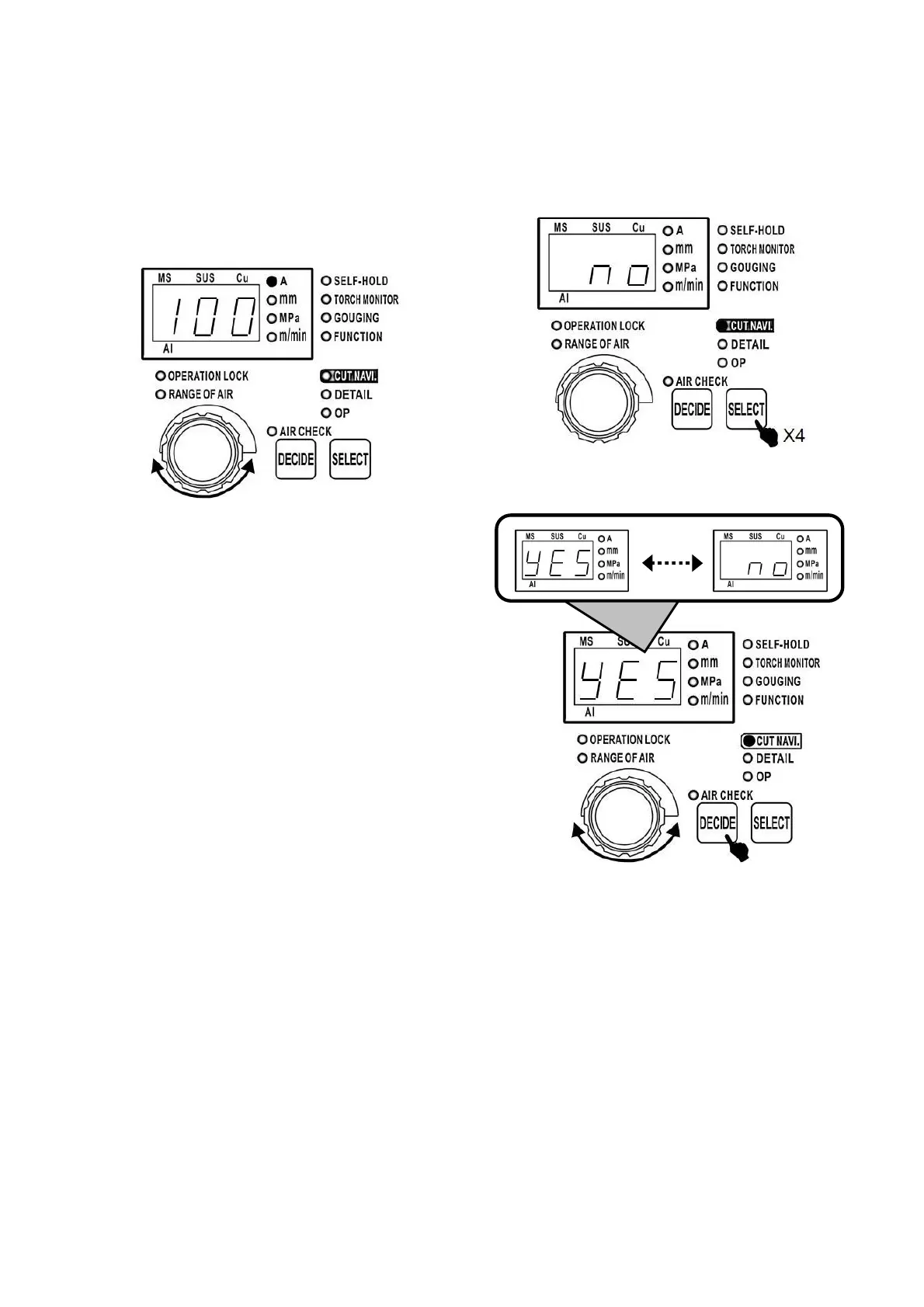
8.3 Setting the cutting current
Set the cutting current as follow.
(1) On the stand-by mode, the digital display
indicates the set cutting current.
(2) Turn the dial to change the cutting current.
Note:
The cutting current set value can be set within the
output current adjustment range. When the unit
LED 「A」 blinks, it means that the machine is
cutting now. During cutting, the dial can be turned
to modify cutting current set value too.
8.4 Cutting navigation
8.4.1 The condition setting method for
cutting navigation
(1) On the stand-by status, press selection button
4 times, cutting navigation LED is lit.
(2) When turning the dial to display 「yes」, press
the DECIDE button.
※ When the selection is 「no」, machine enters
submenu.
The cutting navigation function can’t be used
under below mentioned situation:
※ In 【the cutting torch selection 「P11」】 of
submenu, the cutting torch, of which does
not match the rated specification of the
cutting machine, is selected.
※ When gouging mode is selected



 To Next Page