31
General facts
InformationOperationHelp
- Functions of the secondary systems -
Selecting the "D" sub-gears (manual mode)
In a normal drive in driving gear "D", it is sometimes
necessary based on the driving situation, e.g. overtaking
maneuver, driving up and down mountains, to select
a different driving gear or sub-gear of "D".
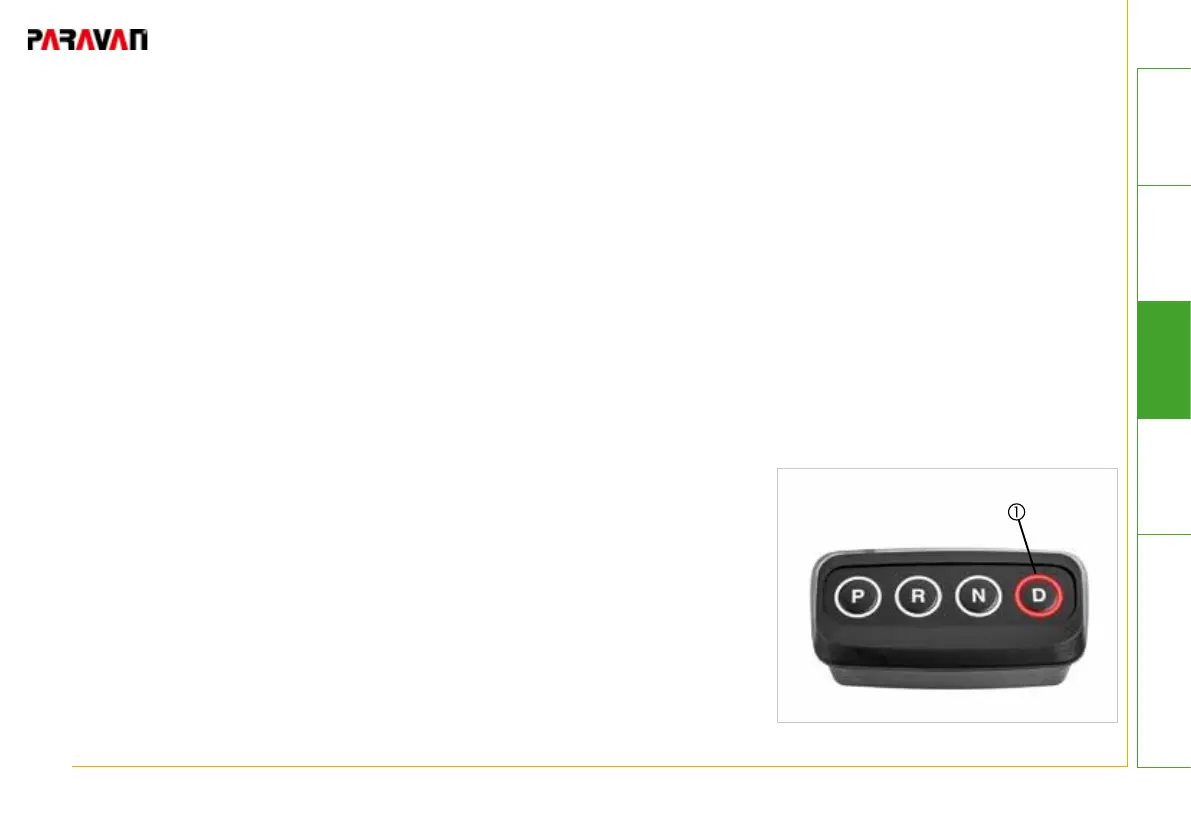
• Press the "D" pushbutton.
-> Sub-gear "1" will be engaged.
• Press "D" pushbutton again.
-> Sub-gear "2" will be engaged.
• Press "D" pushbutton again.
-> Sub-gear "3" will be engaged.
• Press "D" pushbutton again.
-> Driving gear "D" will be engaged.
The driver can shift directly into driving gear "D" from any sub-gear
through a longer pressing of the "D" pushbutton.
The engaged driving gear will be displayed on the instrument
cluster of the vehicle and on the control element .
Fig. 17: Driving gear D


 To Next Page