2.4.1
Measure
•
Use
and
to scroll, when the cursor is on the Measure tab, press
to select.
•
The display will be redirected to the first step in the Measure workflow.
All the operation steps can be configured via Cubetape Manager software.
See chapter 3 for more details. If the operation is disabled, the operation will skip to
the next step directly.
Figure 2-3
Figure 2-5
Figure 2-4
Figure 2-6 Figure 2-7
-
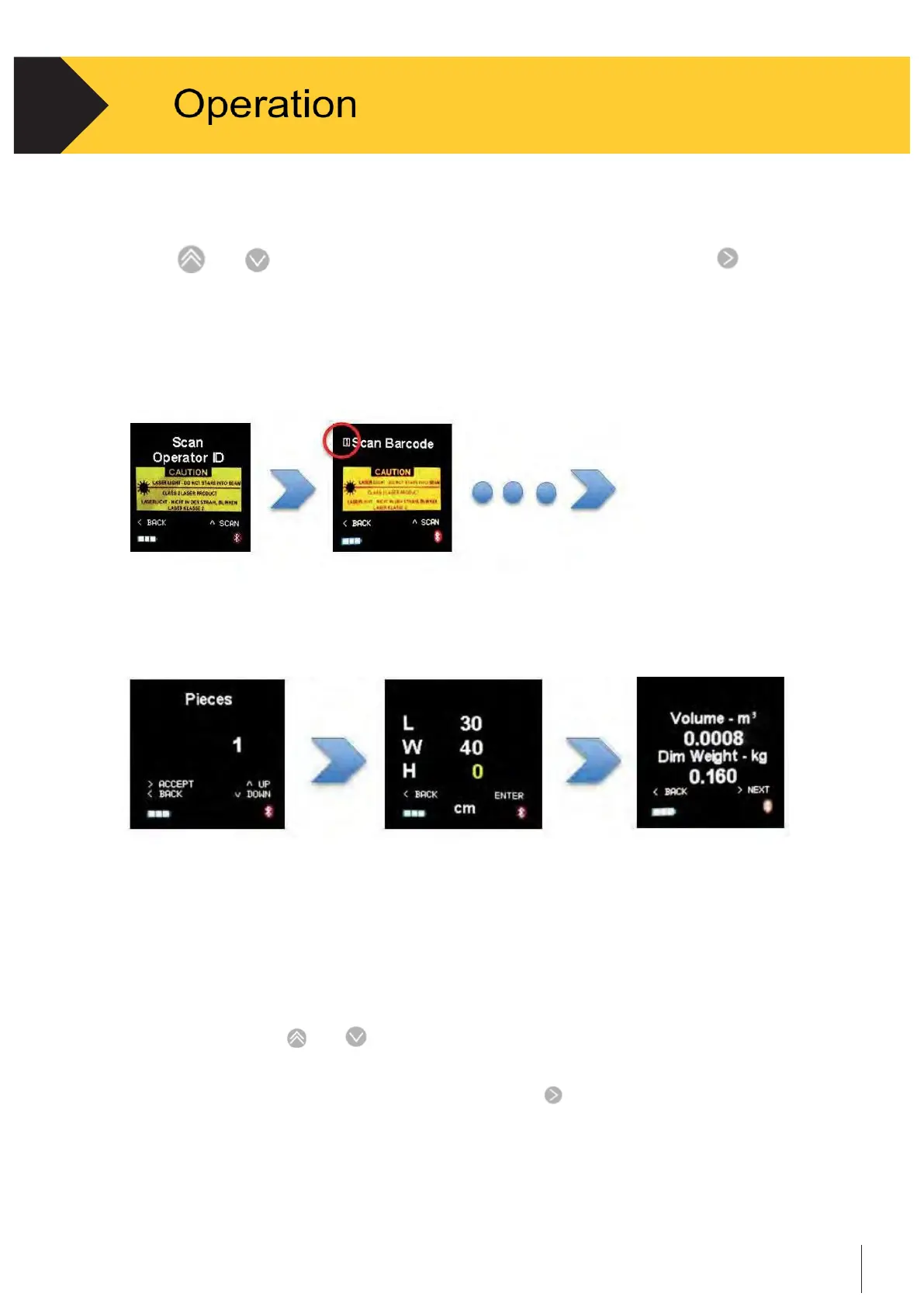
Scan the operator ID: This operation needs to be performed when the device is
powered on only. To change the Operator ID, restart the device See Figure 2-3.
-
Scan barcode: Up to 3 barcodes can be scanned, depending on the configuration.
The sequence number shows on the left top on the screen See Figure 2-4.
-
Input pieces: Use
and
to scroll the value See Figure 2-5.
-
Measure the length, width and height See Figure 2-6.
-
Show the volume and dimensional weight. Press to send/save the record.


 To Next Page