5.6
Tape Cassette and Battery Replacement
•
To replace the tape cassette and battery, remove the silicone sleeve first.
•
To slide the rear cover of the device down, push the index finger at the upper right
corner of the rear cover as indicated.
5.6.1
Tape Cassette Replacement
•
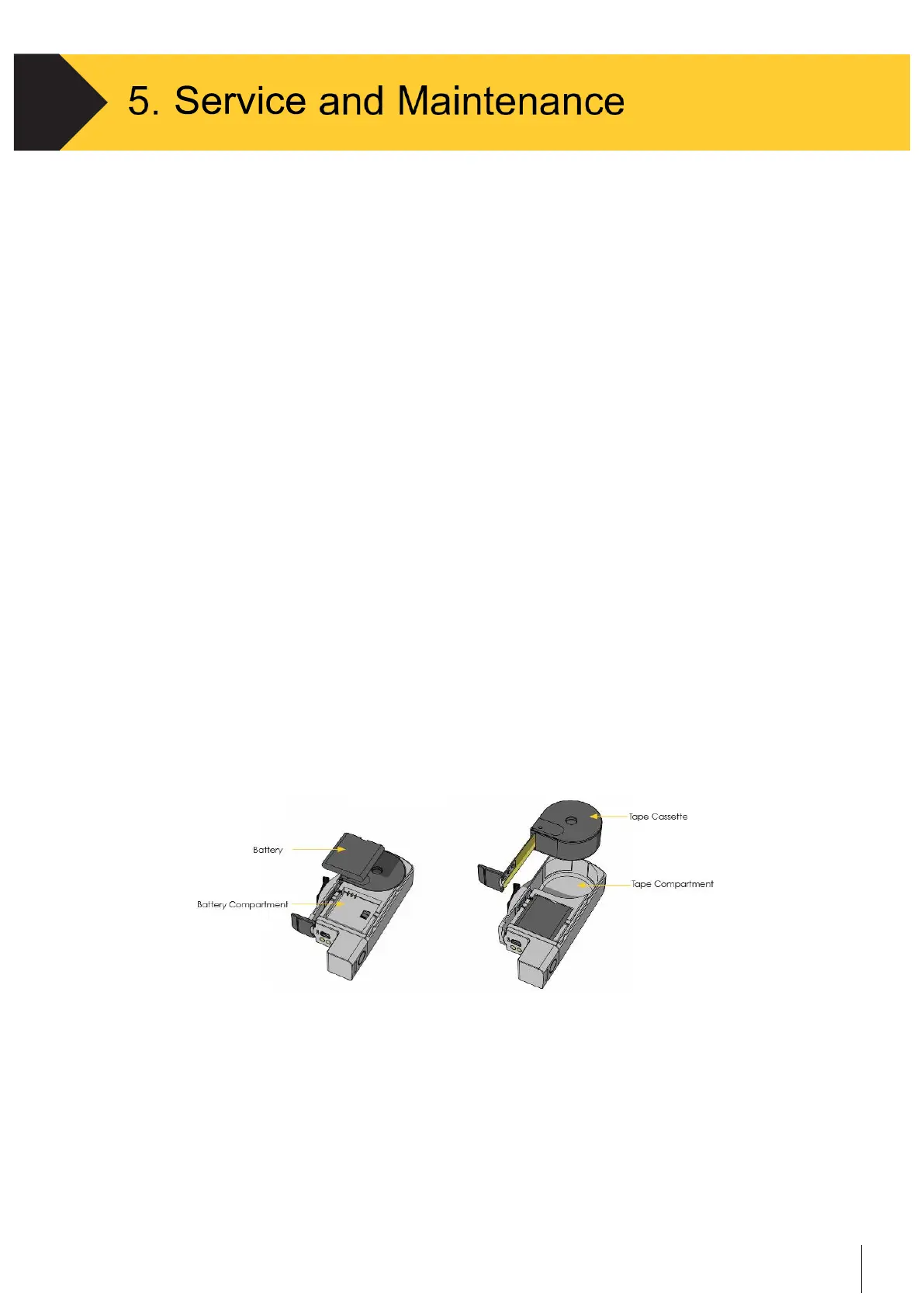
Remove and replace the tape cassette by turning over the C190CubetapePRO, extracting
the tape a few centimeters and then lifting the tape away from the device slowly.
5.6.2
Battery Replacement
•
To replace the tape cassette and battery, remove the rubber sleeve first.
•
Then
s
lide the rear cover of the device down by pushing the index triangle at the upper
right corner of the rear cover as indicated below.
•
Remove and replace the battery by slightly press the trough at the middle edge of the
battery upward as indicated below
•
Remove and replace the tape cassette by turning Cubetape PRO over, extracting the tape
a few centimeters and then lifting the tape away from the device slowly
Figure 5-1
Tape Cassette and Battery Replacement


 To Next Page