1.1
CubetapePRO Overview
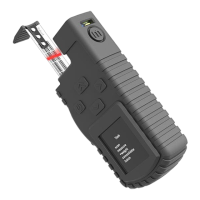
The CubetapePRO is a portable data-capture device for use in transport,
shipping and warehousing applications. It is designed to collect, record and
transfer data records made up of a series of items, including barcodes,
piece counts, weights, dimensions, and other information, such as device
serial number and units.
Cubetape captures dimensions using an integrated digital tape, and (if configured)
item information using a barcode scanner. On-board display and function keys
allow other data to be collected using a series of configurable tasks.
Data is collected and stored on Cubetape. The recorded data can be transferred
to a host application running on a PC, PDA, smart indicator, tablet or phone.
Communication options include Bluetooth (HID and SPP profiles) and physical
USB cable. When connection is established, data transmission can be
performed in either online or batch modes.
Cubetape supports multiple data-capture tasks, which can be selected and
loaded by an operator from the application menu. Standard applications are
Measure, Weigh, Consolidate, Batch Upload and Ship.
1.2
Main Features
•
Easy-to-handle robust enclosure with protective silicone sleeve
•
Standard 3 meter tape for dimensional measurement – BoT (Barcode on Tape)
•
OLED 24-bit full-color display with 128 × 128 resolution
•
Li-ion 970mAh battery with 2-hour recharge cycle
•
Motorola scan engine for tape + barcode reading and decryption
•
Class 2 SPP and HID profile Bluetooth connectivity for data transmission
•
USB serial port for PC connection and battery charging
•
Front button access to basic functions, such as scan and measure
•
Supplementary Cubetape Manager software for configuration and management
•
Supplementary CheckMate for Windows software for data handling and processing
•
Supplementary CheckMate for Android App for data capture including server software
•
Automatic shutdown features for energy conservation


 To Next Page