DATASHEET
α
18
Appendix
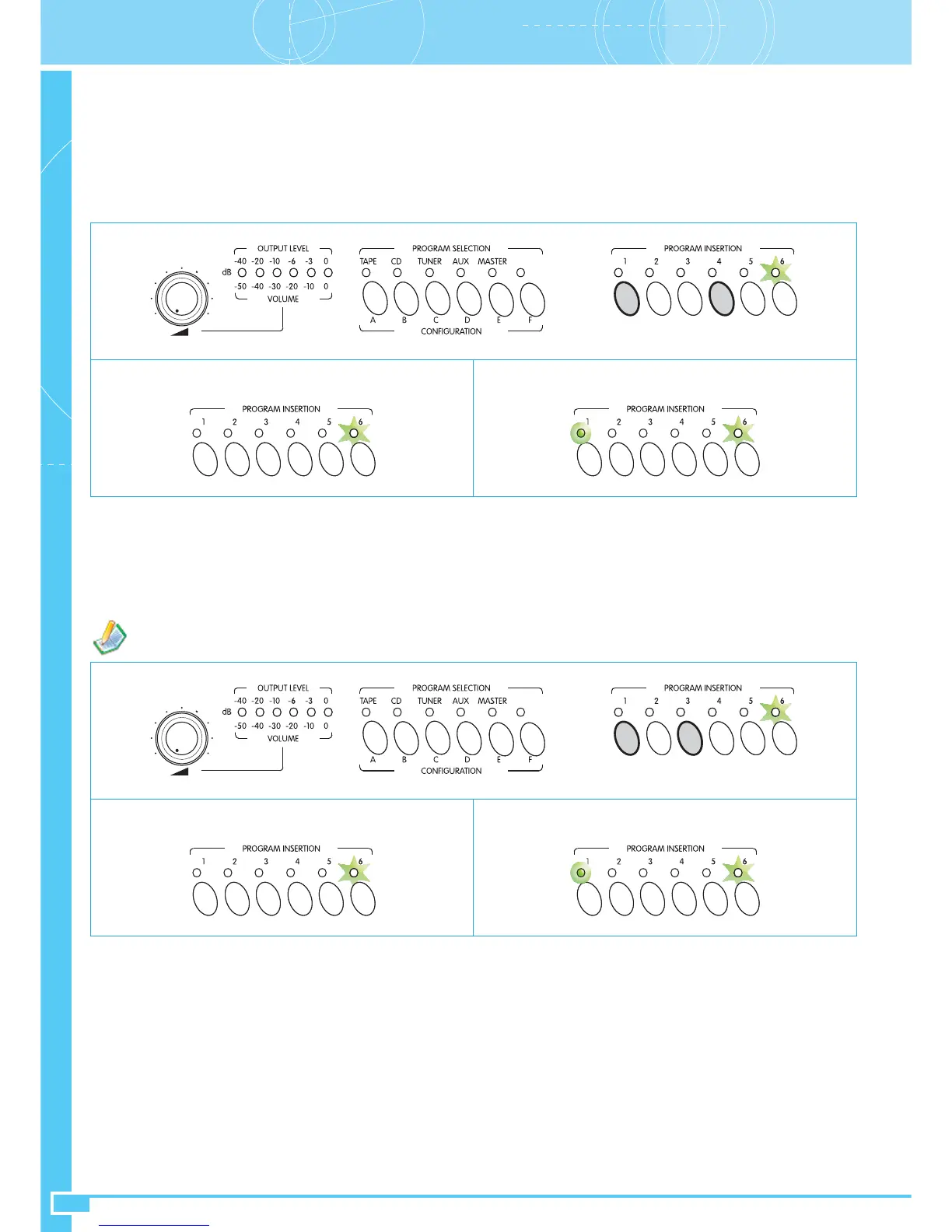
• SINGLE/DUAL mode
To enter the programming mode, press keys 1 and 4 at the same time. LED 6 will start to flash.
LED 1 will show the current mode setting:
LED OFF = SINGLE mode (single amplification for both speech and music)
LED ON = DUAL mode (separate speech and music amplification).
To change the mode, press key 1.
Press key 6 to confirm your choice.
SINGLE mode DUAL mode
Fig. A12
•
Local
chime (active for stations connected to the TO LOCAL UNITS socket)
To enter the programming mode, press keys 1 and 3 at the same time. LED 6 will start to flash.
LED 1 will show the current mode setting:
LED OFF = Chime not activated
LED ON = Chime activated
To change the mode press key 1; press key 6 to confirm your choice.
Chime on Local units NOT ACTIVATED Chime on Local units ACTIVATED
Fig. A13
Section ASettings and Controls
The volume of the Chime signal can be adjusted by means of the control (31) on the bottom of the equipment.


 To Next Page