EasyManua.ls Logo

PAX PX7 - Configure PAX PX7 in CRE for Gift Card Payments; Accessing Setup Screen; Selecting Gift Card Processing

PAX PX7
55 pages
Print Icon
To Next Page IconTo Next Page
To Previous Page IconTo Previous Page
Loading...
22
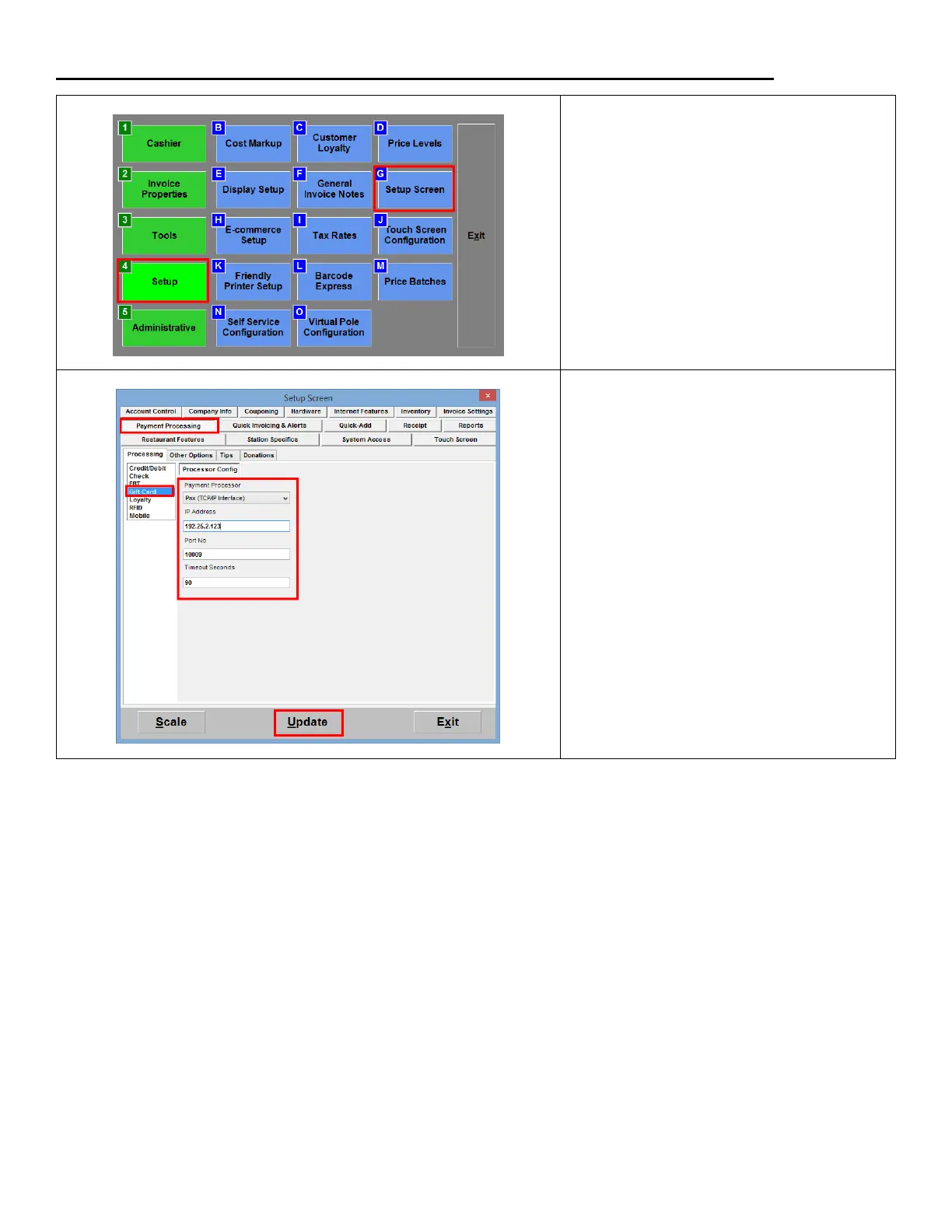
Configuring the PAX PX7 in CRE to accept Gift Card payments TCP/IP Interface
1. From the Options/Manager screen,
select Setup > Setup Screen.
2. Under the Payment Processing >
Processing tab select Gift Card.
From the dropdown select Pax
(TCP/IP Interface). Enter the Static IP
Address you assigned to the PAX; for
Port No. enter 10009, if not there.
Hit Update to save your changes.

Related product manuals