PBI-Dansensor A/S COPYRIGHT © PBI-300042-B 10/2010
CheckMate 3 EN User Guide 45
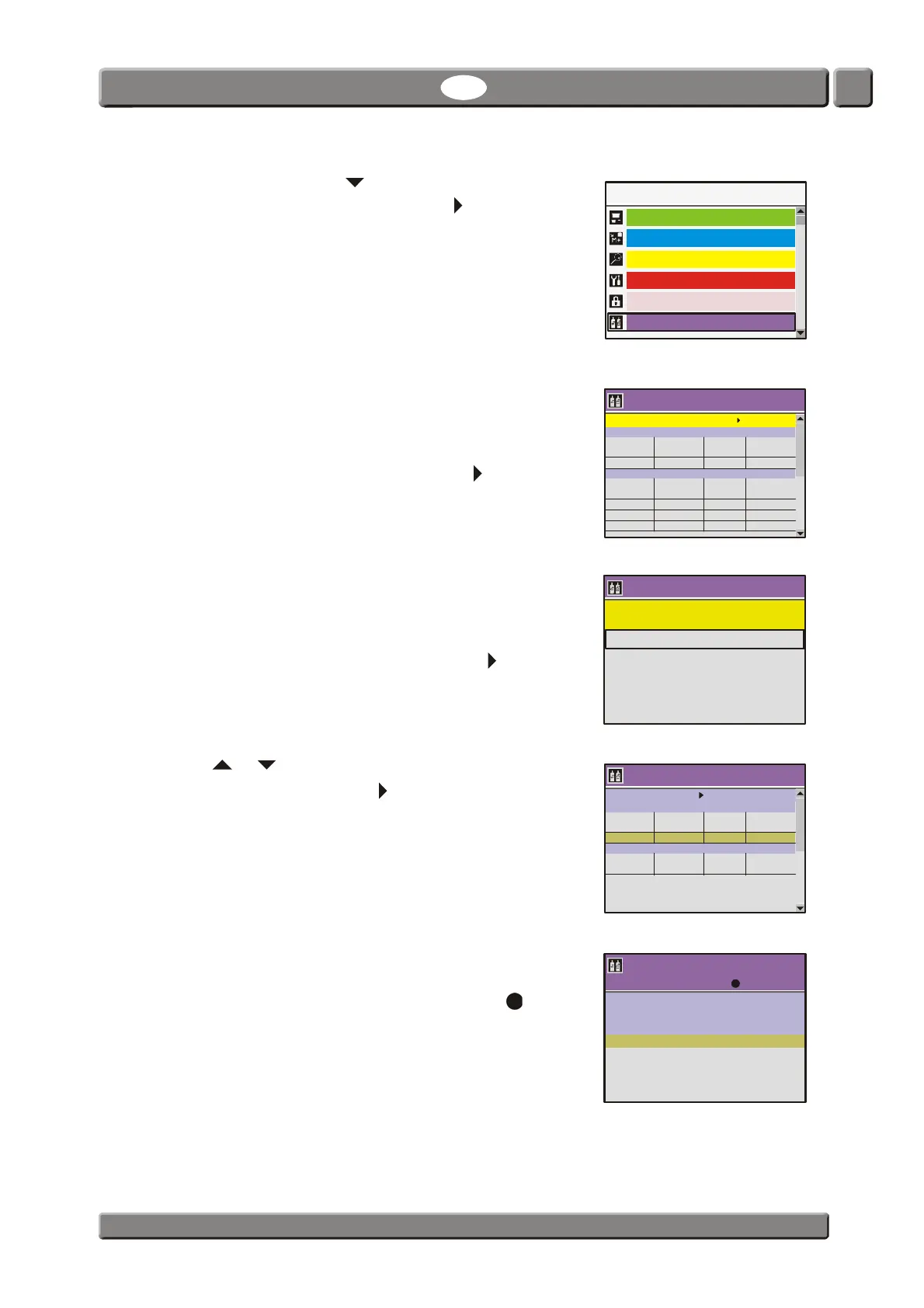
5. In the Main menu use key to scroll down to the
Calibration menu item then push the key to enter the
function.
6. The appearing Calibration menu holds a list of the
various sensors in the device.
For each sensor there is a table showing the appropriate
calibration parameters.
To proceed with the calibration push the key.
7. From this menu you can select between the following
items:
- Perform calibration
- Erase/enter calibration
Select Perform calibration, then push the key.
8. Use or key to select the 20,9460 field for the O
2
sensor (EC), then push the key.
9. The pump starts and now make sure to expose the
needle to a 20,946% O
2
gas.
Let measurement run for 10 min. then push key.
08/17/06
Main menu
Data log
Product menu
Diagnostic menu
General setup
Calibration
Access level
Calibration
O sensor (EC)
O Response Pressure Calibration
%mVmbardate
20,9460 18,208 1031,9 05/08/06
CO sensor (100%)
CO Response Pressure Calibration
%mbardate
100,00 0,533 1034,0 05/08/06
60,00 0,463 1034,0 05/08/06
25,00 0,336 1034,0 05/08/06
2
2
2
2
Erase / enter calibration
13:46
08/17/06
!!! WARNING !!!
Calibration requires use of certified gases
Wrong calibration will cause invalid measurements
Calibration
Select sensor and press to begin calibration
O sensor (EC)
O Response Pressure Calibration
%mVmbardate
CO sensor (100%)
CO Response Pressure Calibration
%mbardate
2
2
2
2
20,9460 XX,XXX XXXX,X XX/XX/XX
13:46
08/17/06
XX,XXX
XX,XXX
XXX,X
%O
mV
mbar
2
20,9460
Sensor:
EMF:
Pressure:
1:


 To Next Page