ООО «ТЛК Трейд» | 196158, г.Санкт-Петербург, Пулковское шоссе, д.30, корп.4, оф. 213В (юр.) | ИНН 7810592830 КПП 781001001
р/с 40702810068000007550 | к/с 30101810200000000704 | Филиал ОПЕРУ ОАО Банк ВТБ в Санкт-Петербурге | БИК 044030704
ОКПО 66035862 | ОКАТО 40284565000 | ОГРН 1107847196060 | т.(812)6499888 | http://www.tlct.ru http://www.rftel.ru
mail@tlct.ru
Customers can use UP, DOWN, LEFT,RIGHT, ENTER, EXIT keys from front panel to navigate in the menus,
select and confirm the parameters in LCD screen.
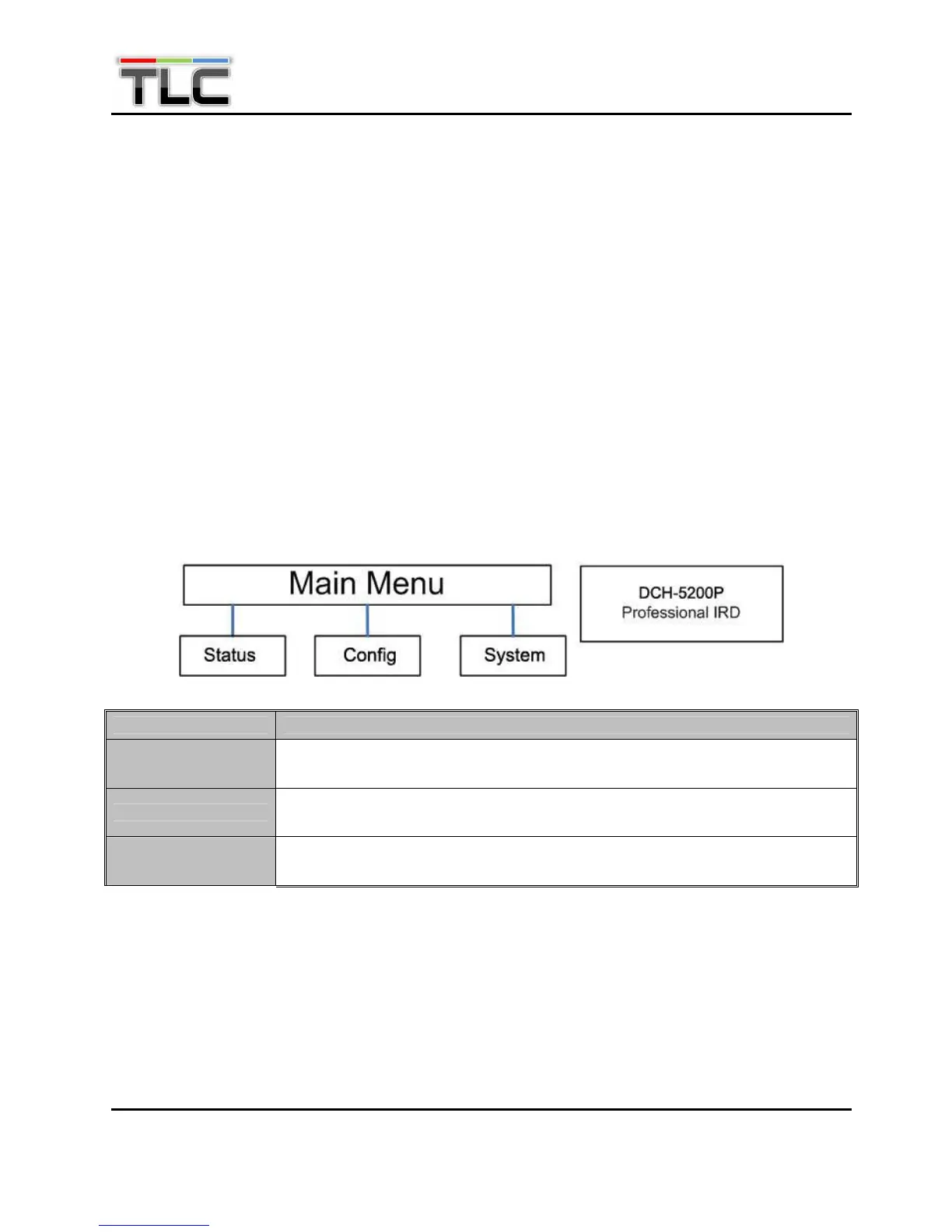
5.1.2 Main menu
User can press ENTER into the main menu. In the main menu, there are 3 sub-menu, Press UP/DOWN to switch
between the sub-menus.
● Status
● Config
● System
After go into every sub-menu, you can press LEFT or RIGHT to move the cursor, then use UP or DOWN to
change the value, and then you can press ENTER to make the selection.
Submenu Name Description
Status
Monitor the parameters of Tuner, TS over IP input (only when the TS/IP streaming
board is installed) and decoding info.
Config
Configure the parameters of Input and output, including CI settings, AV decoder, ASI
output and so on.
System
Check and set system settings and read the equipment information, and make the
default factory setting and so on.
5.1.3 Configuration Menu
In the Configuration menu, user can configure and monitor the parameters of input and output, including Tuner,
CI settings, AV decoder, ASI output, BISS, SDI, TS over IP input (only when the TS/IP streaming board is
installed) and so on. Choose Configuration and press UP or DOWN to scroll the sub-menus, press ENTER to go
into the sub-menus. There are ten sub-menus to configure:


 To Next Page