ООО «ТЛК Трейд» | 196158, г.Санкт-Петербург, Пулковское шоссе, д.30, корп.4, оф. 213В (юр.) | ИНН 7810592830 КПП 781001001
р/с 40702810068000007550 | к/с 30101810200000000704 | Филиал ОПЕРУ ОАО Банк ВТБ в Санкт-Петербурге | БИК 044030704
ОКПО 66035862 | ОКАТО 40284565000 | ОГРН 1107847196060 | т.(812)6499888 | http://www.tlct.ru http://www.rftel.ru
mail@tlct.ru
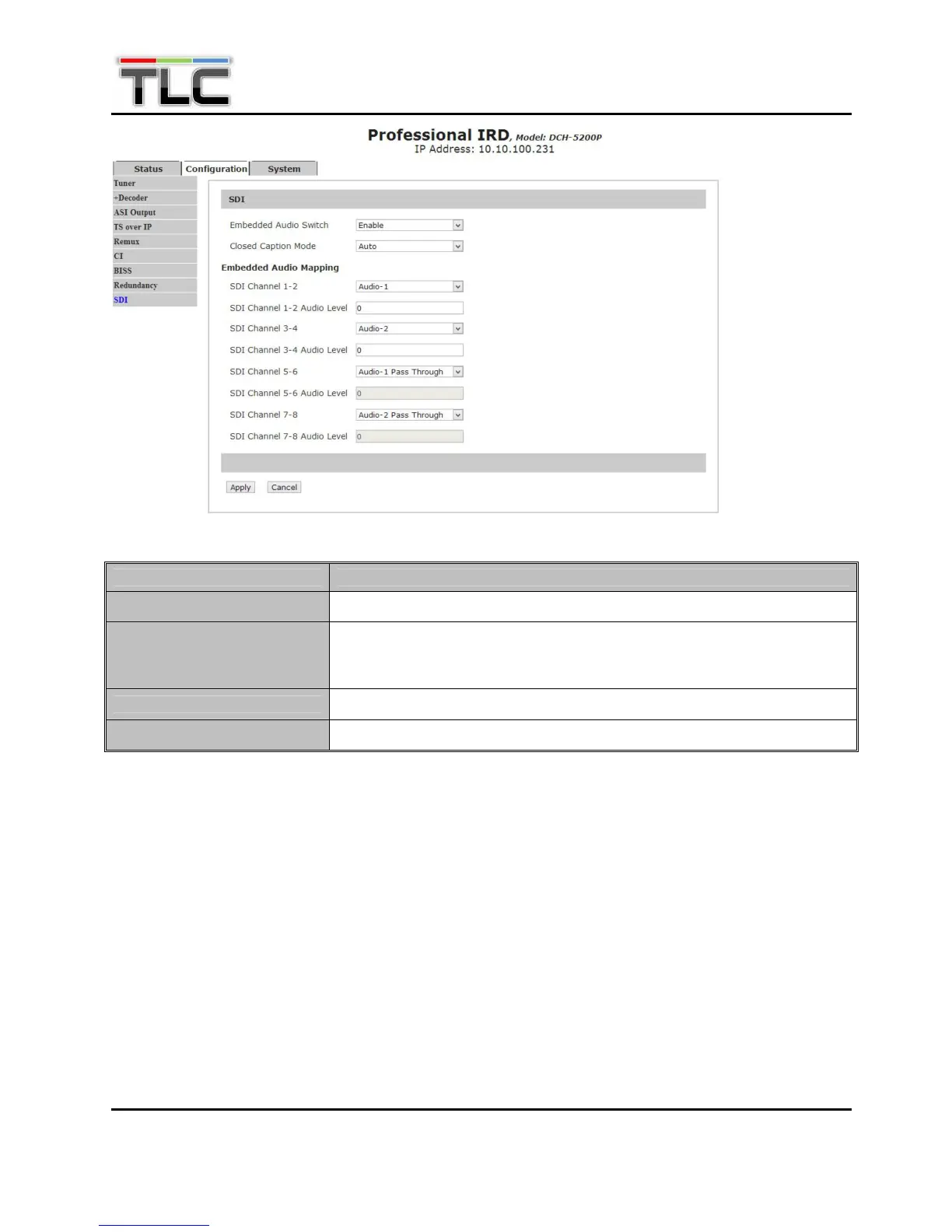
Menu Name Description
Emb Aud Switch
To enable or disable embedded audio function.
Closed Caption Mode
To Select the mode of closed caption among “Auto”, “Line21” and “SMPTE
334M-608” and “SMPTE 334M-708”. (Note: must enable closed caption
function in Decoder menu first.)
SDI Channel x-x
To set audio embedded channel.
SDI Channel x-x Audio level
To adjust audio level on that channel.
5.2.11 System
Set parameters of system. There are three subpages, Device page, IP Control Page, Version page,
Login Page, Factory Default page, System Reboot and Upgrade page. In Device subpage, user can set
the Product name, Model number, Brightness of LCD on front panel and Web auto refresh Time. Click
“Apply” button to submit, or click “Cancel” button to cancel.


 To Next Page