ООО «ТЛК Трейд» | 196158, г.Санкт-Петербург, Пулковское шоссе, д.30, корп.4, оф. 213В (юр.) | ИНН 7810592830 КПП 781001001
р/с 40702810068000007550 | к/с 30101810200000000704 | Филиал ОПЕРУ ОАО Банк ВТБ в Санкт-Петербурге | БИК 044030704
ОКПО 66035862 | ОКАТО 40284565000 | ОГРН 1107847196060 | т.(812)6499888 | http://www.tlct.ru http://www.rftel.ru
mail@tlct.ru
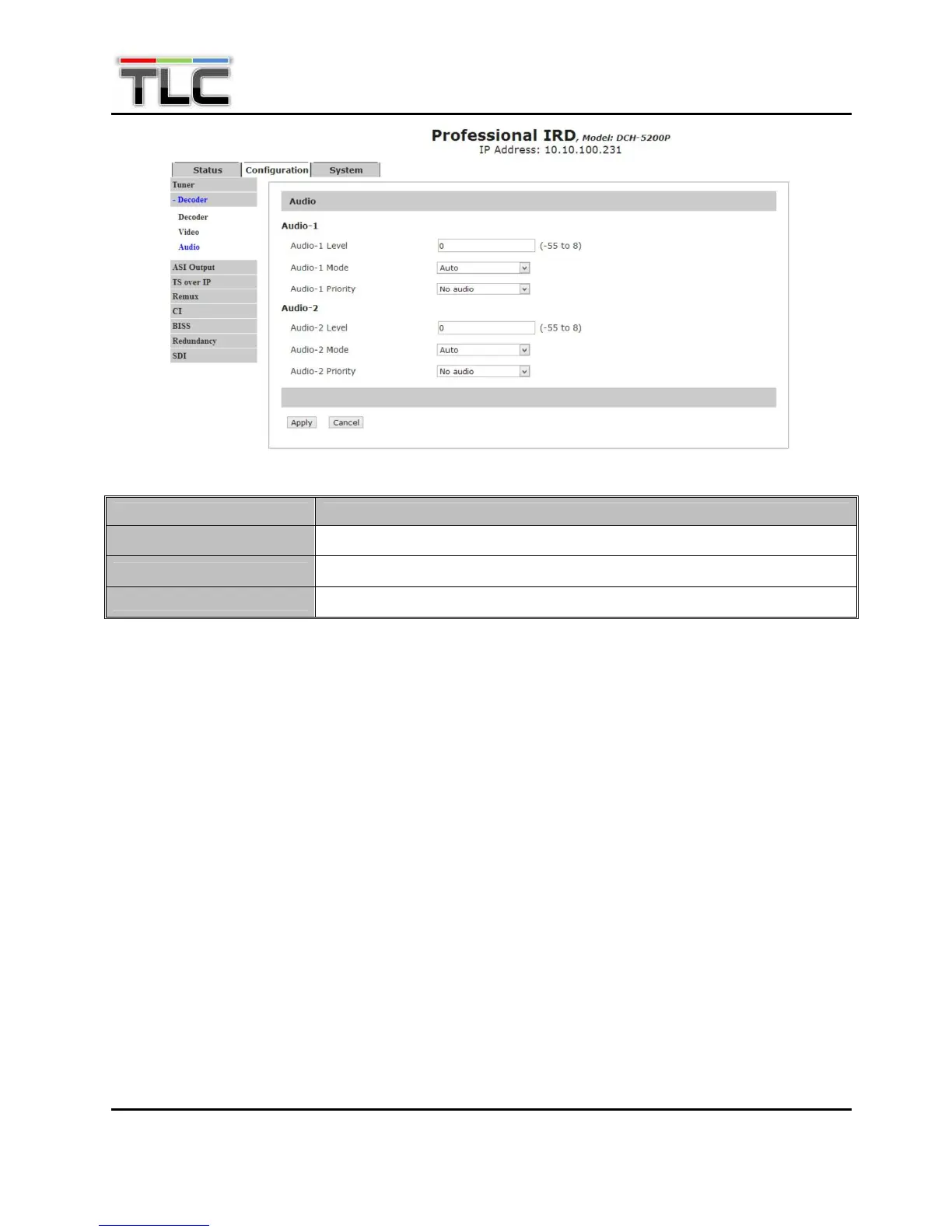
Menu Name Description
Audio-x Level
To configure the analog audio output level.
Audio-x Mode
To set output audio mode among “Auto”, “Stereo”, “Left”, “Right” and “Mono”
Audio-x Priority
To configure output audio priority.
5.2.4 Config—ASI Output
Set parameters of ASI output. There are two ASI output ports, you can select the input source in this
page. Click “Apply” button to submit, “Refresh” button to refresh latest status of settings, or click
“Cancel” button to cancel.


 To Next Page