Operators Manual Model PT2000/H Series Gas Monitor Rev 2. January 2014
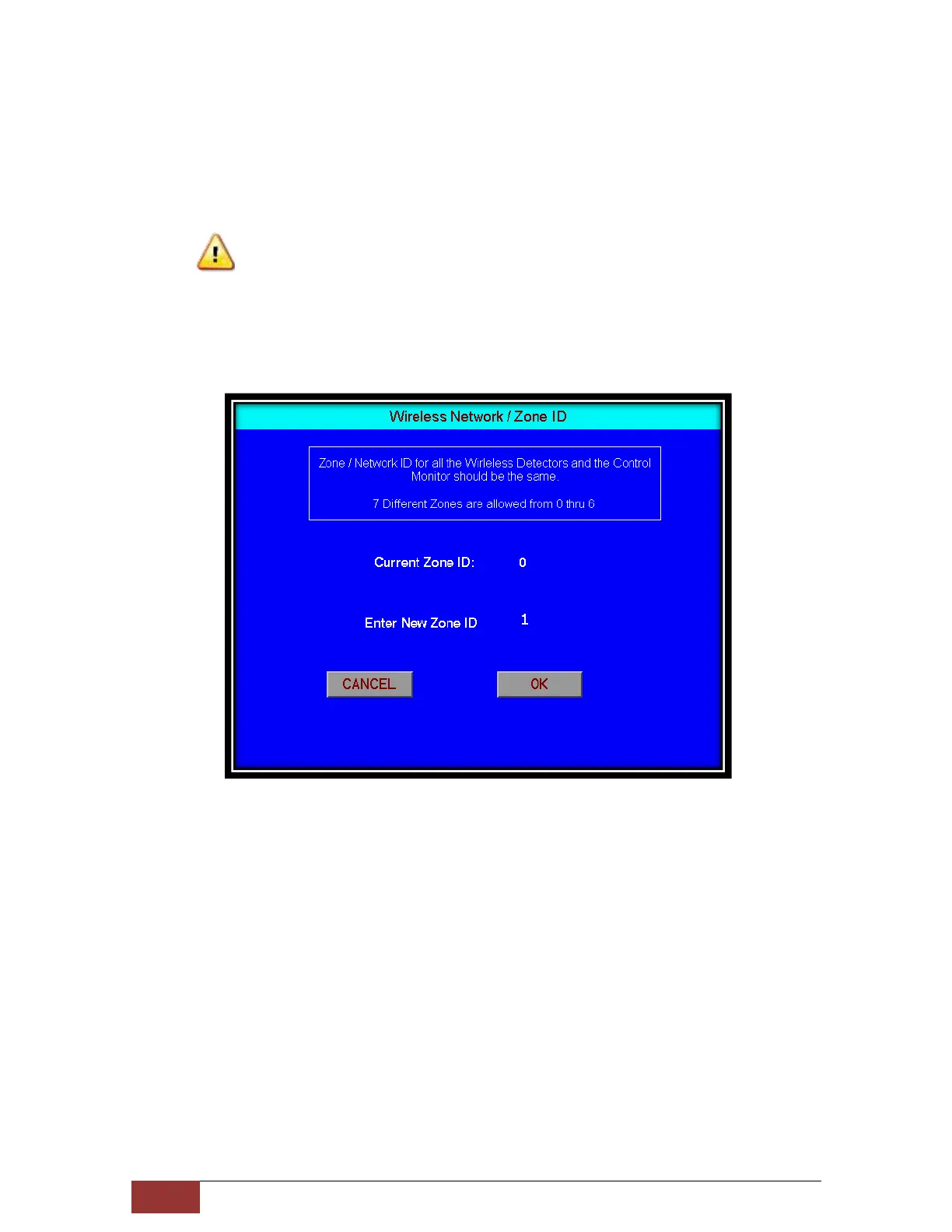
4.1.5 Wireless Network / Zone ID: A distinct Network or Zone ID is used if multiple
systems are working within the wireless range of each other. This is to avoid
cross talk between sensors and controllers. By assigning a distinct Network ID
the sensors and controller will communicate only the ones with the same
Network ID. Up to 7 distinct Zones & Network IDs can be assigned (0 thru 6)
Caution
Before changing the network ID be sure that all the Wireless Detectors have the
same Network / Zone ID else there will be communication failure between the
sensors and the Controller. Leave the controller and wireless detectors on
defulat 0 as Network ID if there are no other PT2000 System in the area.
4.1.6 Call Out / Alarm Text Messaging: Enable or Disable this option to send Alarm
text messages over the mobile phones.
4.1.7 Enable / Disable Wireless Remote Alarms: Enable this option for the
controller to communicate with Wireless Relay Module for Remote Alarms.
When disabled all the PT2000/H communications with the Wireless Remote
Relay Module (Alarm Station) are inhibited.



 To Next Page