Operators Manual Model PT2000/H Series Gas Monitor Rev 2. January 2014
4.2 Channel / Sensor Configuration
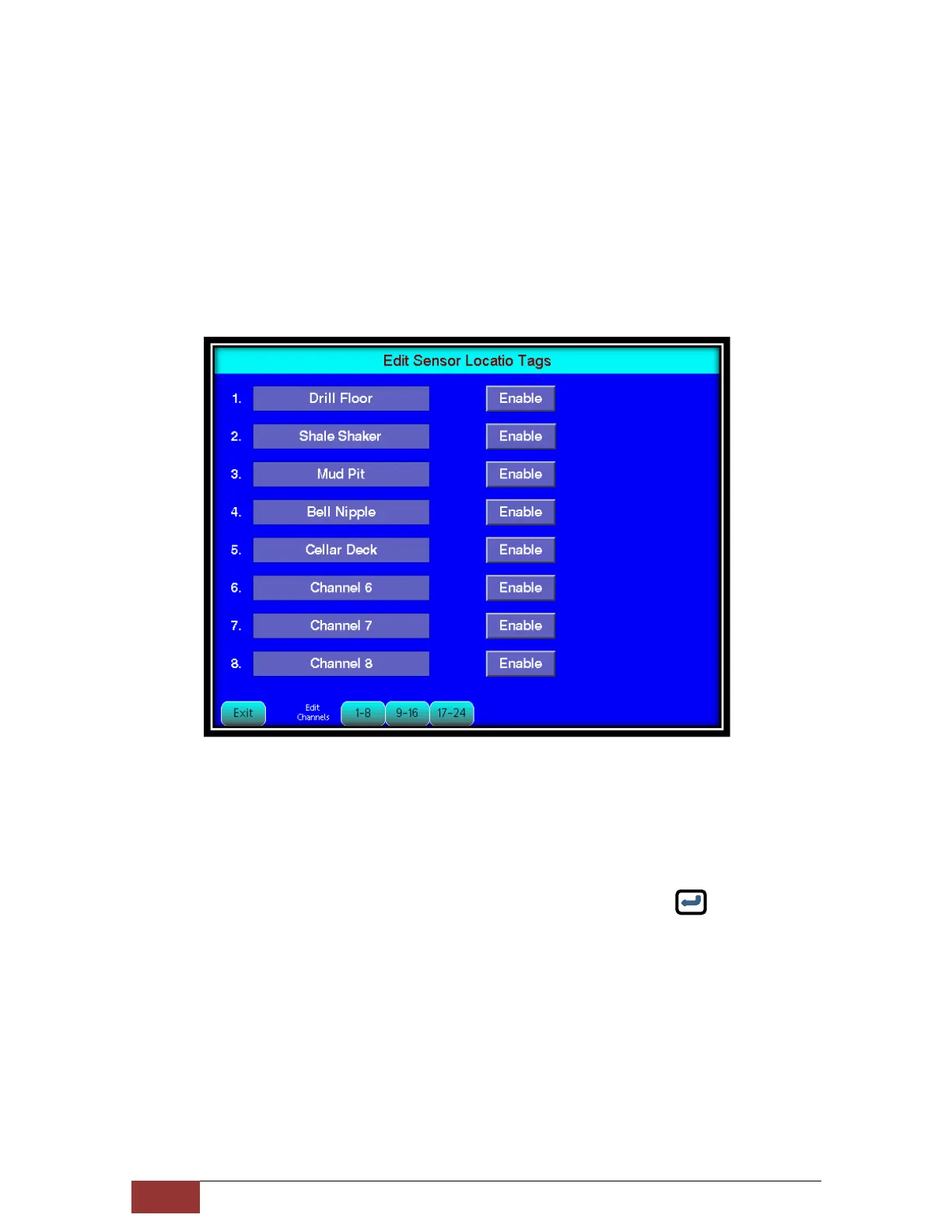
This option allows the user to assign location tags to each sensor / channel and Enable
or Disable the Sensor. If any sensor has been Disabled then all the data transmitted by
that sensor will be ignored by the controller.
It is strongly recommended that all the wireless detectors Address should be in
consecutive numerical order. If total of 10 detectors are used then the address should
be from 1 thru 10. To assign addresses to the wireless detectors refer to section on
Setting Up Wireless Detectors
Program Detector Address
The screen above shows Sensor setup screen assign location tags and to
enable and disable the sensor. The location tags when entered will replace the
default channel number and will identify as same when text message is sent
out on an alarm condition.
To modify the location tag, simply touch the tag field and a virtual keyboard
will appear on the screen. Type the location name and press key.
Press to Toggle the Enable / Disable button. When Disable the data from the
wireless transmitter will be discarded.
Using the tabs on the bottom of the screen edit / modify all the sensor location tags.
Disable all the sensors that are not being used.
Press EXIT to return.



 To Next Page