EasyManua.ls Logo

Pentax Optio W90 - During Recording

Pentax Optio W90
320 pages
Print Icon
To Next Page IconTo Next Page
To Previous Page IconTo Previous Page
Loading...
66
2
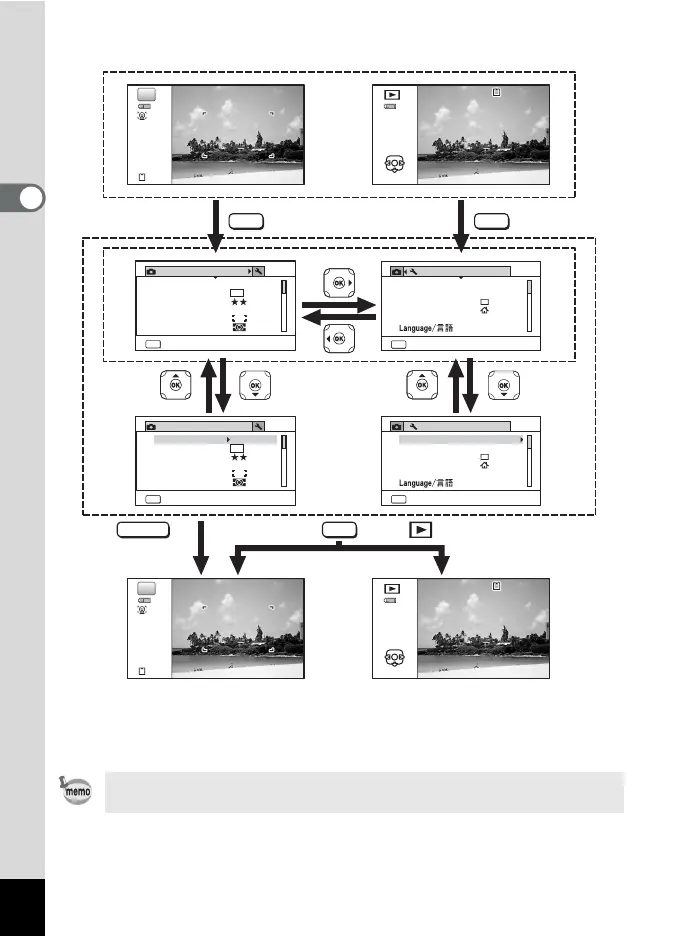
Common Operations
Available button operations appear on the display during menu
operation.
38
100
10 0
-
0038
00 3 8
100
-
0038
38
100
10 0
-
0038
00 3 8
100
-
0038
1/4
AWB
MENU
12
M
1/4
AWB
MENU
12
M
1/4
MENU
1/4
MENU
P
P
Edit
Rec. Mode
Recorded Pixels
Image Tone
Quality Level
White Balance
AE Metering
AF Setting
Bright
Exit
Rec. Mode
Recorded Pixels
Image Tone
Quality Level
White Balance
AE Metering
AF Setting
Bright
Exit
Setting
Exit
Sound
Date Adjustment
02/02/2010
World Time
Alarm
English
Standard
Text Size
Setting
Exit
Sound
Date Adjustment
02/02/2010
World Time
Alarm
English
Standard
Text Size
Edit
MENU
SHUTTER
MENU
MENU
The setting is complete
and the camera returns
to A mode.
Press halfway
During recording During playback
The setting is complete
and the camera returns
to Q mode.

Table of Contents

Other manuals for Pentax Optio W90

Related product manuals