28 29
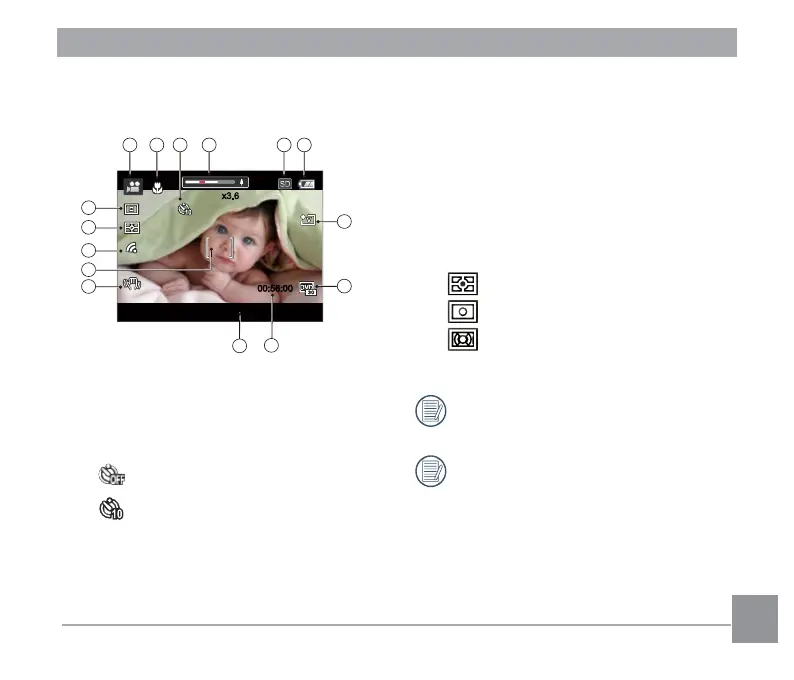
Overview of the Screen Icons in
Movie Mode
-0.3 EV
00:56:00
x3.6x3.6
21 3
4
7
8
10
14
15
13
65
9
11
12
1 Movie Mode
2 Macro Mode
3 Self-Timer
Self-timer Off
Self-timer 10sec
4 Zoom Display (by turning the Zoom
Lever)
5 SD Memory Card/Built-in Memory
6 Battery Status
7 Color Effect
8 Video Quality
9 Remaining Recording time
10 Exposure Compensation (EV value)
11 Image stabilization
12 Focus Frame
13 Eye-Fi ON
14 Expo Metering
AiAE
Spot
Center
15 AF Mode
Use an SD memory card with Class 4
or higher for the video recording.
Optical Zoom and Digital Zoom can be
adjusted (208X in total). Digital Zoom
can be adjusted to 4X.



 To Next Page
 Loading...










