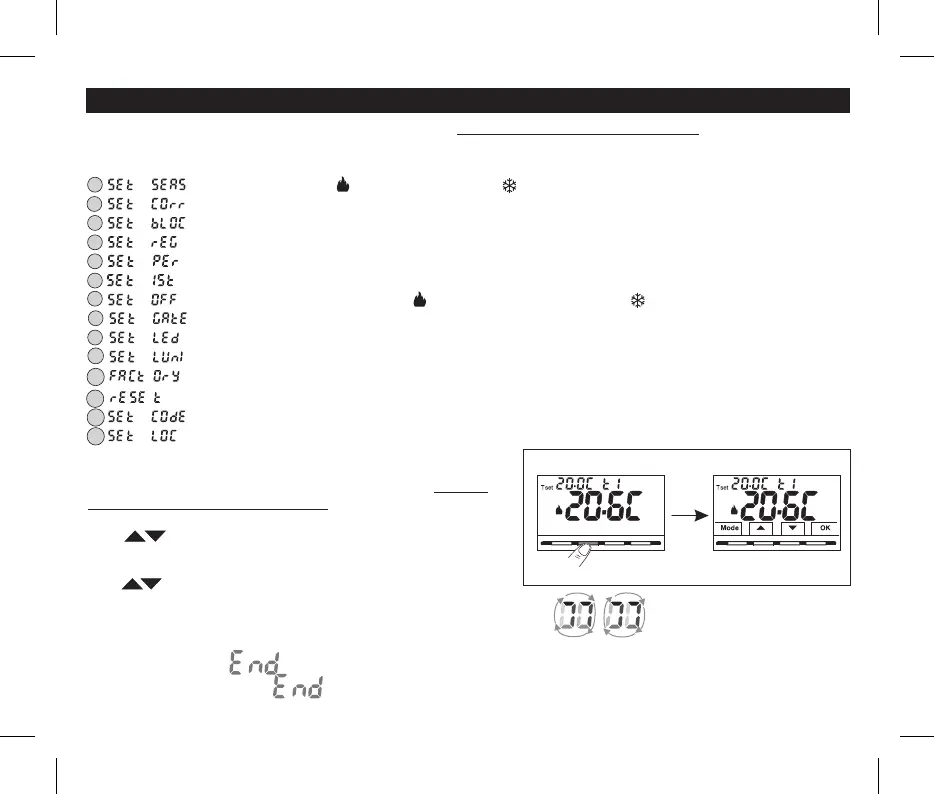
The following menus are available sequentially:
1 = Season WINTER / SUMMER(heating) (cooling)
2 = Correction of room temperature reading (OFFSET)
3 = MAX and/or MIN set temperature loks
4 = Type of temperature adjustment mode
: Proportional modulating » (Default) or Differential ON /OFF«PrOP «On:OF»
5 = Setting period duration for modulating Proportional
6 = Hysteresis value for Differential ON/OFF
()Screen visible if the menu has been set toSEt rEG On:OF
7 = Antifreeze Protection Thermal protection(INV ) (EST )
8 Input for external contact= (deactivating the thermostat remotely)
9 = Display backlighting
= Brightness setting
()menu visible if backlighting has not been switched off
= Installer Reset ()returns the device to factory settings
= Restart (does not delete entered settings)
= Password setting13
=14 Keyboard lock ()menu only visible if a Password has been entered
8 - STRUCTURE OF MENUS AVAILABLE (configuration)
8.1 - How to navigate within Menus
10
11
12
WARNING: access to the Prog menu (configuration) is recommended since the modification of somefor the qualified installer or experienced user
settings might affect correct system operation. Access to the menu can be password-protected (see par. 10.11 ).
From normal thermostat operation (with button symbols visible), press and
hold the Mode button for at least 6 seconds to access the menu.PROG
Access to menus can be password-protected (see par. 10.11 ).
Press to scroll through the various menu items.
press to change the chosen menu parameter or setting.
NOTE: Modepressing the button returns to the previous screen.
Confirm with the OK button ( .the display shows a clockwise rotation of the following segments to indicate successful saving
Proceed to change another parameter or briefly press the button to exit the menus and return to normal operation of the device, the display brieflyMode
shows the flashing message .
The automatic exit from the menus is also obtained (Time-out) have elapsed since the last key was pressed, the thermostat«» when 60 seconds
returns to normal operation, any unconfirmed last modification will not be retained..
13
Normal stand-by
device operation
Briefly press a button
within 6 sec. press desired key
Normal operation reactive device
When the desired menu item is displayed, press OK, the current setting flashes,
( if has been set in the menu )Prop SEt rEG


 To Next Page