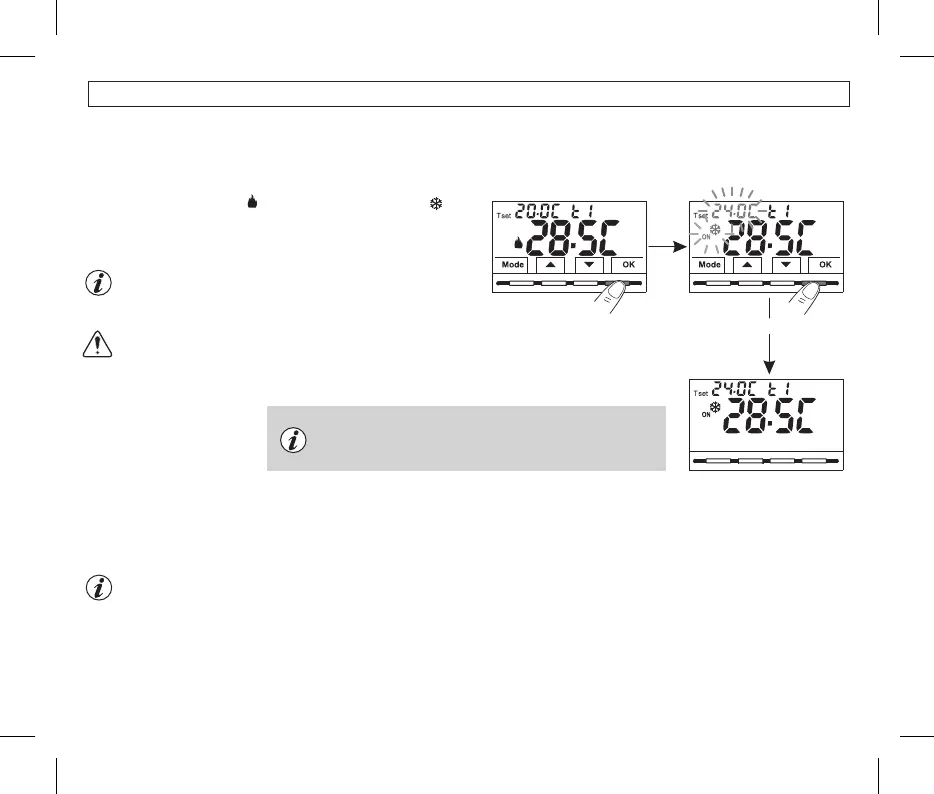
7.3 - SETTING THE CURRENT WINTER/SUMMER SEASON (Quick Command)
Press and hold for 6 sec.
With the device in normal operation, press and hold the button for atOK
least 6 seconds.
The product will present the proposed season change so if for example
the current season is Winter (heating), it will show the icon
flashing and the corresponding level and T set.
Confirm with OK button.
At the change of season, the t1 level (with its corresponding T set
value) of the incoming season will be taken over, regardless of the
active level in the previous season.
The season change request is prevented in the case of active
external contact (see par. 10.6 onwards).
Confirm with buttonOK
Example:
normal operation
SUMMER season
(cooling)
If no confirmation is made within 5 seconds by pressing the OK
button, the device returns to normal operation without making any
changes.
Example:
normal operation
WINTER season
(heating)
12
Changing the season from Winter (heating) to Summer (cooling) or vice versa can also be done from the appropriate menu item
“Prog”, see paragraph 10.1.
7 - USE OF THE THERMOSTAT


 To Next Page