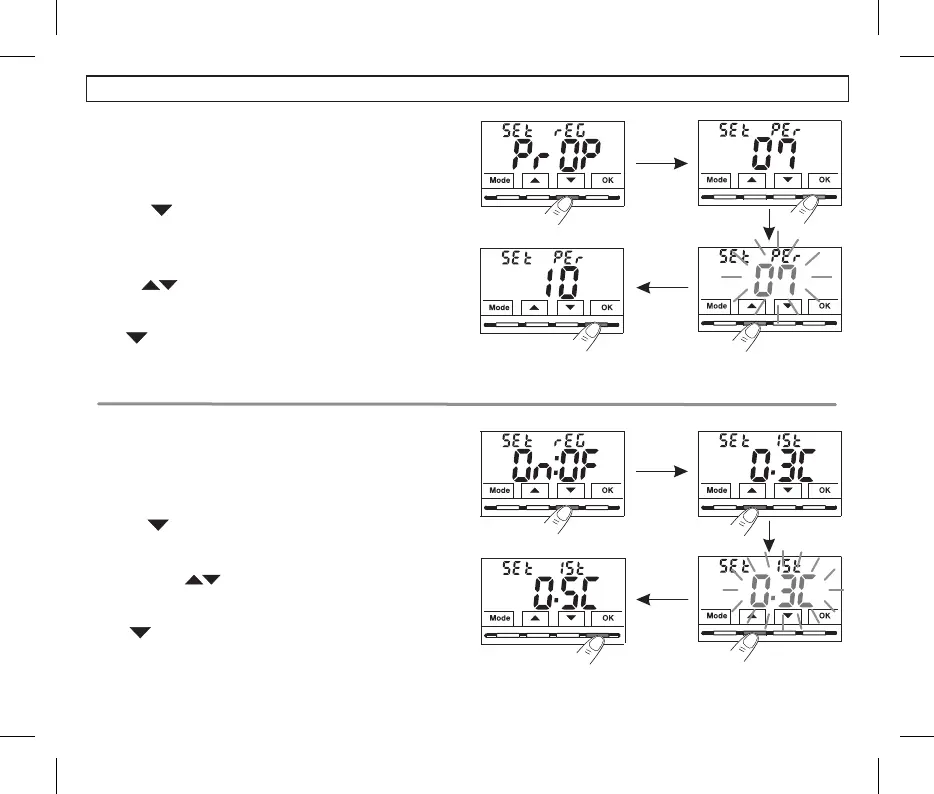
10.4.3 - SETTING HYSTERESIS FOR
THERMAL DIFFERENTIAL ON-OFF
10 4. .2 - SETTING PERIOD DURATION FOR
IN TIMEMODULATING PROPORTIONAL
•Select the , as described in paragraphSEt rEG PrOP, menu screen
10.4.1.
•Press the button to display the next menu (SEt Per period
duration).
•Confirm with OK if you want to change the period duration, the current
value flashes.
•With the buttons, enter the duration of the desired period
(settable from 7 to 20 minutes, default 7 minutes).
•Press to confirmOK .
•Press to select another menu item or press the button to exitMode
the menus and return to normal operation
.
•Select the as described in paragraphSEt rEG On:OF menu screen,
10.4.1.
•Press the button to display the next menu SEt Ist (Hysteresis).
•Confirm with OK if you want to change the hysteresis, the current
value flashes.
•Use the buttons to enter the desired hysteresis value, which
can be set from 0.2 °C to 1.2 °C (default 0.3 °C).
•Press to confirmOK .
•Press to select another menu item or press the button to exitMode
the menus and return to normal operation.
.
18
10 - CONFIGURATION MENU (Installer)


 To Next Page