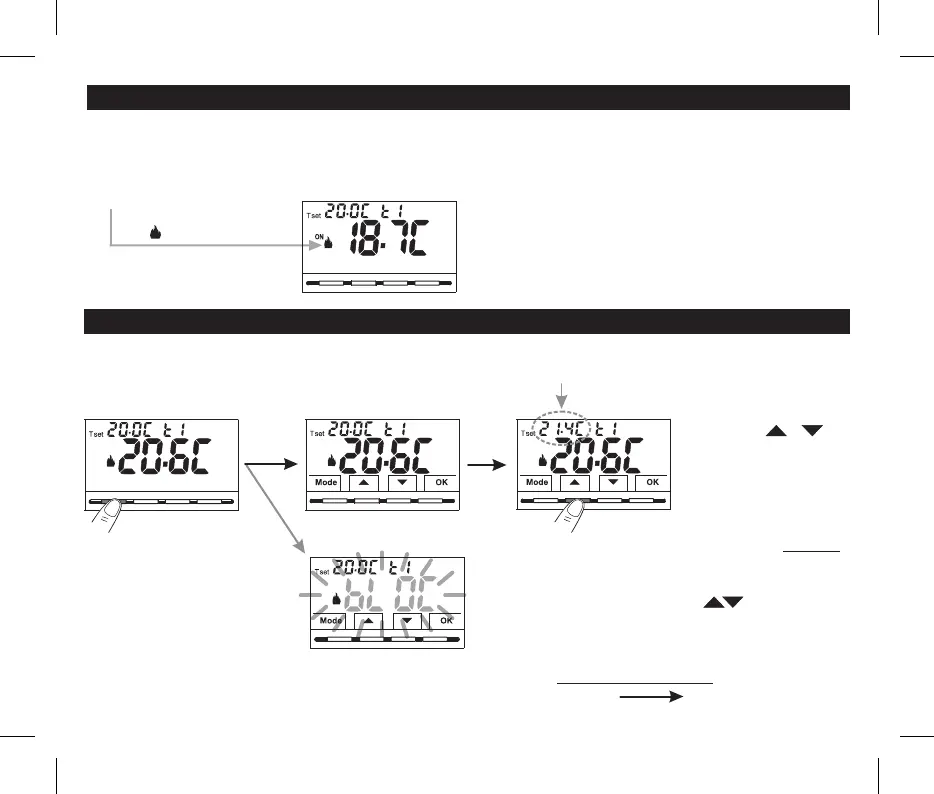
To select the and change the T set,desired temperature level
see the next paragraph.
6 - START THE THERMOSTAT
Winter mode (heating)
ON + = e.g. operating boiler
The thermostat is operational, it shows on the display:
the “heating” mode, the Temperature Set t1Winter
(Co fort) at 20°C, the detected room temperature.n
The first time mains voltage is engaged, the thermostat performs a lamp-test by switching on all display segments, displaying
the installed software version for a few seconds.
When this phase is over, the thermostat displays the normal operation screen.
7 - USE OF THE THERMOSTAT
Normal operation
7.1 - SETTING THE “T SET” TEMPERATURE OF THE CURRENT
LEVEL
in the absence of temperature locks, it will be possible to
change directly by pressing the keys the new current
T set value will be saved automatically.
results in a change of 0.1 degrees.
Each press of or
Example: changed Set t1 (Comfort)
from 20.0°C to 21.4°C.
10
Note: if the keyboard lock is engaged
(see par. 10.12) or deactivated the
thermostat by remote contact as
described in par. 10.6.3 and 10.6.4,
when any key is pressed, the word
“ ” will appear flashing for a fewbLOC
seconds; it will not be possible to
make any changes directly from the
normal operation screen.
From normal thermostat operation in stand-by, pressing a key, the backlight activates (if not excluded) and the words selection
and navigation ( )if backlighting is not set to always on appear. Within 6 secs., a variation is made the second time the desired key
is pressed.


 To Next Page