activates level and Tset OFF ANTI-FREEZE if in WINTER or THERMAL PROTECTION in SUMMER( ) ( )
return to the level and Tset active before closing the contact
For the operating principle procedure and the displays when the external contact changes state, see the images in the previous paragraph
10.6.3, bearing in mind that the contact is normally closed N.C. and not N.O.
10 7. - DISPLAY AND KEY BACK-LIGHTING
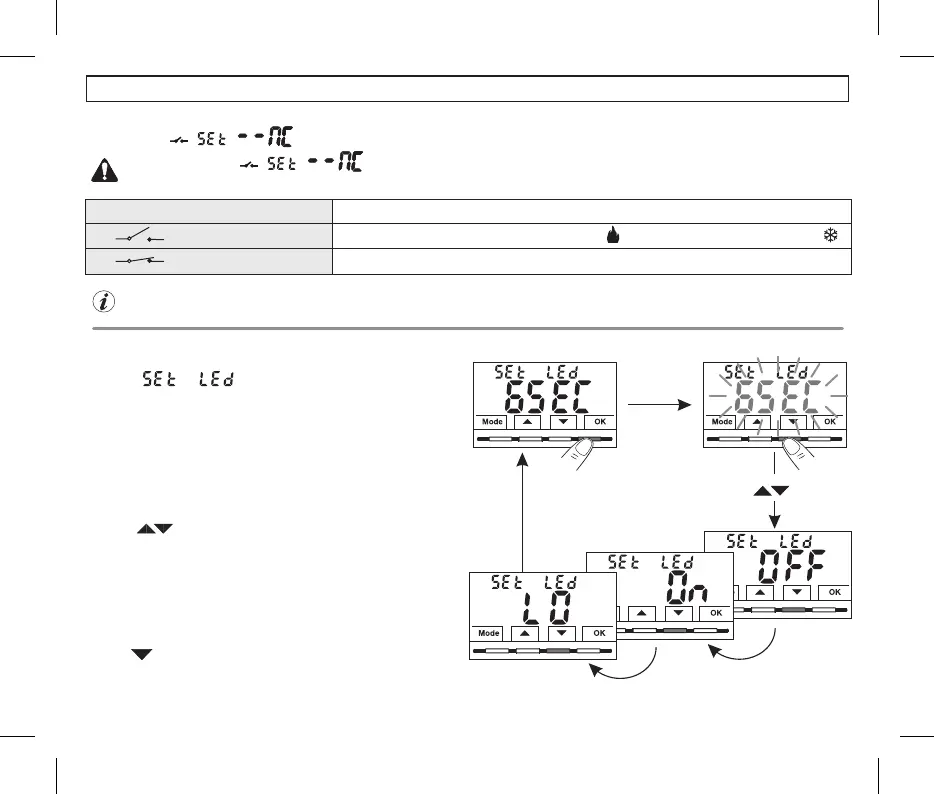
•With the keys select the desired item
6SEC = Backlight off after 6 sec. (default).
OFF D=.isabled backlighting
ON = Backlight always ON.
LO = Backlighting with mild intensity (cannot be changed) after 6 sec.
•Pre key to confirm the desired settingss .OK
•Press to select another menu item or press the button to
Mode
exit the menus and return to normal operation.
Example with default setting
Press to confirm the desiredthe OK button
setting.
The menu allows you to manage the backlighting of,
the display.
•From normal operation of the thermostat, access the menus by holding
down the button as described in Chap. 9, the screenMode Set Led
appears, confirm with OK.
The currently active setting flashes on the display, example in the figure:
6SEC=timing at 6 seconds (default)..
23
10.6.4 - COMMAND NOT RESETTABLE on N.C. external contact “Normally Closed”
Confirmed screen for the management of the N.C. external contact as per the procedure in paragraph 10.6, the following operation is obtained:
Do not enable the item prior to connecting a switch or other device that allows change of state from OFF
mode to current operating mode and vice versa to terminals and (AUX).12
Contact closure
Contact opening
e.g. external contact N.C.
Thermostat operation
Select with
the keys
10 - CONFIGURATION MENU (Installer)


 To Next Page