10. - MANAGEMENT OF6 EXTERNAL CONTACT for remote thermostat switching on/off
The thermostat is equipped with an input (AUX) for an external contact, it will
be possible to connect accessory equipment (e.g. time switch, switch,
window contact, etc.) that can deactivate the thermostat remotely, whose
control must necessarily be potential-free.
A typical use is the window contact that can be connected to this input e.g. to
switch off the temperature control in Winter (or Summer) when a window is
opened.
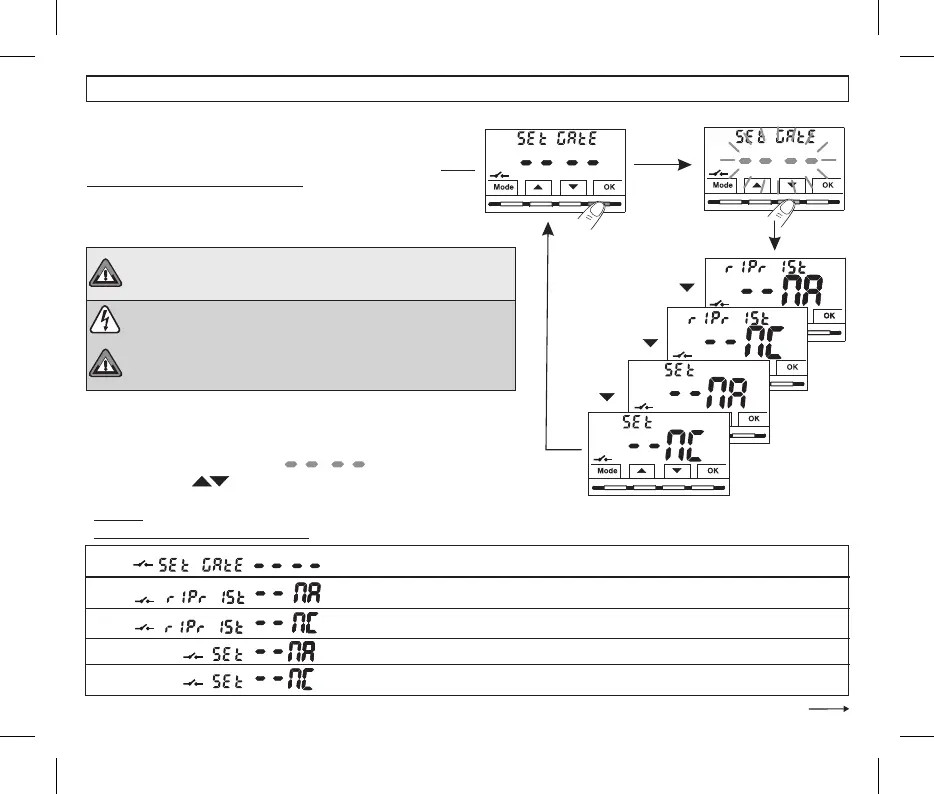
Before enabling any item of the menu listed below ensure«»Set GAtE
you have connected an external contact to thepotential-free terminals
1 2 AUXand ( ) see par. 5.4.
= No external contact enable (default);
= RESETTABLE command on N.O. external contact “Normally Open”
= RESETTABLE command on N.C. external contact “Normally Closed”
= Command NOT RESETTABLE on N.O. external contact “Normally Open”
= Command NOT RESETTABLE on N.C. external contact “Normally Closed”
•From normal operation of the thermostat, access the menus by holding down
the button as described in Chap. 9“Mode” .
The screenis displayed.SEt GAtE
•Confirm by pressing the dashes flashOK, .
•Using the buttons ,
select the desired external contact management
mode screen .(see table below)
•press OK to confirm.
Follows
WARNING: only connect switches and contacts with insulation
suitable to work at 230Vac mains voltage to terminals 1 and 2 AUX.
20
•press the Mode button to exit the menus and return to normal thermostat operation.
MULTIPLE INSTALLATIONS: It is NOT permitted to connect the remote
contact on more than one thermostat; each thermostat must have its
AUX input operated independently of the others.
10 - CONFIGURATION MENU (Installer)
Press the OK button
to confirm the desired
management of the
external contact


 To Next Page