in the event of enter the reset code to the request to access the PROG configurationFORGOTTEN password
menus (see par. 8).
10.1 - ENTERING AND MANAGING PASSWORDS1 TO ACCESS THE MENUS
From normal operation of the thermostat, pressing and holding the “Mode”
button will request the previously entered password before accessing the
PROG menus .(seepar. 8)
Confirm
1°
2°
10 1.1 .1 - PASSWORD MODIFICATION OR CANCELLATION
1°
2°
1°
2°
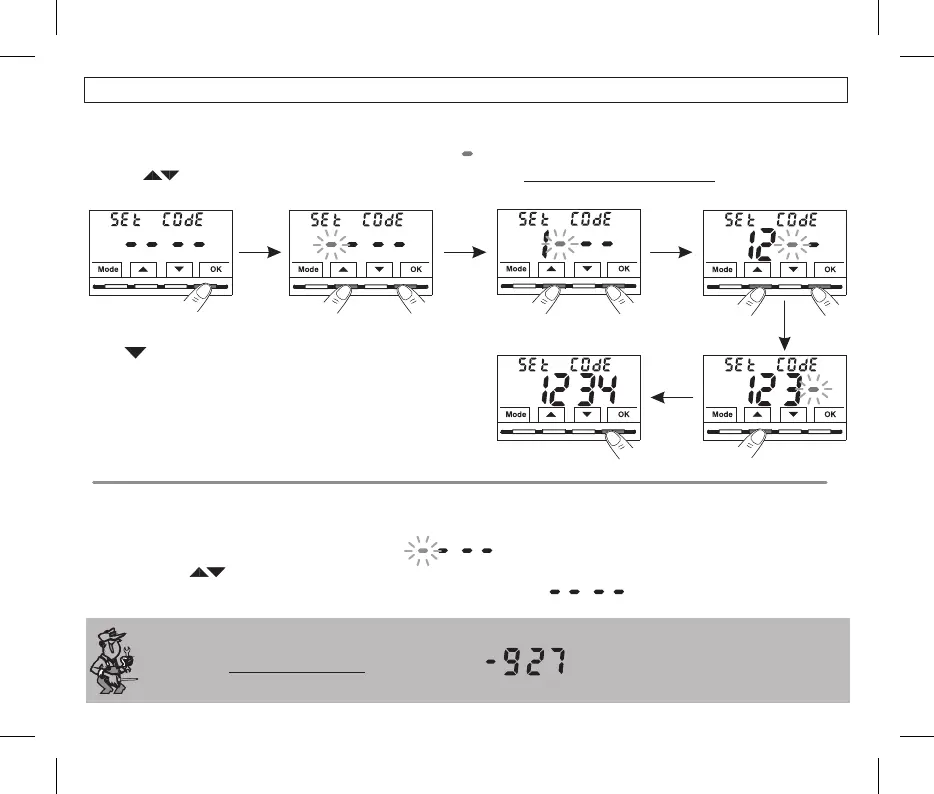
•From normal thermostat operation, access the menus by holding down the key as described in Chap. 9.“Mode”
•When the screen is displayed, confirm with , the first dash flashesSEt COdE OK .
• 0000 9999 individually confirm them with «OK».Using the keys, enter 4 digits (dashes not included) between and ,
Note: press the key to return to the previous screen in the event of an error or to exit the SEt COdE menu.Mode
The « » password allows access to all menuInstallatore PROG
(configuration functions.
•To the password already entered, from normal operation of the thermostat, access the menus by holding down the button asCHANGE “Mode”
described in Chap. 9.
.•When the screen is displayed, confirm with will be displayed with the first dash flashingSEt COdE OK
•Using the buttons enter the 4 digits (excluding dashes) between and confirming them individually with, of the NEW password 0000 9999,
the "OK" button or if you wish to , enter the 4 dashes instead of the numbers:CANCEL IT
(note: if a dash is entered as the first digit in
this situation, the other 3 digits can only be set as dashes).
The password will be CANCELED!
26
•Confirming the last digit with the button, the desired password is saved.OK
•Press to select another menu item or press the button to exit the
Mode
menus and return to normal operation.
Information reserved to installer or expert user only
10 - CONFIGURATION MENU (Installer)


 To Next Page