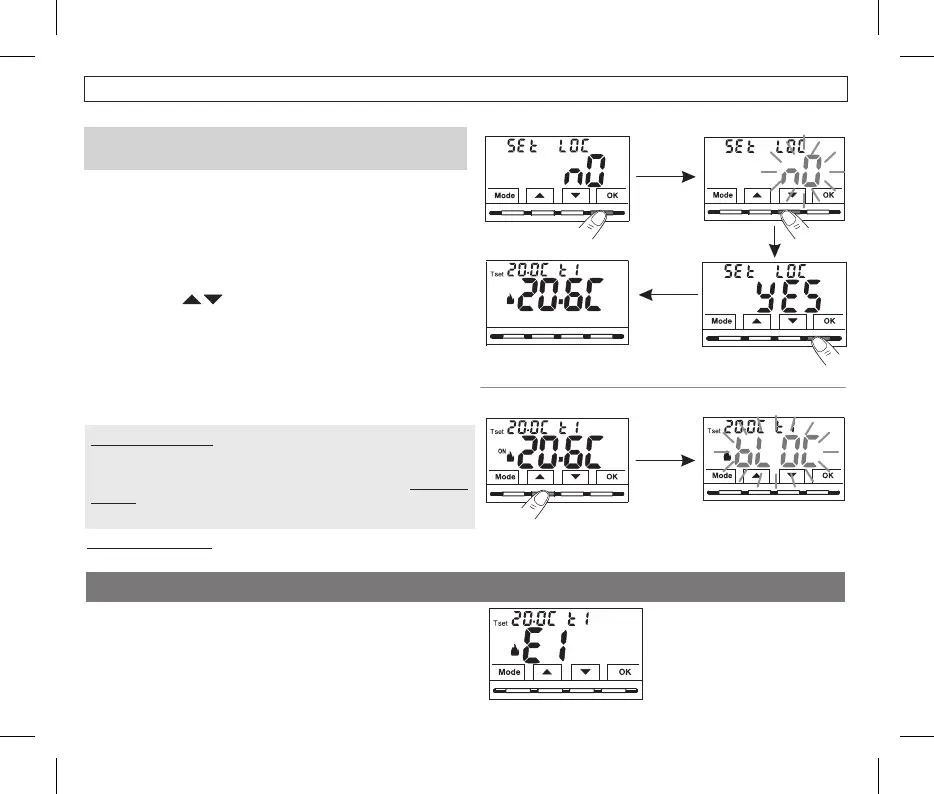
10.12 - KEYBOARD LOCK (menu displayed ONLY with password set)
•With the buttons choose to enable the lock or to“YES” “NO”
disable it
.
•Press toconfirmOK .
•Press the button to exit.Mode
•From normal operation of the thermostat, access the menus by
holding down the button as described in Chap. 9Mode .
•
Enter the Password previously set.
•On the menu screen, confirm with flashes.SEt LOC OK, nO .
IMPORTANT: VISIBLEthis menu will only be if a hasSEt LOC Password
previously been set (see par. 10.11).
This function serves to prevent unauthorised persons from modifying any
thermostat settings.
Consequently, when the keyboard lock is engaged, from the Normal
thermostat operation screen, pressing any key will show flashing on“bLOC”
the display for a few seconds.
To temporarily disable the keyboard lock, it is necessary to access the
PROG Passwordmenus by holding down the button, enter the“Mode”
and return to Normal thermostat operation by briefly pressing the Mode
button. Any user setting of the thermostat, will be possible within 120
seconds of the last pressing of any key and will then be reset to “Keyboard
lock” again.
Normal operation
Keyboard lock engaged
11 - FAULT SIGNALLING
Thermostat in
“Normal operation” with fault
indication on display E1
Normal operation
In the event of a malfunction of the room temperature probe (short-
circuited or open probe), it is identified on the display by the fixed text
“E1”, instead of the room temperature (TA) reading.
A qualified installer will be required to replace or repair the device.
The thermostat deactivates the temperature control and the relay.
To permanently disable the “Keyboard lock”, in the menu screen confirm with the word as described above.SEt LOC OK, NO
27
10 - CONFIGURATION MENU (Installer)


 To Next Page