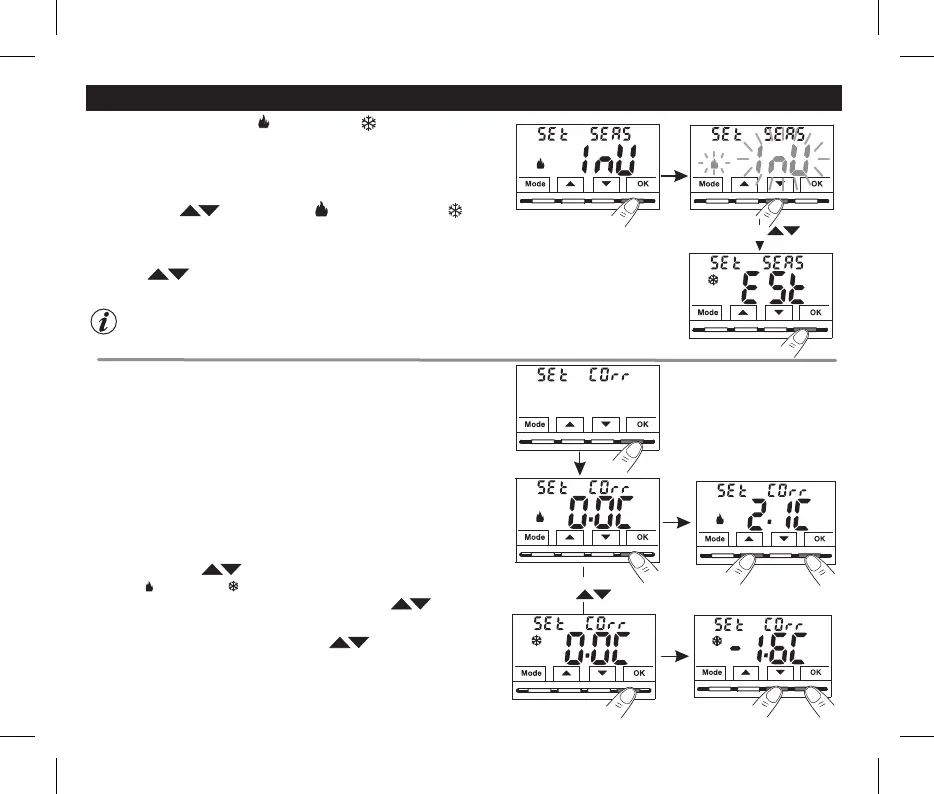
10.1 - SETTING WINTER or SUMMER MODE
• Under item confirm with .Set SEAS OK
•Select with the keys the WINTER (heating) or SUMMER (cooling)
mode
•C key.onfirm with OK
Current season flashing
It will be possible to change the season between Winter/Summer and vice versa, without entering the menu
(see par. 7.3)
select with the keys
Confirm
10.2 - CORRECTION OF ROOM TEMPERATURE READING
• Under item confirm withSet Corr, OK, the displayed value flashes.
• Use the buttons to select the room temperature correction for the
WINTER or SUMMER mode .
• Change the required temperature value with the buttons .
• C key.OKonfirm with
select with
with the key
1°
2°
10 - CONFIGURATION MENU (Installer)
If for any reason the thermostat must be installed in a position where the
measured room temperature might be affected (e.g. perimeter wall which is on
average colder in winter and warmer in summer than the rest of the dwelling)
the device has 2 separate parameters to adjust the room temperature
measured in the and .Winter Summer modes
From normal thermostat operation,
access the menus by pressing and
holding the « » keyMode as explained in chapter 9.
•Use the buttons to select another menu item or press the button to exit the menusMode
and return to normal operation.
Possible correction: -6.0 °C ÷ 6.0 °C (default 0.0 °C).
•Press the Mode button briefly and use the buttons to select another
menu item, or press the button twice to exit the menus and return to“Mode”
normal operation.
1°
2°
15
From normal thermostat operation, access the menus by pressing and
holding the « » keyMode as explained in chapter 9.


 To Next Page