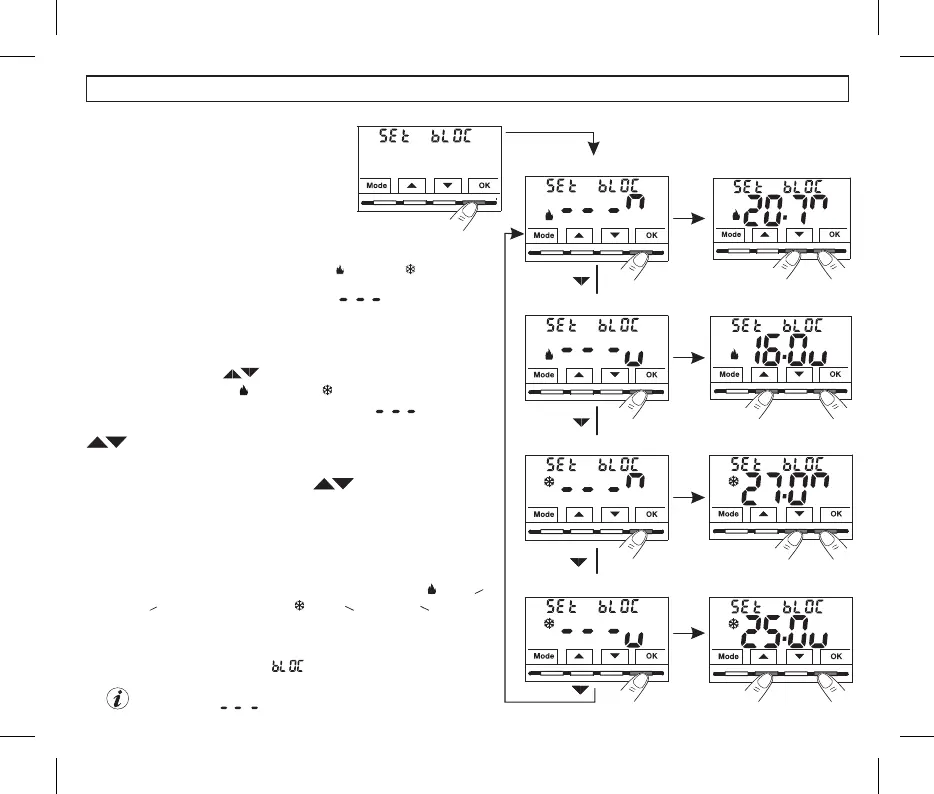
10.3 - MAX AND MIN SET TEMPERATURE LOCK (Winter and Summer mode)
In certain installations (public buildings,device
hotels, etc.) it might be useful to limit the
maximum and/or minimum temperature set
points. This avoids incorrect settings by
unauthorised personnel (energy savings).
•Under the menu item, confirm withSEt bLOC OK.
•Pressing the buttons sequentially displays the MAX and MIN,
temperature locks for Winter and Summer mode.
If there are no locks already inserted,the display shows .
•
Select the desired lock, confirm with the 3 dashes flash, using the buttonsOK
enter the desired temperature value.
•Confirm with the OK button.
1°
2°
MAX Wintertemp. lock mode
MIN Wintertemp. lock mode
MAX Summertemp. lock mode
MIN Summertemp. lock mode
set and confirm
10 - CONFIGURATION MENU (Installer)
From normal operation of the thermostat, access the menus by holding down
the button as described in Chap. 9.Mode
1°
2°
1°
2°
1°
2°
It is possible to limit (lock) the temperature valuesMAXIUM MINIMUM BOTH,or
settable (T set) on the device.
The restriction may be applied either to the or .Winter Summer distinctly
Note: by default, no temperature lock is entered .
To cancel any previously set locks bring the MAX/MIN set
points back to
GENERAL RULE Set temperature t1 greater than the: if (comfort) is
maximum entered lock Set, it will level out with it. If temeperatureOFF o t2
setting is , it will level out with it.less than the minimum entered lock
The following rule will apply to all other temperatures: ( )=WINTER t
1
than than ( ) = than .t2; t2 OFF - SUMMER t1 t2; t2 OFF
>
>
>>
•Press the button briefly and use the buttons to select anotherMode
menu item, or press the button twice to exit the menus and return toMode
normal operation.
16
set and confirm
set and confirm
set and confirm
During thermostat operation, the user may not set a higher or lower thantSEt
the max and min. locks entered. The display will signal impossibility to
perform the operation by displaying .


 To Next Page