10.8 - BRIGHTNESS ADJUSTMENT (back-light)
This setting is only accessible if the parameter isSEt Led
not set to (backlight always off)OFF 10,7see par. )
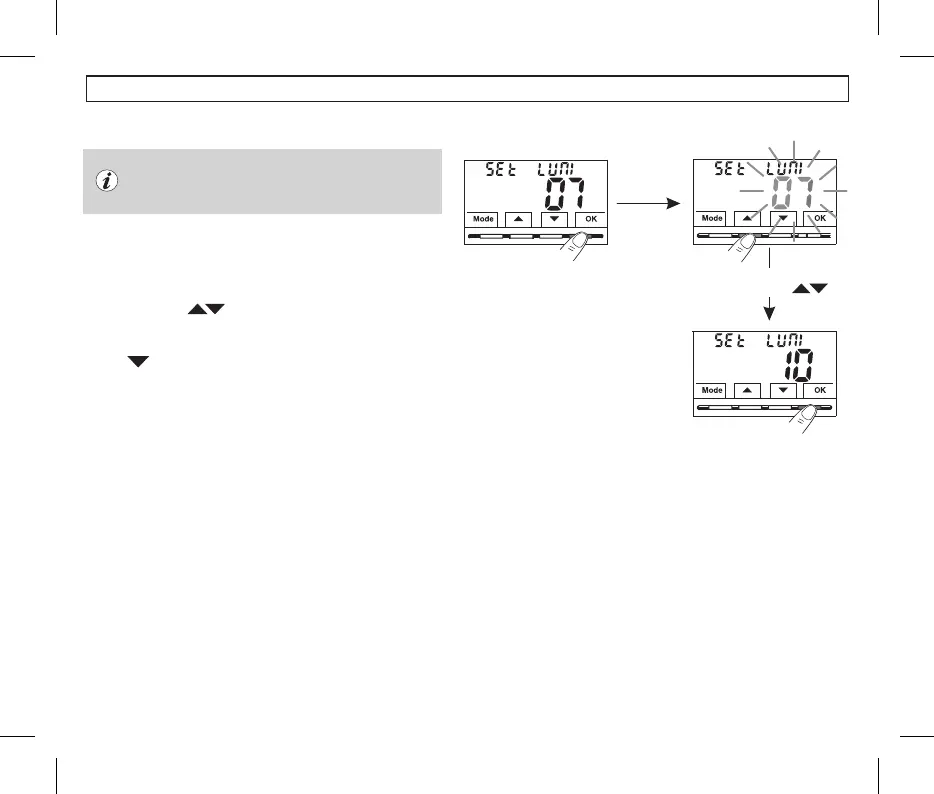
Select
with the buttons
Example: 7 default value
•From normal operation of the thermostat, access the menus by holding
down the button as described in Chap. 9Mode .
The screen is displayed.SEt LUMI
•Confirm with the button, the set brightness value flashesOK
•Using the buttons choose the intensity of the backlight, which,
can be set from 1 to 10 levels (default 7).
•
Press the button to confirm the desired setting.OK .
•Press to select another menu item or press the button to exitMode
the menus and return to normal operation..
24
10 - CONFIGURATION MENU (Installer)


 To Next Page