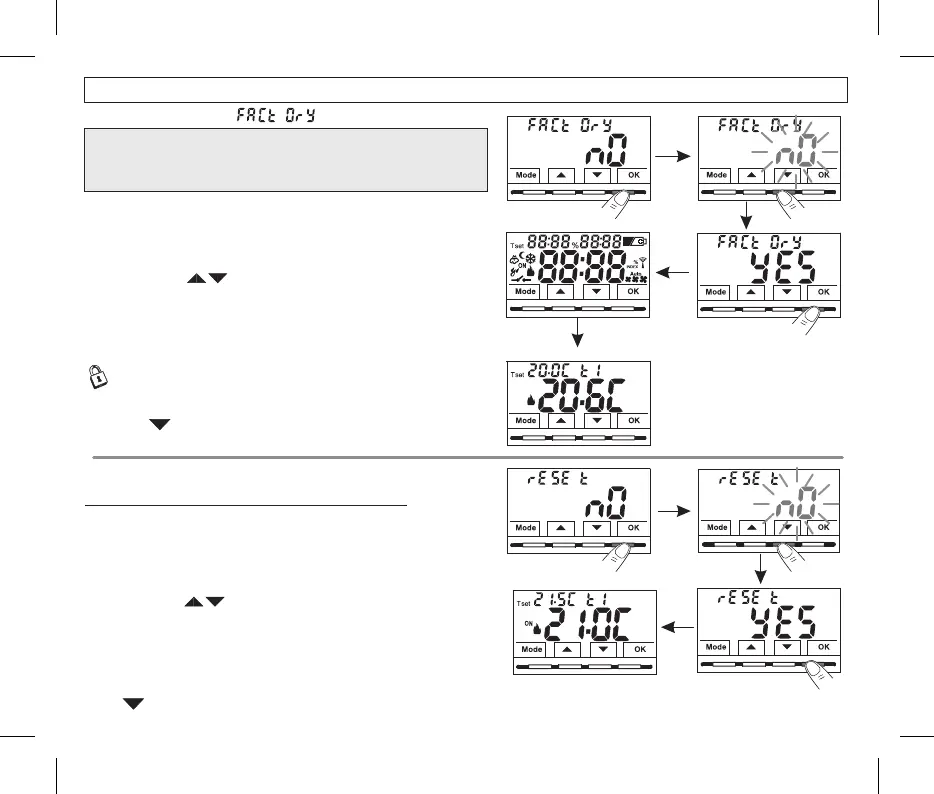
The RESTORE operation deletes any password entered.
•Using the buttons choose to perform the Restore or .“YES” “NO”
•From normal operation of the thermostat, access the menus by holding
down the button as described in Chap. 9.Mode .
•When the screen is displayed, confirm with the wordFACtOrY nOOK,
flashes..
•Confirming with cancels the Restore operationOK "NO" .
•Press the button to move to the next menu or press the button
Mode
to exit the menus and return to normal operation.
•Confirming by pressing the button, the display shows all litYES OK
segments for a few seconds, then the thermostat restores the factory
settings (see summary table in par. 2), positioning yourself on the
normal operation screen.
Normal operation
Should the thermostat feature malfunctioning, wrong displays or other
incorrect conditions, perform a .“rESEt”
10.10 - RESET (Restart)
Does not cancel ANY previously entered or modified settings
•From normal operation of the thermostat, access the menus by holding down
the button as described in Chap. 9Mode .
•When the screen is displayed, confirm with the word flashes.rESET OK, NO
•Ifyou opt for the display exits the function and goes back to the initial screen.NO rESEt .
•Press to select another menu item or press the button to exit the menus and return to normal operation
Mode .
10. - RESTORE ( )9 factory reset
The thermostat is operating,in
Winter mode “heating”,
Temperature Set (Comfort) att1
20°C.
•Using the buttons choose to perform the Reset or .“YES” “NO”
•Confirming by pressing the button, the display shows all lit segmentsYES OK
for a few seconds, then the thermostat returns to normal operation without
changing any previous settings.
25
Example if you confirm YES
by pressing the keyOK
IMPORTANT! The RESTORE (Reset) operation is
recommended for the installer or expert user. In fact, this
operation deletes many previous settings and programs
carried out also according to the type of system.
10 - CONFIGURATION MENU (Installer)


 To Next Page