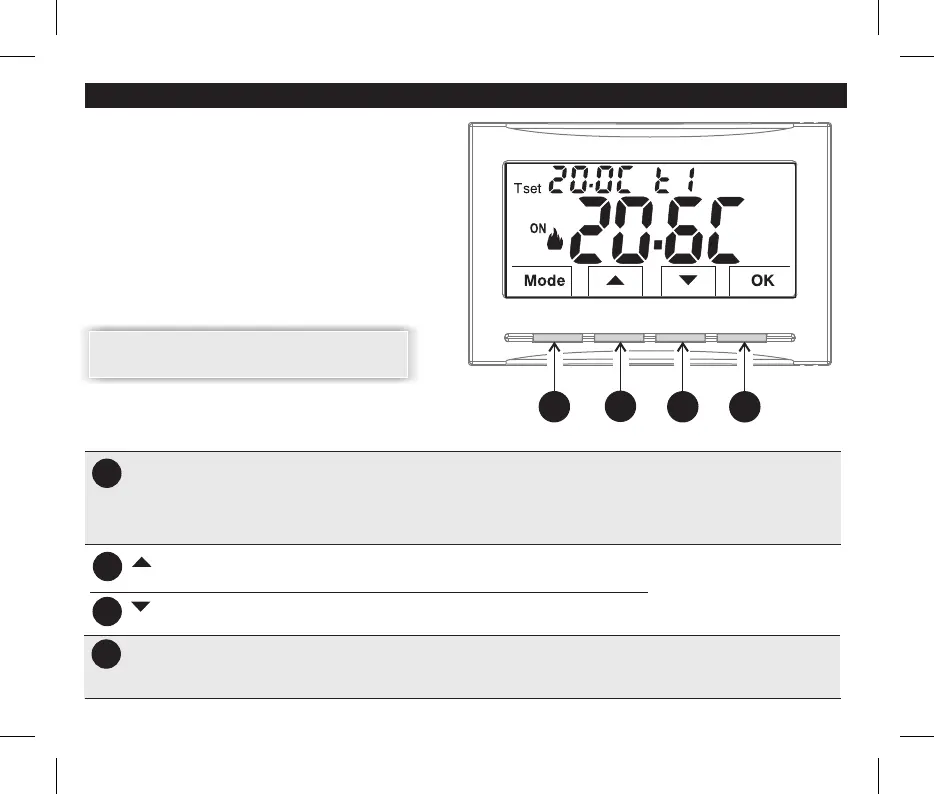
A
B
C
increases the desired Set temperature;Key
navigation through the menus: to increase a setting value;
Key decreases the desired Set temperature;
navigation through the menus: to decrease a setting value;
D
OK
Level confirmation and T set selected (t1 or t2 or OFF)
access to selected menu / confirm function or set value (within the menus)
6
A
B
C
D
Multifunction Key Mode / back
its use changes depending on function or active menu:
Mode = short pulse pressure switch from Tset t1 temperature (comfort) to t2 (economy) to OFF
.prolonged pressure (6 sec.) access to Prog menus
.short press within menus = return (back) to previous item, exit from Prog menus
Key (confirm setting)
3 - KEY FUNCTION LEGEND
DISPLAY AND KEY BACK-LIGHTING
Touching any key activates back-lighting,
displaying the words selection and navigation
,
press the desired key within 6 secs. to vary the
settings (touching any key reactivates a 6 sec time-
out).
Note: setting the backlight always on (par. 1 ) the0.7
words selection and navigation will also always be
visible.
Note: more particular button functions are described
in the specific paragraphs.
Press the pulse arrow key for single
increase/decrease, in some settings
it will be possible to keep pressed for
fast increase/decrease


 To Next Page