Operating conditions
• The mains voltage must lie within the specified range; see Electrical data.
A deviation of ± 10 % is permissible.
• The rated frequency must be within ± 3 Hz of the value specified.
• The ambient temperature must be below 55 °C. For further options, see Technical data.
The cooling unit must only be used in such a manner as to ensure that the specified cooling capacity is able to
meet actual demands.
Only the specified coolant may be used.
For Pfannenberg spare part numbers, see Spare part orders.
4.5 Service interface
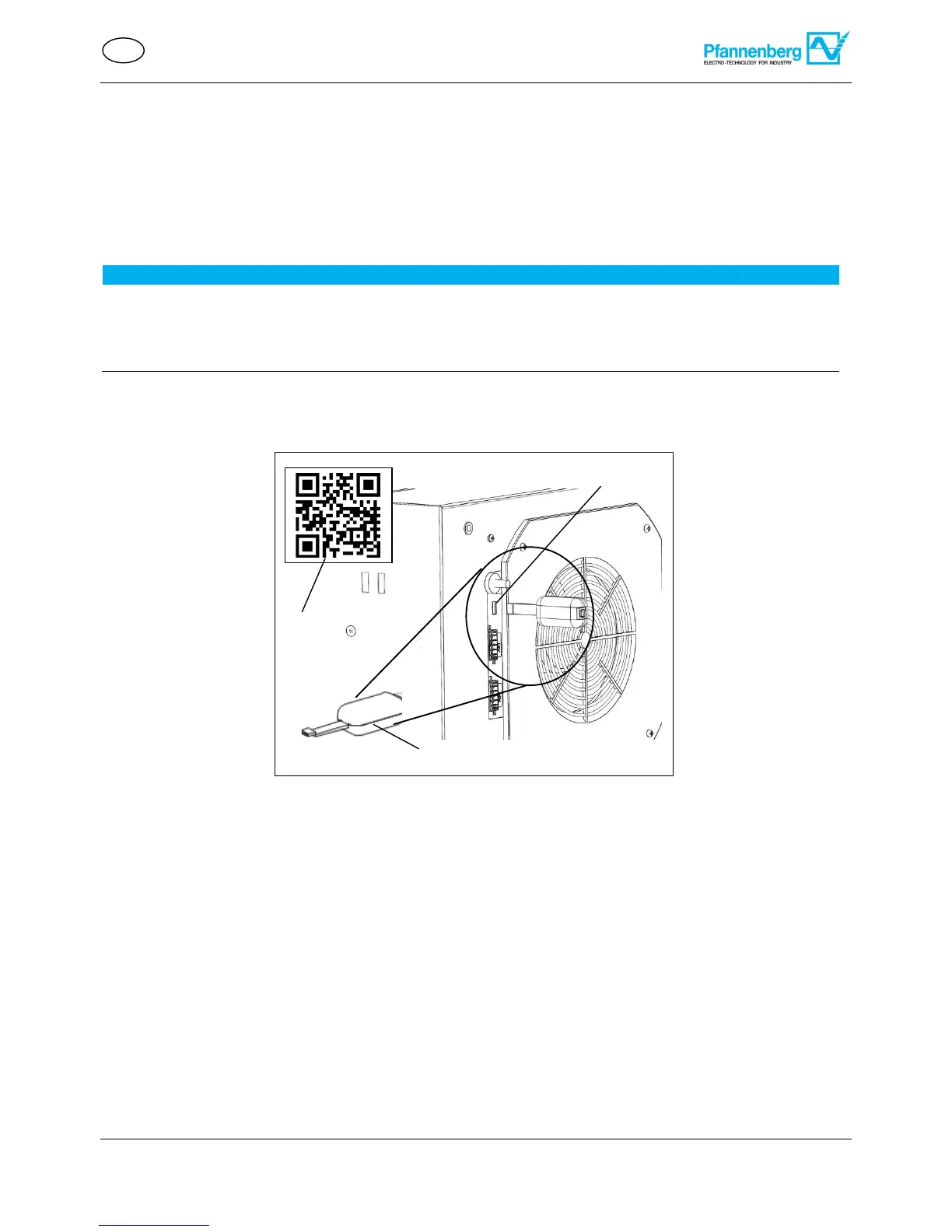
• The service interface (1) can be used to change operating parameters.
• For this purpose, a USB adapter (2) and the ECoolPLANT 2.X configuration software and USB driver software
are required.
• The connection for the USB adapter is marked on the electrical circuit diagram with the identifier X28.
• The USB adapter enables connection to a computer that works with the ECoolPLANT 2.X configuration
software. The detailed use is described in the corresponding operating manual for the ECoolPLANT 2.X
software.
• Remove the USB adapter (2) from the unit after use. The service interface (1) is only provided for temporary
data exchange in order to read system notifications, etc. Continuous operation is prohibited.
The USB adapter is available as an accessory, see Spare part orders.
The ECoolPLANT software (3) is available for download free of charge on the website:
https://www.pfannenberg.com/ QR-Code (3).
The corresponding operating manual for the ECoolPLANT software is available HERE and from My
Pfannenberg.


 To Next Page