Operating Manual DTS and DTI 6201C / 6301C Multi-Controller (MC) 086100016 © Pfannenberg GmbH Page 8 / 43
2.4.2 Controller
Controllers are regulating units for the adjustment of refrigeration functions and operating data. They enable
readouts of system messages and diagnostic data. The controllers have a service interface which enables various
configurations. There is also a connection for collective fault indications.
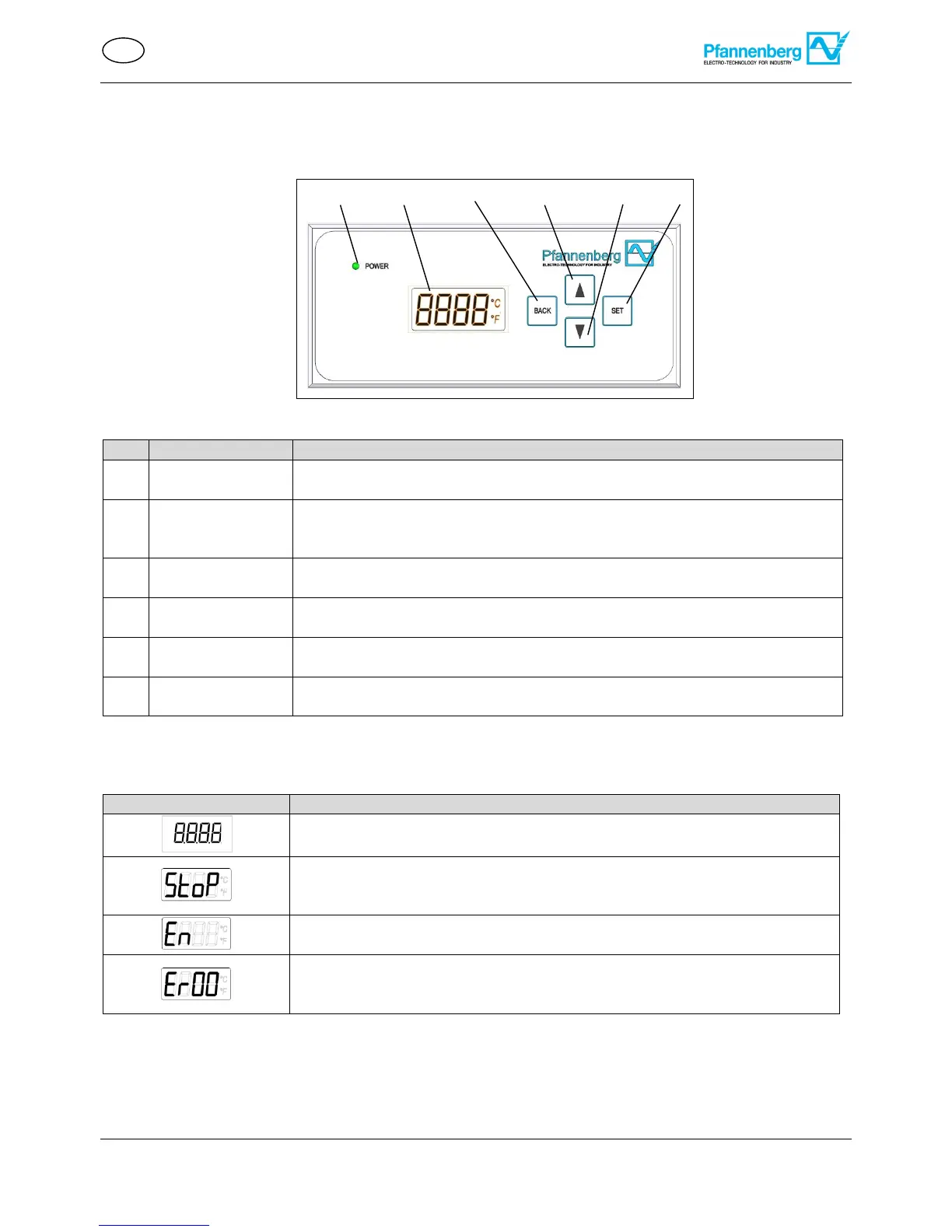
- Displays the operating mode:
Permanently illuminated = fault-free / blinking = operational fault
- Displays system information:
Temperature measuring unit, energy function, operating mode, system data,
error number and menu settings / menu items / menu level.
- Activation of menu settings.
- Jump back to the next higher menu level.
- SCROLL UP through the menu items or display elements in the current menu
level
- SCROLL DOWN through the menu items or display elements in the current
menu level
- Selection of the current menu item.
- Jump to the next lower menu level.
Cooling units with a multi-controller (MC) have a control panel with a green LED light (1) and an LCD (2). They are
located on the unit cover. Permanent illumination of the green LED light (1) while the mains voltage is connected
indicates fault-free operation. System information is displayed in the LCD. The following system information can be
displayed:
Display – Temperature (°C/°F) of the regulating sensor in normal operating status.
Display – Stop mode execution. Door is open.
Alternating display with temperature and stop mode, with fault Er00. Display: StoP
Er00Temperature.
Display – Energy function execution, activated in energy saving mode
Alternating display with temperature display (°C/°F).
Display – Error number when a fault occurs.
In case of a fault, error number (Er01-Er15) is displayed alternating with
temperature (°C/°F). Exception, fault ER00: Display StoP Er00Temperature.
In case of an operating fault or a malfunction, the gray LED light (1) begins to blink and the LCD (2) displays error
numbers alternating with the temperature. For details, see Error messages .
Figure 3 - Multi-Controller (MC) control panel


 To Next Page