9 | P a g e
Digital Pressure Switch (standard with Essential Series drives)
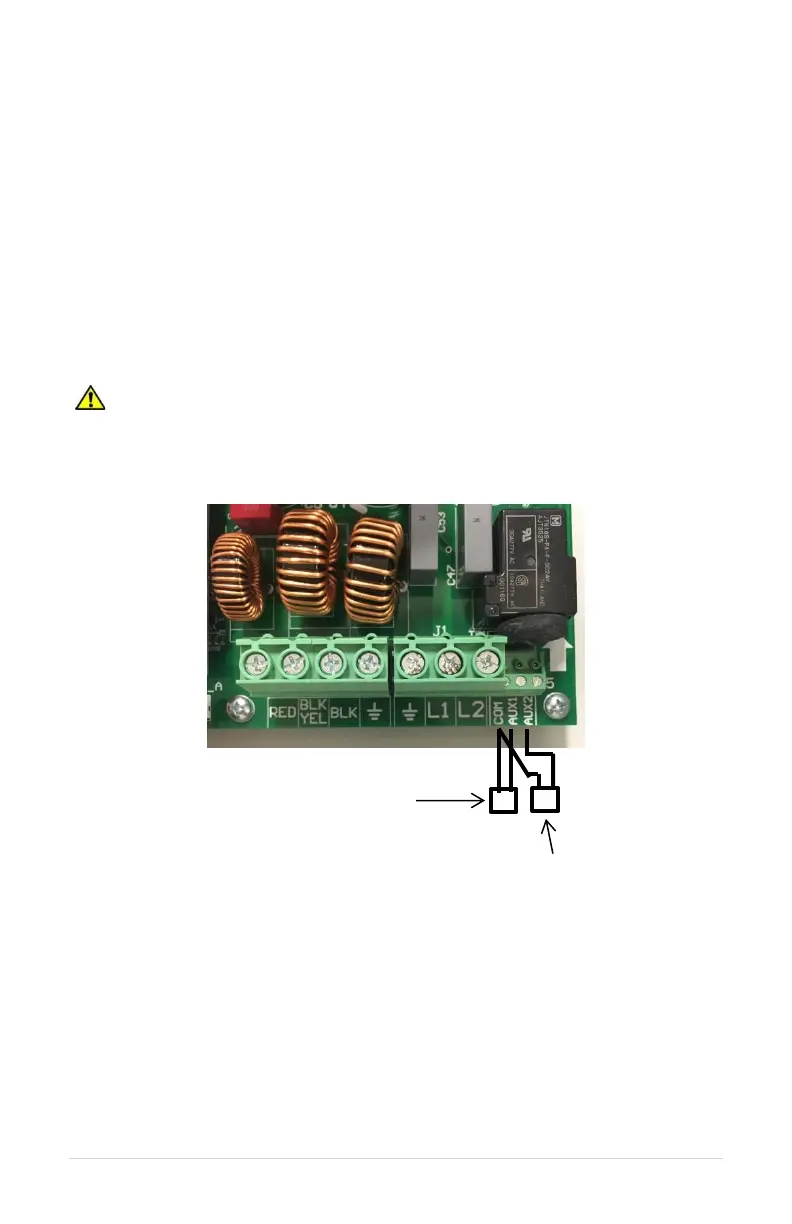
Follow these steps to connect a digital pressure switch:
1. Using the keypad, set the value of parameter SYSTEM CONFIG to 1. Refer to Table
14, Interface Parameters, or Section 6.5, System Configuration, for details.
2. Connect either wire of digital pressure switch to AUX1
3. Connect second wire of digital pressure switch to COM
The following steps detail connecting an overpressure switch (not provided by Phase
Technologies).
4. Connect one wire of overpressure switch to AUX2
5. Connect second wire of overpressure switch to COM
6. If using overpressure switch, change AUX2 SELECT to 0
CAUTION: By default, AUX1 is programmed such that OPEN=STOP, CLOSED=RUN
and AUX2 is programmed such that OPEN=RUN, CLOSED=STOP. When SYSTEM
CONFIG = 2 (Analog CP), AUX1 and AUX2 are programmed such that OPEN=RUN,
CLOSED=STOP. See parameters AUX1 SELECT and AUX2 SELECT to change this
setting.
Figure 7 – Connection Diagram for Digital Pressure Switch. Digital pressure switch
connected to AUX1 and COM, overpressure switch connected to AUX2 and COM.
See Section 7.2 for information on changing the pressure set point of the digital pressure
switch.



 To Next Page