23
TEMPERATURE RECORDER
Setting the start time
1. Turn off the power switch.
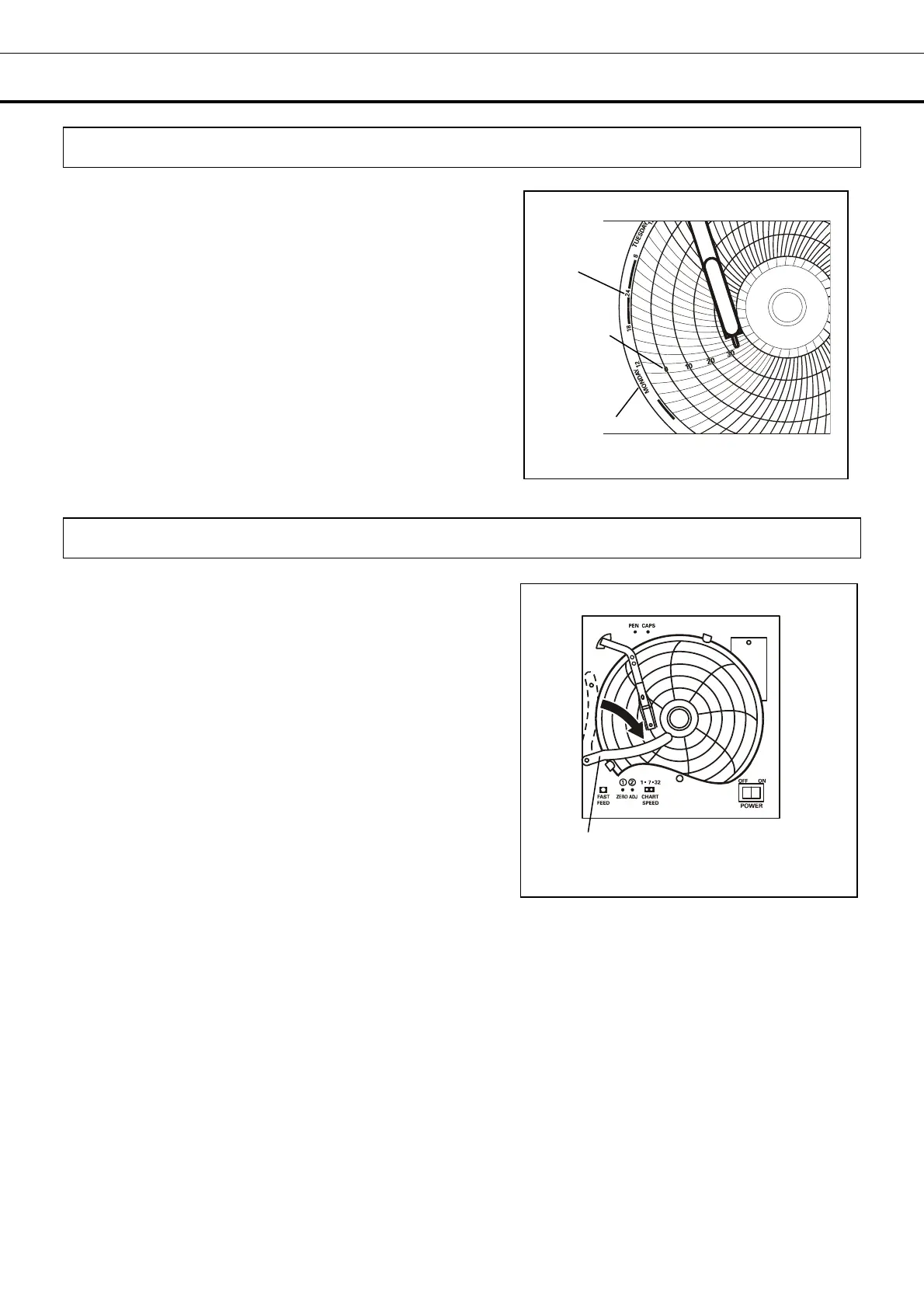
2. Place the recording chart at a position slightly in front of
the desired time (the recording chart is rotated to the left).
[Fig. 1]
3. Turn on the power switch.
4. Set the time by using the fast feed button to quickly
rotate the recording chart.
The fast feed button can be used to accurately set the
time.
Replacing the recording chart
1. Turn off the power switch.
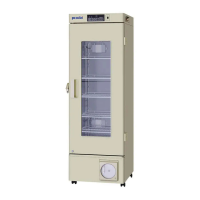
2. Slightly raise the end of the pen lifter and remove from
the pen lifter stopper. Then rotate clockwise (until the pen
top is on the pen lifter) as shown in Fig. 1
This helps to prevent the recording chart from becoming
marked when it is removed or when loading a pen
cartridge.
3. Remove the chart hub cover, and then replace the
recording chart.
4. Place the chart hub cover.
5. Confirm the new recording chart is inside of the chart
guides.
6. Set the start time of the recording.
Time
Temperature
Day of week
Fig. 1
Fig. 1
Pen lifter



 To Next Page