23
BASIC PARAMETERS
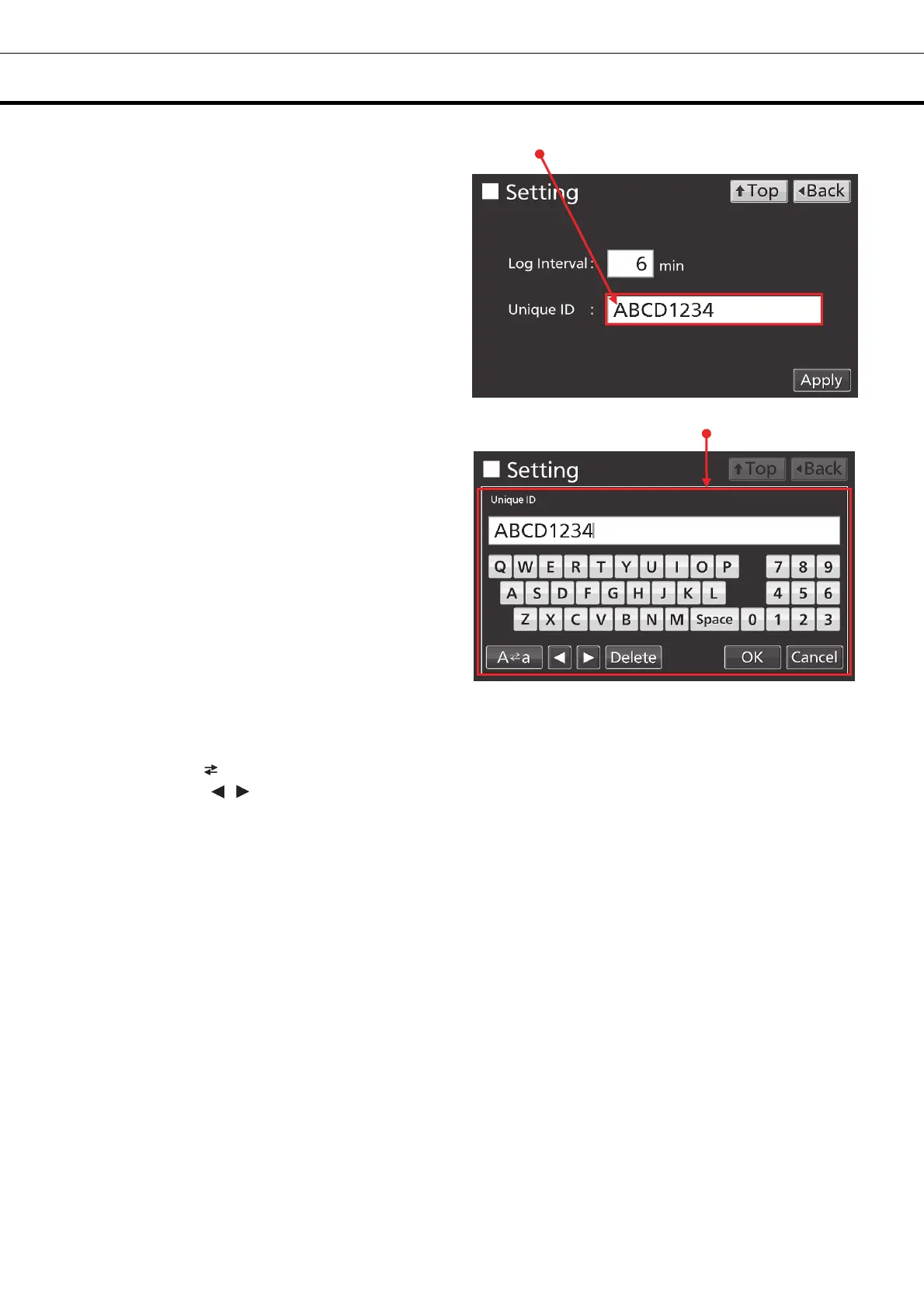
●When inputting alphanumeric characters
1. By pressing alphanumeric input box, alphanumeric
input window is displayed.
2. Press alphabetic key and numeric key to input
alphanumeric characters, and press OK key.
●Key description
• Alphabetic key (A~Z, Space): Input alphabetic characters or spaces.
• Numeric key (0~9): Input numerical values.
• UC/LC key (A a): Change UC/LC of alphabetic key.
• Left/Right key ( / ): Move the cursor to left/right.
• Delete key: Delete an alphanumeric character on the left side of the cursor.
• Cancel key: Stops inputting on the alphanumeric input box and closes the alphanumeric input window.
Note: While the alphanumeric input window is open, it is not possible to operate Top key and Back key.
[Auto return function]
When there is no key operation for about 90 seconds on the screen excluding the top screen: Exit the
setting mode and return to the top screen.
<
When the sleep function is on >
When there is no key operation for about 90 seconds without alarm / error after sleep state: Exit the
setting mode and return to the top screen.
Alphanumeric input box
Alphanumeric input window











 To Next Page